
When assembling a high-performance PC or optimization-focused workstation, the choice of intake fans is one of those deceptively simple decisions that can derail an entire build. Many builders make the mistake of assuming that bigger is always better, purchasing 140mm fans only to discover they block the EPS power connectors at the top of the motherboard or collide with thick front radiator brackets. Others make the opposite error: they pack three budget 120mm fans into a case, creating a high-pitched whine that turns their quiet home office into an endurance test.
The fundamental mistake lies in looking at fans as simple air-pushers. An intake fan is a complex system of thermodynamics, fluid dynamics, and acoustics. To make the correct choice between 120mm and 140mm configurations, you must look past basic marketing claims and focus on the physical realities of your chassis design, structural obstructions, and tolerance for mechanical noise.
As an Amazon Associate we earn from qualifying purchases at no extra cost to you.



Our Top Picks
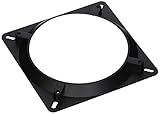
 Bgears Fan Adapter 140mm to 120mm for All1 Count (Pack of 1)7 x 0.5 x 6 inches0.02 PoundsCheck on Amazon

Top 3 picks at a glance
Decide These 3 Things First
Before spending any money on cooling hardware, you must establish three baseline parameters of your computer case and physical environment. Skipping these steps often results in compatibility returns or disappointing thermal performance.
- Measure Your Actual Mounting Hole Spacing: Do not rely solely on your case manual. A 120mm fan uses a 105mm x 105mm mounting hole pattern, while a 140mm fan uses a 125mm x 125mm pattern. Ensure your case has physical rails or designated drill holes for your target size, keeping an eye out for structural rivets or frame overlaps that might block a wider fan frame.
- Assess Your Intake Obstructions: Look at what is directly behind and in front of your intake mounts. If you have a restrictive solid front panel with narrow side slits or a dense nylon dust filter, you are dealing with high impedance. If you have an open, high-airflow mesh panel, you are dealing with low impedance. This dictates whether you need static-pressure-optimized blades or high-airflow-optimized blades.
- Determine Your Ambient Noise Floor: If your room sits at a quiet 30 decibels (dBA), a fan configuration that emits 28 dBA under load will be highly noticeable. If you run air conditioning or live in a noisy urban area where the ambient noise is 40 dBA, you can prioritize raw performance over ultra-quiet acoustics.
1. Dimensions and Case Compatibility: The Physical Constraints
The most obvious difference between 120mm and 140mm fans is their physical footprint, but the implications go far beyond simple width. A standard 120mm fan has a footprint of 120mm x 120mm, while a 140mm fan occupies 140mm x 140mm. This extra 20mm of width and height can create severe clearance issues with motherboard VRM heatsinks, RAM modules, and top-mounted liquid cooling radiators.
Depth is another critical dimension. The vast majority of case fans are 25mm thick. However, if you are working in a compact Mini-ITX chassis or have a massive three-slot graphics card pushed up against the front intake panel, you may need to look at slim form factors. For example, the ARCTIC P12 Slim PWM PSTThis 10mm reduction in thickness can be the difference between a GPU fitting into a compact case or being physically blocked by the intake array. Note that 140mm fans rarely come in slim variations; if you have tight clearance issues, 120mm is often your only viable path.
2. Material and Blade Design: Plastic vs. Liquid Crystal Polymer
The materials used to manufacture fan blades and frames directly impact both acoustic profiles and longevity. Under high rotational speeds, plastic fan blades experience a phenomenon known as “blade creep.” Over years of operation, centrifugal force causes the plastic to stretch slightly outward. If the clearance between the blade tip and the inner frame is tight, this creep can lead to scraping, increased vibration, and eventual motor failure.
Budget and mid-range fans typically utilize standard PBT (polybutylene terephthalate) plastic, which is durable but flexible under stress. Premium fans employ Liquid Crystal Polymer (LCP). LCP is incredibly rigid, allowing manufacturers to reduce the tip clearance (the gap between the blade edge and the frame) to less than 1mm. This tight tolerance prevents pressurized air from escaping backward over the blade tips, dramatically improving static pressure. When choosing between sizes, remember that a larger 140mm blade is subject to greater rotational tension at its outer edges, making high-quality materials and rigid structural bracing even more critical than they are on a smaller 120mm blade.
3. Bearing Construction: Fluid Dynamic vs. Sleeve
A fan is only as good as its bearing. The bearing design determines how quietly the fan spins, how it handles different mounting orientations, and how long it will last before developing a rattle.
Sleeve bearings are the cheapest to produce. They rely on a lubricating oil within a sleeve to keep the shaft spinning smoothly. However, when mounted horizontally (as a bottom intake or top exhaust), gravity pulls the lubricant away from the shaft, leading to rapid wear, grinding noises, and failure within 20,000 to 30,000 hours of use. Fluid Dynamic Bearings (FDB) and self-stabilizing oil-pressure bearings (like Noctua’s SSO2 system) use pressurized fluid to keep the shaft centered. These bearings run quietly in any mounting orientation and regularly achieve lifespans exceeding 150,000 hours. If you are mounting intake fans on the bottom of your case pulling air upward, avoid cheap sleeve bearings entirely and invest in FDB options.
4. Performance Metrics: CFM, Static Pressure, and Noise Levels
When comparing 120mm and 140mm intake fans, you must understand the relationship between three key metrics: Airflow (measured in Cubic Feet per Minute, or CFM), Static Pressure (measured in millimeters of water, or mmH2O), and Noise (measured in dBA).
Because a 140mm fan has roughly 36% more surface area than a 120mm fan, it can move the same volume of air (CFM) at a lower rotational speed (RPM). For example, the NZXT F140QIt operates at a maximum of 1200 RPM, delivering 42.92 CFM of airflow while keeping its noise level down to a whispering 19 dBA. To match that 42.92 CFM with a 120mm fan, you would typically need to run the smaller fan at 1500 to 1800 RPM, which increases the pitch of the motor and the turbulence of the air, resulting in a much more noticeable, high-frequency sound.
However, static pressure tells a different story. If your intake mount is choked by a dense dust filter or a solid front panel, a high-airflow 140mm fan will struggle. The air will simply bounce off the restriction and escape back through the fan blades. In these high-impedance scenarios, a pressure-optimized 120mm fan with thick, tightly scooped blades will often perform better, forcing air through the restriction rather than letting it pool uselessly at the intake boundary.
5. Price Tiers and Budget Planning
Your budget will largely dictate whether you should buy multiple 120mm fans or fewer, larger 140mm fans. Prices vary significantly based on bearing type, material quality, and brand engineering.
- Mid-Range: This is where options like the NZXT F140Q sit. You get advanced bearing designs, optimized blade sweeps, sturdier frames, and rubber anti-vibration corners that decouple the fan motor from your steel case chassis to prevent humming.
- Premium: These fans feature cutting-edge industrial materials like Liquid Crystal Polymer, whisper-quiet magnetic levitation or ultra-premium FDB bearings, extensive accessory bundles, and manufacturer warranties extending up to six years.
6. Compatibility Adapters and Mounting Solutions
What happens if you have a high-quality 140mm fan but your case or liquid-cooling radiator only features 120mm mounting holes? This is where mounting adapters become invaluable. They allow you to bridge the gap between different frame sizes without buying entirely new fans.
For high-end setups, the Noctua NA-SFMA1It is specifically designed to let you mount 140mm fans onto 120mm water-cooling radiators, maximizing airflow and lowering noise levels on liquid-cooled loops. For more general chassis applications, the Bgears Fan Adapter 140mm to 120mmIt allows a 140mm fan to sit on a 120mm case mount. Keep in mind that using an adapter adds physical depth—usually 10mm to 15mm—to your fan assembly, which can create interference with your RAM, motherboard heatsinks, or graphics card.
7. Warranty and Lifespan Expectations
When purchasing fans, look closely at the manufacturer’s warranty. A long warranty period is a direct reflection of bearing quality and engineering confidence. Budget fans typically carry a 1-year or 2-year warranty, which is appropriate for sleeve or low-grade rifle bearings that may degrade quickly under heavy continuous use.
Mid-range and premium fans often come with 5-year or 6-year warranties. Because intake fans are your first line of defense against dust buildup and component overheating, investing in premium bearings with long warranties pays off over time. Looking ahead to 2026, as PC hardware power demands and thermal densities continue to rise, having a reliable, long-lasting cooling foundation ensures you will not have to rebuild your entire system simply to replace a rattling, worn-out intake bearing.
Spec Checklist
Use this reference table to understand what specifications you should expect at different price points when deciding on your intake fan setup.
| Specification | Budget Tier | Mid-Range Tier | Premium Tier |
|---|---|---|---|
| Price Range | Varies | Varies | Varies |
| Bearing Type | Sleeve or Rifle Bearing | Standard Fluid Dynamic (FDB) | Premium FDB, SSO2, or Magnetic Levitation |
| Airflow (CFM) | 35 – 50 CFM | 50 – 75 CFM | 70 – 100+ CFM |
| Static Pressure | 0.8 – 1.5 mmH2O | 1.5 – 2.2 mmH2O | 2.2 – 3.5+ mmH2O |
| Noise Level | 25 – 35 dBA | 18 – 25 dBA | 12 – 20 dBA |
| Warranty | 1 to 2 Years | 3 to 5 Years | 6 Years |
Red Flags
When shopping for intake fans, look out for these warning signs of poor quality or misleading marketing:
- Sleeve Bearings Labeled as “Sleeve/Hydro”: Some manufacturers use misleading terms like “hydro-bearing” to disguise cheap sleeve bearings. If the price is incredibly low and there is no mention of true Fluid Dynamic Bearing (FDB) patents, it is likely a standard sleeve bearing that will fail quickly if mounted horizontally.
- No PWM Control (3-Pin Connectors): Avoid fans that use 3-pin DC power connectors instead of 4-pin PWM (Pulse Width Modulation) connectors. 3-pin fans are difficult to control precisely via your motherboard BIOS, meaning they will often run at 100% speed, creating excessive noise.
- Missing Anti-Vibration Pads: If a fan frame is solid, hard plastic with no rubber dampening pads on the mounting corners, it will transfer its motor vibrations directly to your PC case, turning your steel or aluminum chassis into an amplifier for low-frequency humming.
- Unrealistic Performance Claims: Be skeptical of any fan claiming over 80 CFM of airflow while keeping noise levels below 15 dBA. True silent operation requires a trade-off in raw air volume, and exaggerated specs usually point to poor testing standards or outright fabrications.
FAQ
Can I mount a 140mm fan in a 120mm slot?
Yes, but you will need a physical adapter like the Bgears Fan Adapter or the Noctua NA-SFMA1. These adapters convert the mounting hole pattern from 120mm to 140mm. However, you must make sure you have enough physical clearance inside your case, as these adapters add 10mm to 20mm of depth and extend the fan’s width, which can collide with internal components.
Is a single 140mm fan better than two 120mm fans?
No. While a single 140mm fan is quieter than two 120mm fans running at high speed, two 120mm fans provide a larger total surface area and will move significantly more air. A dual-120mm configuration is better for high-performance builds that require maximum thermal dissipation, while a single 140mm fan is ideal for low-noise, mid-range builds.
Do intake fans need higher static pressure than exhaust fans?
Yes. Intake fans almost always pull air through restrictive barriers like mesh panels, dust filters, and structural front grilles. To overcome this resistance without losing airflow, intake fans require higher static pressure (ideally above 1.8 mmH2O). Exhaust fans, which blow air directly out of an open rear mount, can prioritize high CFM over static pressure.
How does fan thickness affect intake performance?
Standard 25mm fans offer deep, aggressively curved blades that generate excellent static pressure. Slim fans, like the 15mm-thick ARCTIC P12 Slim, must use shallower blades to fit their thin frames. This reduction in blade depth decreases static pressure, meaning slim fans must spin faster and louder to push air through restrictive dust filters compared to standard-depth fans.









