Samsung sells solid state drives in three very different shapes, and the keyword “Samsung SSDs” hides that. One group plugs into an M.2 slot on the motherboard and talks over PCIe. Another is a 2.5-inch SATA drive that swaps into an older laptop or desktop bay. A third is a pocket-size external drive that connects over USB. Choosing the right one begins with where the drive will live, not which model number looks newest.
This guide is for gamers, creators, and upgraders who have already decided on the Samsung brand and want to match a drive to a job. Five distinct models are covered: two internal NVMe drives, one SATA drive, and two portable drives. Several of these drives appear in the listings in more than one capacity, so the article uses a single representative capacity for each and notes the range where the listing shows it. The goal is a clear map of what each drive does best in 2026, based only on the specifications stated in the listings.
Our Top Picks




Top 3 picks at a glance
Quick Picks
As an Amazon Associate we earn from qualifying purchases at no extra cost to you.



| Product | Best for | Key spec from the title |
|---|---|---|
| Samsung 990 PRO 2TB | Fast, mainstream NVMe gaming | PCIe 4.0 M.2 2280, up to 7,450 MB/s |
| Samsung 9100 PRO 2TB | Fastest internal speed | PCIe 5.0×4 M.2 2280, up to 14,700MB/s |
| Samsung T7 Portable 1TB | Everyday portable storage | USB 3.2 Gen 2, up to 1,050MB/s |
| Samsung T9 Portable 2TB | Fast external transfers | USB 3.2 Gen 2×2, up to 2,000 MB/s |
| Samsung 870 EVO 2TB | Upgrading older systems | SATA III 2.5-inch, up to 560MB/s |
How to Choose
Match the interface to your hardware
Interface is the first filter. The 990 PRO needs a PCIe 4.0 M.2 2280 slot, and the 9100 PRO needs a PCIe 5.0 x4 M.2 slot to reach its stated speed. Plugging a PCIe 5.0 drive into a PCIe 4.0 slot is possible in many systems, but the drive will be limited by the slot. The 870 EVO uses SATA III, so it fits an old 2.5-inch bay and tops out around the 560MB/s stated on the listing. The T7 and T9 use USB, and their speed depends on the USB port you plug into.
Read speed numbers as ceilings
Stated speeds are best-case sequential figures. The 990 PRO lists up to 7,450 MB/s, the 9100 PRO up to 14,700MB/s, the T9 up to 2,000 MB/s, the T7 up to 1,050MB/s, and the 870 EVO up to 560MB/s. For gaming load times, the difference between a fast PCIe 4.0 drive and a PCIe 5.0 drive is often small, because games rarely saturate the drive. Large file copies and video editing benefit more from high sequential speeds.
Choose capacity for your library, not the headline speed
The listings show 1TB, 2TB, and 4TB options for the 990 PRO, 1TB and 2TB for the 9100 PRO, and a range for the portable drives. Modern games run to large install sizes, so a 1TB drive fills quickly. As a rule, pick the capacity you need, then pick speed. A 2TB drive in a slower tier is usually more useful than a 1TB drive in a faster tier when your library keeps growing.
What to ignore and where budget models cut corners
Ignore promotional language about AI computing or heavy-duty workloads; it is marketing copy and not a measurable spec. Cheaper SSDs generally cut corners on sustained write speeds, controller quality, and endurance ratings, which listings rarely spell out. Staying with a known brand and a model with published speeds is a sensible way to avoid the worst of that. For external drives, check whether your device has a USB port fast enough to use the drive’s speed.
Heat is the last practical factor for internal NVMe drives. Faster PCIe 5.0 drives tend to run hotter, so check whether your motherboard provides an M.2 heatsink or whether the drive needs one. A laptop with a cramped M.2 bay may favor a cooler PCIe 4.0 drive over a faster, hotter one.
Compatibility with the device is the quiet deciding factor for the portable drives. A USB 3.2 Gen 2 drive like the T7 will work in a Gen 2×2 port, and the T9 will work in a slower port, but each runs at the speed the slower side allows. Before paying extra for the faster portable model, look up which USB standard your laptop, console, or desktop offers. If the port is the bottleneck, the cheaper drive delivers the same real-world result.
It is also worth planning where files will live. Many buyers pair a fast internal drive for the operating system and current games with a larger or slower drive for archives and backups. That split keeps the expensive speed where it matters, and it means one failed drive does not take every file with it. Samsung’s lineup is built for exactly that layering, which is why this list mixes internal and external models.
The 5 Best Options
Samsung 990 PRO 2TB
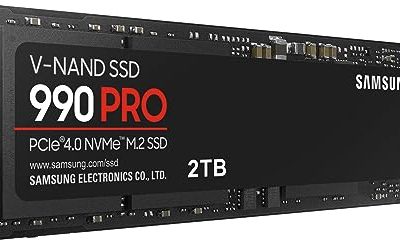
The 990 PRO is a PCIe 4.0 M.2 2280 NVMe drive with stated speeds up to 7,450 MB/s, positioned for high-end computing and gaming. The listing also appears in 1TB and 4TB capacities. It is a natural match for a modern gaming PC, where a fast drive helps load times and file moves.
- Strength: PCIe 4.0 speed up to 7,450 MB/s covers nearly all gaming needs.
- Strength: available in 1TB, 2TB, and 4TB capacities to fit any library.
- Trade-off: it needs a free M.2 2280 slot with PCIe 4.0 support to reach its stated speed.
Skip it if your board lacks an M.2 slot, if you need an external drive, or if your slot is limited to older SATA-only storage where the extra speed has nowhere to go.
Samsung 9100 PRO 2TB
The 9100 PRO is a PCIe 5.0 x4 M.2 2280 drive with stated speeds up to 14,700MB/s, and the listing also appears in a 1TB capacity. It is the fastest internal drive in this list, aimed at builders with a PCIe 5.0 slot who handle large files, video projects, or heavy datasets.
- Strength: up to 14,700MB/s is the highest stated speed here.
- Strength: PCIe 5.0 x4 headroom suits large sequential workloads.
- Trade-off: it requires a PCIe 5.0 slot to reach that speed, and faster drives often run warmer.
Skip it if your motherboard is PCIe 4.0 only, because the extra speed would go unused.
Samsung T7 Portable SSD 1TB
The T7 is a portable external SSD in Titan Gray, rated for up to 1,050MB/s over USB 3.2 Gen 2. It is positioned for gaming, students, and professionals who want a pocketable drive for backups, school work, or moving projects between machines.
- Strength: portable and USB-based, so it works with a wide range of devices.
- Strength: up to 1,050MB/s is plenty for backups and everyday file transfers.
- Trade-off: it is slower than the T9, which offers up to 2,000 MB/s.
Skip it if you want the fastest external speed or need internal storage.
Samsung T9 Portable SSD 2TB
The T9 is a 2TB portable SSD using USB 3.2 Gen 2×2, rated up to 2,000 MB/s. It targets gamers and professionals who move large files often and want an external drive that keeps pace. The Gen 2×2 interface only reaches its stated speed on a matching port.
- Strength: up to 2,000 MB/s is the fastest external speed on this list.
- Strength: 2TB capacity suits large game libraries and video files.
- Trade-off: it needs a USB 3.2 Gen 2×2 port to reach its top speed.
Skip it if your computer only offers older USB ports, since the extra speed would go unused. Buyers who only back up documents and photos will also find the lower-tier T7 more than adequate for that job.
Samsung 870 EVO 2TB
The 870 EVO is a 2.5-inch SATA III drive rated for read speeds up to 560MB/s, available here in a 2TB capacity. It is pitched at upgrading older PCs and laptops. For a system without an M.2 slot, a SATA SSD is a straightforward way to speed up loading and boot times.
- Strength: SATA III compatibility works in older desktops and laptops.
- Strength: 2TB capacity gives plenty of room for an older system’s library.
- Trade-off: 560MB/s is far below the NVMe drives in this list.
Skip it if your machine has a free M.2 slot, since an NVMe drive will be much faster.
Which One Fits Your Situation
You are building a new gaming PC
The Samsung 990 PRO 2TB covers the needs of most gaming builds with PCIe 4.0 speed. Move to the 9100 PRO only if your motherboard offers a PCIe 5.0 M.2 slot and you handle large files.
You are upgrading an older laptop or desktop
The Samsung 870 EVO 2TB fits SATA bays, so it is the practical choice when there is no M.2 slot. It will make an older machine feel faster.
You need a backup or travel drive
The Samsung T7 Portable 1TB is a good fit for everyday backups, while the Samsung T9 Portable 2TB suits larger projects and faster transfers.
You work with large video files
The Samsung 9100 PRO 2TB offers the highest sequential speed. If you need to move files between machines, pair it with the T9 for fast external copies.
Common Mistakes
- Buying a PCIe 5.0 drive for a PCIe 4.0 slot and paying for speed that cannot be used.
- Confusing a SATA drive with an NVMe drive when the motherboard has only one type of slot.
- Choosing a portable drive without confirming the USB port speed on the device.
- Picking a small capacity because the speed number looked impressive.
- Ignoring heat on fast internal drives when the board lacks an M.2 heatsink.
Related guides
- Sustainable Gaming Pc Power Supply Efficiency Guide
- Noctua Nh-D15 Vs Thermalright Peerless Assassin 120
- Thermal Paste Application Method For Lga1851
Frequently Asked Questions
Is the 9100 PRO worth it over the 990 PRO?
It depends on your slot and workload. The 9100 PRO states up to 14,700MB/s, but it needs a PCIe 5.0 slot, and gaming load times often show little difference between the two.
Can I use an internal SSD externally?
Sometimes, with an enclosure. Portable drives like the T7 and T9 are ready to use out of the box, which is simpler if you need to move data between computers.
Which Samsung SSD suits an older laptop?
The 870 EVO is a 2.5-inch SATA drive, so it fits many older laptops and desktops. Confirm your laptop uses a SATA bay before buying.
Do all Samsung SSDs reach their listed speeds?
Listed speeds are maximums under ideal conditions. Real results depend on the slot or port, the file type, and the drive’s temperature. Small random reads, which dominate game loading and operating system tasks, never reach the headline figure on any drive, so treat the number as a way to rank models rather than a promise about daily use. One internal drive covers most people, and an external model such as the T7 or T9 is the easiest way to add a separate backup copy without opening the case.