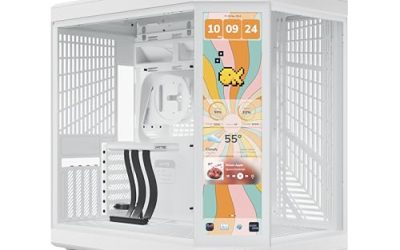
An inverted PC case rotates or mirrors the usual motherboard layout, so the graphics card, cooling fans, and cable routing all end up in places a traditional tower never puts them. The payoff is a build that shows off its parts through the glass and often separates the power supply and cables into their own chamber. The risk is that the word “inverted” is applied loosely, and buyers sometimes discover the layout only after the case arrives.
This guide is for builders who want a showpiece system with a dual-chamber or flipped look and are comparing seven ATX mid-tower options. One honest caveat applies to the whole list: the listing titles spell out the layout only in a few cases, such as the dual-chamber design, vertical GPU airflow, or the inverted wording on one be quiet! model. For the rest, the title describes size, fans, and glass, so verify the orientation in the product manual before you commit in 2026. A duplicate Musetex Y6 listing with non-LED fans was skipped as a near copy.
Our Top Picks
 MUSETEX Y6 PC Case16.73"D x 10.83"W x 15.67"H16.73 x 10.83 x 15.67 inches14.55 PoundsCheck on Amazon
 MUSETEX ATX PC Case 7 PWM ARGB Fans16.73"D x 8.35"W x 18.5"H16.73 x 8.35 x 18.5 inches15 PoundsCheck on Amazon


Top 3 picks at a glance
Quick Picks
As an Amazon Associate we earn from qualifying purchases at no extra cost to you.


| Product | Best for | Key spec from the title |
|---|---|---|
| SSUPD Xhuttle | Vertical GPU airflow showcase | Dual-chamber design, panoramic glass, 3 x 120mm ARGB fans |
| be quiet! Light Base 600 LX | Lighting-focused dual chamber | Fully windowed, ARGB LED strip, 4 Light Wings 120mm PWM fans |
| be quiet! Light Base 600 DX | Aquarium-style display build | Fully windowed front and side, dual chamber, inverted wording |
| Lian Li V100 | Large GPUs and radiators | 420mm GPU support, 360mm radiator, side USB-C |
| Antec C6 Curve Air | Curved glass with airflow | 3 PWM fans, 450mm GPU support, panoramic glass |
| MUSETEX Y6 | Fan-heavy lighting build | 7 pre-installed ARGB fans, Type-C, 270-degree glass |
| MUSETEX K2 | Dual glass and many fans | 7 PWM ARGB fans, Type-C, full-view dual glass |
How to Choose
Confirm what the layout really is
Dual-chamber means the motherboard sits in one compartment while the power supply, drives, and cables live in another. Inverted means the board is rotated or mirrored from the standard orientation. Those are related but different, and a case can be one without the other. Read the manual for the motherboard mounting direction, the PSU location, and the I/O panel position, because those details decide whether your ports face a convenient direction on the desk.
Check graphics card and radiator limits
Spec thresholds stated in these titles include 420mm GPU support and a 360mm radiator on the Lian Li V100, and 450mm GPU support on the Antec C6 Curve Air. For a modern flagship card, aim for at least 40mm more clearance than the card length, since power cables and vertical mounts eat space. If you plan to fit a 360mm radiator, confirm whether it mounts at the top, side, or bottom of the chassis you choose, because the flipped layout can move those positions.
Judge airflow, not just glass
Fully windowed designs look striking but can choke intake. Look for the count and type of fans: the Musetex cases state seven PWM ARGB fans, the Light Base 600 LX states four 120mm PWM fans, the Xhuttle states three 120mm ARGB fans, and the Antec states three PWM fans. PWM fans can change speed with temperature, which helps with noise. A case with many fans and little ventilation can still run warm if the glass blocks intake paths.
What to ignore and where corners get cut
Ignore cosmetic claims such as infinity mirror effects when your priority is cooling or quiet running. Budget cases tend to cut corners on dust filters, panel thickness, and cable management space. Check for front Type-C ports if you plan to use modern peripherals; the Lian Li lists side I/O with USB-C and the Musetex models list Type-C support. If dust control matters, look for the dust filter wording the Lian Li title includes.
Finally, think about the desk. A flipped layout can move the I/O cluster, the power inlet, and the cable exits to different edges than you are used to. Sketch where the monitor, wall outlet, and any under-desk shelf will sit, then picture the case in that spot. A showpiece that has to face the wall to keep cables tidy defeats the purpose of buying a case with this much glass.
The 7 Best Options
SSUPD Xhuttle
The Xhuttle is a black ATX mid-tower built around a dual-chamber design with panoramic tempered glass and vertical GPU airflow, and it includes three 120mm ARGB fans. It is the most explicit about layout in this list, which makes it a safe pick for someone who wants the unusual look and does not want to guess at the orientation.
- Strength: dual-chamber design keeps the PSU and cabling out of view.
- Strength: vertical GPU airflow is a stated feature, not a vague claim.
- Trade-off: the title lists only three fans, so some builders may add more for heavy loads.
Skip it if you want a traditional layout with the GPU mounted horizontally.
be quiet! Light Base 600 LX
This black mid-tower pairs a fully windowed front and side with a dual-chamber design, an ARGB LED strip, and four Light Wings LX 120mm PWM fans. It targets builders who want a polished, lighting-forward case from a brand known for quiet components, and the four fans ship with the case.
- Strength: four 120mm PWM fans are included, covering airflow on day one.
- Strength: fully windowed panels and an ARGB strip suit display builds.
- Trade-off: the title does not state an inverted layout, so confirm the orientation yourself.
Skip it if you prefer a mesh-fronted case with minimal glass.
be quiet! Light Base 600 DX
The DX shares the fully windowed front and side, dual-chamber build, and ARGB LED strip, and it is described as an aquarium-style mid-tower with inverted wording in the title. It is the clearest match to the keyword among the be quiet! models. If your goal is a display piece that shows every part, this is the one that speaks to it.
- Strength: the title explicitly references the inverted layout.
- Strength: aquarium-style windows maximize the view of the build.
- Trade-off: heavy glass coverage can limit intake airflow compared with a mesh front.
Skip it if you plan to run a high-power build in a warm room without extra fans.
Lian Li V100
The V100-ATX is a black mid-tower with side I/O including USB-C, a dust filter, support for 420mm GPUs and a 360mm radiator, and an included GPU bracket. Of everything here, it offers the most generous stated GPU and radiator limits. It fits builders with a long graphics card who still want a compact desk footprint.
- Strength: 420mm GPU and 360mm radiator support suit big components.
- Strength: a GPU bracket and dust filter are included in the listing.
- Trade-off: the title does not describe the layout orientation, so verify it in the manual.
Skip it if you want seven or more fans pre-installed, as the title does not state a fan count.
Antec C6 Curve Air
The C6 Curve Air is a mid-tower ATX case with three PWM fans, panoramic tempered glass, a high-airflow design, and 450mm GPU support. The curved glass gives it a wraparound look, and the airflow focus suggests ventilation was not sacrificed for the view. It suits a gamer who wants display and cooling in balance.
- Strength: 450mm GPU support is the second-largest figure on this list.
- Strength: three PWM fans are included for baseline airflow.
- Trade-off: the title does not state an inverted layout, so confirm before buying.
Skip it if the inverted or flipped layout is your main reason for shopping.
MUSETEX Y6
The Y6 ships with seven pre-installed infinity mirror PWM ARGB fans, an ATX mid-tower body, a Type-C front port, and 270-degree full-view tempered glass. It is aimed at buyers who want a lot of lighting and fan count included in the case itself, which can save money on separate fans.
- Strength: seven pre-installed fans mean no separate fan purchase.
- Strength: Type-C support and a wide glass view suit a modern showpiece.
- Trade-off: many ARGB fans add cable clutter and lighting controller complexity.
Skip it if you want a quiet, understated build without heavy lighting.
MUSETEX K2
The K2 is a black ATX mid-tower with seven pre-installed PWM ARGB fans, Type-C support, and full-view dual tempered glass. It is similar in spirit to the Y6 but with a dual-glass layout, making it the better match for anyone who wants a view from two sides.
- Strength: dual full-view glass supports a showcase build.
- Strength: seven PWM ARGB fans are included on day one.
- Trade-off: glass on two sides reduces room for mesh intake and can trap heat.
Skip it if your hardware runs hot and needs the airflow of a mesh-front design.
Which One Fits Your Situation
You want the clearest dual-chamber layout
The SSUPD Xhuttle states its dual-chamber design and vertical GPU airflow outright, so it removes the guesswork. Pair it with a card well under the clearance limit.
You want the inverted label on the listing
The be quiet! Light Base 600 DX is the one whose title references the inverted layout and aquarium-style windows. It is the most literal match to this keyword.
You have a long graphics card
Choose the Lian Li V100 for its 420mm GPU limit and included bracket, or the Antec C6 Curve Air if you want 450mm support with curved glass.
You want lots of fans out of the box
The MUSETEX Y6 or MUSETEX K2 each include seven fans, so you avoid buying extras. Pick the K2 if you prefer dual-glass viewing.
Common Mistakes
- Assuming every showpiece case is inverted when the title never says so.
- Buying a long graphics card and not leaving margin beyond the stated GPU limit.
- Choosing full glass on every side and then skipping extra intake fans.
- Ignoring where the I/O panel ends up on the desk once the layout is flipped.
- Counting RGB fans as better cooling when fan speed control and airflow paths matter more.
Related guides
- Sustainable Gaming Pc Power Supply Efficiency Guide
- Noctua Nh-D15 Vs Thermalright Peerless Assassin 120
- Thermal Paste Application Method For Lga1851
Frequently Asked Questions
What is the benefit of an inverted case?
The main benefit is presentation, since the graphics card and cooling hardware face the glass differently. Some designs also separate cables into a second chamber, which can tidy the view.
Is a dual-chamber case the same as an inverted case?
No. Dual-chamber describes separating the motherboard area from the PSU and cables, while inverted describes how the motherboard is oriented. Some cases combine both features.
Will airflow suffer in these cases?
It can, particularly in fully windowed designs. Look for the number of PWM fans and ventilated panels, and add intake or exhaust fans if the listing offers few.
Do all of these accept long graphics cards?
Not all state a limit. The Lian Li V100 lists 420mm and the Antec C6 Curve Air lists 450mm; for the others, measure your card against the manual’s clearance numbers.