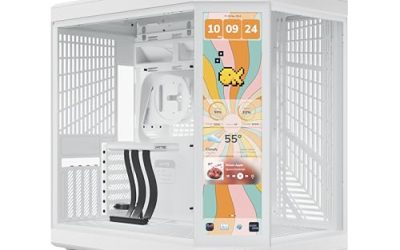
Shopping for an NZXT case is mostly a question of picking a family and then a fan package. The current line-up splits into the compact H5 and H6 Flow models, the larger dual-chamber H9 Flow series, and the S5 RGB with its wide glass. Inside each family the differences come from how many fans ship in the box, whether the lighting is addressable, and whether a controller is included. Pay attention to those points, because they decide how much you will need to buy after the case arrives.
This guide is for builders who already like the NZXT look, clean panels, hidden cable runs and a glass-forward layout, and want to know which model fits their parts. Whether you are fitting a 360mm radiator, a long graphics card, or just a quiet air-cooled build, the eight listings below show what the titles promise, so you can match case size to component size before you order in 2026.
Our Top Picks
 NZXT H6 Flow RGB Mid-Tower Airflow Case withH6 Flow RGB v116.34 x 11.3 x 17.13 inches20.7 poundsCheck on Amazon


Top 3 picks at a glance
Quick Picks
As an Amazon Associate we earn from qualifying purchases at no extra cost to you.


| Product | Best for | Key spec from the title |
|---|---|---|
| NZXT H5 Flow (Black) | Compact airflow build | 2 x 120mm fans, 360mm front radiator |
| NZXT H9 Flow (Black) | Large air or liquid build | 4 fans, 420mm top and front radiator |
| NZXT H6 Flow (White) | White theme, compact dual-chamber | 3 x 120mm fans, panoramic glass |
| NZXT S5 RGB (Black) | Showcase mid-tower | 360mm RGB reverse fan, 415mm GPU clearance |
| NZXT H6 Flow RGB (White) | Lit-up white build | 3 RGB fans, panoramic glass |
| NZXT H9 Flow RGB+ (Black) | Fully synced lighting | 7 RGB fans, Control Hub |
| NZXT H9 Flow RGB+ (White) | White flagship with lighting | 7 RGB fans, Control Hub |
| NZXT H9 Flow RGB (Black) | Single-fan-unit RGB look | 420mm RGB fan unit, wraparound glass |
How to Choose
Start with the chamber layout and case size
The H5 Flow is described as a compact ATX mid-tower, while the H6 Flow and the H9 Flow use a dual-chamber layout that places the power supply and cables behind a divider. Dual-chamber designs look tidier and keep the PSU away from the main compartment, but they need more width. Measure your desk space and confirm that the board size you own (ATX, micro-ATX or mini-ITX) fits. The H9 series is the right choice if you want the most room for large coolers and extra fans.
Check radiator and graphics card limits
Listings state radiator limits such as 360mm at the front on the H5 Flow and 420mm at the top and front on the H9 Flow. If you run an all-in-one liquid cooler, confirm both its size and whether its tubes will reach the mounting point. The S5 RGB lists 415 mm of GPU clearance, a useful number for long cards. For any other model, look up the clearance on the manufacturer page, because a thick three-fan card can collide with front fans or a radiator.
Count what comes in the box
Fan counts vary a lot: two fans in the H5 Flow, three in the H6 Flow models, four in the H9 Flow, and seven in the H9 Flow RGB+ models. Extra fans can save you real money, but only if you want them, since a fan you remove still leaves its cost in the case price. RGB versions add lighting, and the RGB+ versions include a Control Hub, which tidies cable runs for fans and lighting. Non-RGB models are the better pick if you prefer a plain look and plan to add your own fans.
Think about thermals, noise and what to ignore
Mesh front panels and multiple fans generally mean cooler parts and a bit more fan noise at high load, while solid glass fronts look cleaner but limit airflow. Ignore any claim about performance that the title cannot back up, and focus on fan count, radiator size, panel type and clearance. Where lower-priced cases cut corners is in the number of included fans and in dust filters, so check those on the product page before buying.
The 8 Best Options
NZXT H5 Flow (Black)
The H5 Flow is a compact ATX mid-tower aimed at builders who want a small, airflow-minded case without the bulk of a flagship. The title lists two included 120mm fans, support for a 360mm front radiator and tempered glass. It is a natural fit for builders who plan a mid-range processor and graphics card and want clean lines without a huge tower.
- Strength: 360mm front radiator support is generous for a compact case.
- Strength: two fans are included, so airflow works from the start.
- Trade-off: it is a single-chamber layout, so cable and PSU space is tighter than on dual-chamber models.
Skip it if you want the extra room of a larger case or a built-in RGB package.
NZXT H9 Flow (Black)
This is the larger dual-chamber ATX flagship, fitted with four fans and radiator support up to 420mm at the top and the front. Wraparound glass gives it a display-style look for open-air desks. The wraparound glass and tall frame make cable planning worth the effort, since the interior is visible from two sides.
- Strength: 420mm radiator support on two sides allows big liquid cooling setups.
- Strength: four fans are included, so a plain air-cooled build is ready to run.
- Trade-off: it takes up more desk space than the compact models.
Skip it if your desk is tight or you do not plan to use the extra radiator room.
NZXT H6 Flow (White)
A compact dual-chamber ATX case with panoramic glass and three included 120mm fans, finished in white. It targets people who want the showcase look of the larger H9 in a smaller footprint. It is a good match for builders who want a white theme without stepping up to the largest case.
- Strength: three 120mm fans are included in a compact body.
- Strength: panoramic glass frames the components from two sides.
- Trade-off: the fans do not carry RGB, so lighting needs separate parts.
Skip it if you want integrated lighting or the largest possible radiator.
NZXT S5 RGB (Black)
The S5 RGB is a compact ATX mid-tower with panoramic dual tempered glass and a pre-installed 360mm RGB reverse fan. The title states room for up to 10 fans and 415 mm of GPU clearance. The reverse fan named in the title is built to face the opposite way from a standard unit, so check how it fits your airflow plan.
- Strength: 415mm of GPU clearance welcomes long graphics cards.
- Strength: up to 10 fan mounts leave room to expand cooling later.
- Trade-off: only one RGB fan unit is listed as pre-installed, so more fans mean extra purchases.
Skip it if you want a fully stocked fan set out of the box.
NZXT H6 Flow RGB (White)
This mid-tower airflow case ships with three RGB fans, panoramic glass panels and cable management features, in white. It is the lit version of the H6 Flow family. It saves the cost of buying separate lit fans, which makes the lighting package a convenience as well as a style choice.
- Strength: three RGB fans give a coordinated lighting look from the first boot.
- Strength: the panoramic glass shows off a clean white build.
- Trade-off: the title does not mention a hub, so check how the fans connect to your board’s lighting headers.
Skip it if you prefer a stealth, unlit build.
NZXT H9 Flow RGB+ (Black)
The flagship dual-chamber case with seven RGB fans and an NZXT Control Hub pre-installed. The title describes fully synced RGB, so lighting and fan control run from a single hub. The pre-installed hub also reduces the number of cables you have to route to the motherboard, a real advantage in a large case.
- Strength: seven fans plus a hub make this the most complete package of the group.
- Strength: synced RGB works without extra controller hardware.
- Trade-off: it sits in the premium group and is large, so budget and desk space both matter.
Skip it if you want a plain unlit case or a smaller build.
NZXT H9 Flow RGB+ (White)
This is the white version of the same flagship, again with seven RGB fans and a Control Hub installed. It suits builders matching white graphics cards, memory and cooling. Pairing it with white memory and a light-colored cooler produces a very consistent look through the glass.
- Strength: the white finish pairs well with all-white component themes.
- Strength: the included hub simplifies fan and lighting wiring.
- Trade-off: white panels show dust and marks more readily than black ones.
Skip it if you want a black build or a lower-cost case.
NZXT H9 Flow RGB (Black)
The RGB model (without the plus) pairs a pre-installed 420mm RGB fan unit with 420mm radiator support and wraparound glass. It is a simpler lit alternative to the RGB+ model. Builders who prefer fewer, larger fans for a cleaner front will appreciate the single-unit approach.
- Strength: a single 420mm RGB fan unit gives a clean, bold look at the front.
- Strength: 420mm radiator support remains available for liquid cooling.
- Trade-off: fewer fans appear to be included than in the RGB+ version.
Skip it if you want seven fans and a hub included.
Which One Fits Your Situation
You are building a compact gaming PC on a small desk
Choose the NZXT H5 Flow. Two fans and a 360mm front radiator slot fit a mid-range build without taking over the room.
You want a high-end liquid cooled build
The NZXT H9 Flow (Black) lists 420mm radiator support at both the top and the front, which suits a larger all-in-one cooler.
You like the lit white look
The NZXT H6 Flow RGB (White) keeps the size moderate, while the H9 Flow RGB+ (White) is the pick if you want a full hub and seven fans.
You have a long graphics card
Look at the NZXT S5 RGB (Black), whose title lists 415 mm of GPU clearance.
Common Mistakes
- Assuming every H9 Flow variant ships with the same number of fans.
- Ignoring the radiator limit and tube length when mixing an all-in-one cooler with a front mount.
- Choosing a white case without planning for dust on the panels.
- Buying an RGB case and expecting control hardware that only the RGB+ version includes.
- Choosing a dual-chamber case without measuring the desk or the PSU length.
Related guides
- Noctua Nh-D15 Vs Thermalright Peerless Assassin 120
- Sustainable Gaming Pc Power Supply Efficiency Guide
- Thermal Paste Application Method For Lga1851
Frequently Asked Questions
What does Flow mean in the model name?
Flow models are the airflow-focused versions, designed with perforated or ventilated panels. They generally favor cooling over a fully sealed front.
Which NZXT case has the most fans in the box?
The two H9 Flow RGB+ listings state seven RGB fans, the highest number in this group.
Does the H5 Flow support liquid cooling?
Yes, the title lists support for a 360mm front radiator. Always check the radiator thickness against memory and motherboard clearance. A front-mounted radiator can also limit space for tall memory, so double-check before ordering.
Is dual-chamber better than single-chamber?
Dual-chamber cases hide the PSU and cables in a second section, which looks cleaner and can help airflow. They cost more and need more width, so the benefit depends on your space and taste.