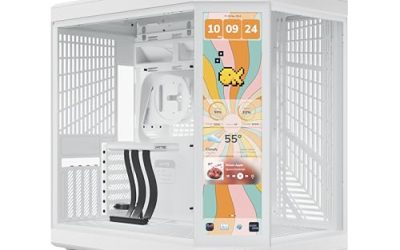
Your first PC build has a surprising number of ways to go wrong, and the case is where many of them start. A cramped chassis makes cable routing miserable, a case without fans can leave a graphics card running hot, and a model that only takes small motherboards locks you out of upgrades. Beginners searching for the best PC cases for a first build are really asking for a box that forgives mistakes: roomy enough to work in, ventilated well enough to cool a gaming rig, and shipped with the fans already installed.
That need shapes this list. Most of the seven cases below are ATX mid-towers with tempered glass and pre-installed fans, so a newcomer does not have to sort out airflow from scratch. One is a micro-ATX model for smaller boards, and one is a compact mid-tower from a well-known brand with a different philosophy. In 2026 a front USB-C port is an expected feature even in basic cases, and every judgment here comes from what the listings state.
Our Top Picks
 MUSETEX Y6 PC Case16.73"D x 10.83"W x 15.67"H16.73 x 10.83 x 15.67 inches14.55 PoundsCheck on Amazon
 MUSETEX ATX PC Case 7 PWM ARGB Fans16.73"D x 8.35"W x 18.5"H16.73 x 8.35 x 18.5 inches15 PoundsCheck on Amazon
 MOROVOL MATX PC Case13.39"D x 10.87"W x 12.44"H13.39 x 10.87 x 12.44 inches10.7 PoundsCheck on Amazon
 MUSETEX ATX PC Case Pre-Install 6 PWM ARGB18.98" x 15.75" x 8.07"15.75 x 8.07 x 18.98 inches12.6 PoundsCheck on Amazon

Top 3 picks at a glance
Quick Picks
As an Amazon Associate we earn from qualifying purchases at no extra cost to you.


| Product | Best for | Key spec from the title |
|---|---|---|
| MUSETEX Y6 (7 ARGB fans) | Showpiece first build | 7 infinity mirror PWM ARGB fans, Type-C |
| MUSETEX Y6 (4 fans) | Clean look without RGB | 4 non-LED fans, 270 degree glass |
| MUSETEX K2 | Dual-glass display build | 7 PWM ARGB fans, dual tempered glass |
| MOROVOL V3 | Small micro-ATX builds | MATX, 3 fans pre-installed, USB 3.0 |
| MUSETEX mesh case | Airflow-minded builders | 6 PWM ARGB fans, polygonal mesh |
| NZXT H5 Flow | Tidy, proven layout | 2 included 120mm fans, 360mm radiator support |
| FOIFKIN F600 | Value ARGB build | 7 PWM ARGB fans, 270 degree glass, Type-C |
How to Choose
Start with motherboard size
Cases are rated by the largest board they accept. ATX is the common full-size standard and leaves the most room for expansion cards and cable management. Micro-ATX boards are shorter and have fewer expansion slots, which suits compact builds, but a micro-ATX case will not take an ATX board. If you already own a motherboard, match its size first; if you are buying fresh, ATX gives the easiest path for a beginner because there is more space to work. Before ordering, write down the motherboard model, the graphics card length, and the cooler height you expect, then compare each against the case listing. That five-minute check prevents the most common first-build return.
Count the fans and the front mesh
A beginner should not have to add fans to get airflow, so look for at least two or three included. Several of these cases ship with six or seven, which helps cool a graphics card and processor right out of the box. Mesh front panels let air in more freely than solid glass or plastic fronts. Fan count alone is not everything, though: a case with two well-placed intake fans can outperform one with many fans placed poorly. Also confirm whether the fans plug into motherboard headers or a shared hub, because a limited number of fan headers can become a bottleneck on a budget board.
Look for the front ports you will use
A front USB-C port is useful for modern phones, headsets, and external drives, and it is expected on current cases. USB 3.0 is fine for older peripherals. Check that the front panel cables on the case match the headers on your motherboard. Beginners often overlook this, and a USB-C front port requires a matching header on the board to work.
Ignore lighting and check build room
RGB fans look attractive but do not make a PC faster, so decide whether you want them. The better question is room: tempered glass panels, radiator support such as the 360mm front radiator on one listing, and enough width for a tall cooler all affect how easy the build is. Budget cases tend to cut corners with thinner panels and fewer dust filters, so inspect the packing and the side panel fasteners on arrival. Also leave some space behind the motherboard tray for cables, since a tight rear gap is what makes first builds look messy.
The 7 Best Options
MUSETEX Y6 (7 ARGB fans)
This ATX mid-tower leads with its fan package: seven pre-installed infinity mirror PWM ARGB fans, a Type-C front port, and 270 degree full-view tempered glass. It is built for builders who want a display piece from the first day.
- Strength: seven pre-installed fans mean airflow is handled without extra purchases.
- Strength: Type-C front port and full-view glass suit a modern build.
- Trade-off: with so many ARGB fans, wiring and lighting control can overwhelm a first-timer.
Skip it if you want a quiet, lighting-free system. It fits buyers who like a lit build and want the fans bundled, such as someone assembling a first gaming desktop who does not want to price out aftermarket fans. Plan time for connecting the fan and lighting cables, since seven fans means seven leads to tidy.
MUSETEX Y6 (4 non-LED fans)
The same Y6 shell with four non-LED fans pre-installed, an ATX mid-tower footprint, Type-C, and 270 degree full-view tempered glass in black. It is the subtler version for buyers who prefer a clean look.
- Strength: four pre-installed fans without the lighting complexity.
- Strength: same panoramic glass and Type-C front connectivity as the lit version.
- Trade-off: no lighting on the fans, so the build looks plainer through the glass.
Skip it if you want RGB. It is a sound pick for first builders who value simple wiring and a restrained appearance, such as a student building a study and gaming machine. It also leaves room to add a lit fan or a light strip later if tastes change.
MUSETEX K2
An ATX mid-tower with seven PWM ARGB fans pre-installed, a Type-C port, and full-view dual tempered glass in black. The dual-glass design shows off the interior from the front and side.
- Strength: seven fans pre-installed with PWM control.
- Strength: dual tempered glass panels frame the components.
- Trade-off: glass front panels usually restrict intake airflow compared with mesh fronts.
Skip it if maximum airflow is your priority. It suits beginners who want a showpiece and are comfortable managing lighting. Since the title does not state a motherboard compatibility list beyond ATX, confirm any unusual board size before buying.
MOROVOL V3
The only micro-ATX case in the group. It lists 270 degree panoramic tempered glass, three fans pre-installed, and USB 3.0, in black. It targets smaller builds and tighter desks.
- Strength: compact micro-ATX format takes up less desk space.
- Strength: three fans are included and the glass panel gives a clear view.
- Trade-off: it accepts only smaller boards, which limits expansion.
Skip it if you own or plan to buy an ATX motherboard. It fits buyers who want a small footprint and are happy with a micro-ATX board. A first-time builder moving a small desk setup into a dorm or apartment is the obvious match, though a short chassis leaves less room for large coolers and long cards.
MUSETEX Polygonal Mesh Case
This ATX mid-tower comes with six PWM ARGB fans, a polygonal mesh front, and an opening tempered glass side panel. USB 3.0 ports, two of them, round out the front I/O.
- Strength: a mesh front supports better intake airflow than solid designs.
- Strength: opening glass side panel makes access during the build easier.
- Trade-off: front I/O lists USB 3.0 only, with no Type-C mentioned.
Skip it if a front USB-C port matters to you. It is a good fit for builders who value cooling over the newest ports, or who plan to hang a USB-C hub on the back of the desk anyway. The opening glass side panel described in the title can ease a first installation.
NZXT H5 Flow
A compact ATX mid-tower with two 120mm fans included, support for a 360mm front radiator, and tempered glass. It focuses on layout and airflow instead of piling on lighting.
- Strength: 360mm front radiator support leaves a path to liquid cooling.
- Strength: compact ATX design from a recognizable brand.
- Trade-off: only two fans are included, fewer than many rivals on this list.
Skip it if you want a lit-up case with many fans from the start. It rewards beginners who plan to grow the build over time, adding fans or an all-in-one liquid cooler once they are comfortable with the basics. A shopper who wants a tidy, uncluttered look in a modest footprint will likely appreciate the approach.
FOIFKIN F600
An ATX mid-tower gaming case with seven pre-installed PWM ARGB fans, 270 degree panoramic glass, and a Type-C front port in black. It aims for the same market as the other lit cases here.
- Strength: seven fans pre-installed, covering airflow for a first build.
- Strength: panoramic glass plus a Type-C front port.
- Trade-off: the brand is less established than NZXT.
Skip it if you favor a known name or a minimal look. It suits buyers who want maximum features in the case, particularly lit fans and a modern front port, and are comfortable researching a less familiar brand. Check the panel fit and included hardware when it arrives.
Which One Fits Your Situation
A first ATX build with a graphics card and lighting
The MUSETEX Y6 with seven ARGB fans packs airflow and lighting together, and the FOIFKIN F600 is a close alternative. Either one gives a beginner a full set of fans and a Type-C port, so the money goes into the components rather than accessories.
A quiet build without RGB
Choose the MUSETEX Y6 with four non-LED fans or the NZXT H5 Flow. Both keep the interior calm and the wiring simple.
A small desk and a micro-ATX board
The MOROVOL V3 is the only dedicated micro-ATX case, with three fans pre-installed.
A build you plan to upgrade to liquid cooling
The NZXT H5 Flow lists support for a 360mm front radiator, which gives you a clear route to an all-in-one cooler later. The MUSETEX mesh case is the alternative for anyone who wants to start with air cooling and plenty of intake.
Common Mistakes
- Buying a micro-ATX case and then discovering the ATX motherboard will not fit.
- Choosing a glass-front case and ignoring intake airflow.
- Counting fan quantity without checking that a fan hub or headers are available.
- Forgetting that a front USB-C port needs a matching motherboard header.
- Overtightening tempered glass panel screws, which can crack the glass.
Related guides
- Sustainable Gaming Pc Power Supply Efficiency Guide
- Noctua Nh-D15 Vs Thermalright Peerless Assassin 120
- Thermal Paste Application Method For Lga1851
Frequently Asked Questions
Is a mid-tower the right size for a first build?
Generally yes. It leaves room for ATX boards, long graphics cards, and tidy cable routing, which makes your first assembly less stressful. Smaller cases save space but demand more careful part selection, so beginners often prefer the extra room.
Do more fans mean better cooling?
Not always. Placement and the front panel design matter as much as the count, and too many ARGB fans can complicate wiring.
Do I need a case with USB-C on the front?
It is convenient for current devices, but you need a motherboard header for it. If you do not, USB 3.0 ports are sufficient.
Is tempered glass fragile?
It is sturdy in normal use but can break under impact or from overtightened screws. Handle the panel with care during the build.