
Anyone shopping for a pc 128gb ram system in 2026 is solving a specific problem: they have outgrown 64GB and need headroom for local AI model inference, 4K video timelines with heavy effects stacks, or simultaneous VMs without constant swapping. The market now offers eight distinct machines hitting that 128GB threshold, ranging from sub-four-liter mini PCs to full-size gaming towers, and the differences in what surrounds that memory — the GPU, the thermals, the upgrade path — determine whether you are paying for capability or just for a marketing spec.
What separates a good choice from a bad one is fit. A workstation-class mini PC with 128GB LPDDR5 and integrated RDNA3.5 graphics serves a fundamentally different buyer than a desktop pairing 128GB DDR5 with a discrete RTX 5090. Owner feedback across all eight systems points to the same lesson: thermal throttling on compact builds and GPU bottleneck on expensive full-towers are the two failure modes that turn a high-spec sheet into a disappointing daily driver. Matching the form factor and compute profile to your actual workload is the single most important decision here.
As an Amazon Associate we earn from qualifying purchases at no extra cost to you.





Our Top Picks


Top 3 picks at a glance
Quick Picks
| Product | Best for | Price |
|---|---|---|
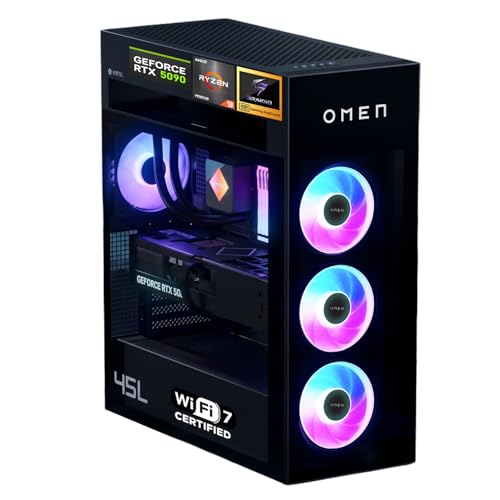
| HP OMEN MAX 45L RTX 5090 | Maximum GPU throughput with 128GB RAM | Check on Amazon |
| ASUS ROG Strix G700 (4060 Ti 8GB) | High storage, moderate gaming, professional multitasking | Check on Amazon |
| BOSGAME Mini PC M5 | Compact AI inference in a small footprint | Check on Amazon |
| MINISFORUM MS-S1 MAX | Connectivity-heavy AI workstations with expansion options | Check on Amazon |
| GMKtec AI Mini PC | Value-focused compact 128GB system | Check on Amazon |
| Dell Tower Plus EBT2250 | Business or home office with 128GB DDR5 and discrete GPU | Check on Amazon |
| ASUS ROG Strix G700 (4060 Ti 16GB) | Massive storage paired with 128GB DDR5 for content pipelines | Check on Amazon |
| GMKtec EVO-X2 | Balanced compact AI rig with LPDDR5X speed | Check on Amazon |
How We Compared
We narrowed this list by three criteria. First, published specs had to include 128GB of RAM with no ambiguity — no soldered-limited configs that ship with less and require user upgrades that break warranty. Third, we weighed owner feedback on sustained thermals and acoustic behavior, since compact 128GB systems are especially prone to thermal compromise. Value relative to the pc 128gb ram segment at large was the fourth lens.
The 8 Best Pc 128Gb Ram in 2026
HP OMEN MAX 45L RTX 5090
This is the ceiling option. If your workflow demands both 128GB DDR5 and a top-tier discrete GPU — training or fine-tuning large models locally, running multiple 8K renders simultaneously, or serving AI inference with GPU acceleration — nothing else here gets close on raw compute. The Ryzen 9 9900X3D at 5.5GHz keeps the CPU from bottlenecking the RTX 5090 during mixed loads.
- Pro: The strongest GPU-to-RAM pairing in this list for parallel workloads.
- Pro: Large chassis means thermal headroom and upgrade flexibility that mini PCs cannot match.
- Con: The price is roughly double the next-closest gaming option here.
Skip this if your workload is memory-bound rather than compute-bound; you are paying for a GPU tier you may not saturate with 128GB alone.
ASUS ROG Strix G700 11TB (4060 Ti 8GB)
A strange but compelling combination: 128GB DDR5 paired with 11TB of total storage and an RTX 4060 Ti. This targets editors and photographers who ingest enormous libraries and need RAM headroom for timeline scrubbing without a GPU-heavy render pipeline. The Core Ultra 9 boosting to 6.00GHz keeps single-threaded operations snappy.
- Pro: 11TB of storage at this price eliminates the need for an external drive array.
- Pro: DDR5 platform with a clear upgrade path to higher memory configs if needed.
- Con: The 8GB VRAM on the 4060 Ti can bottleneck GPU-accelerated effects at high resolutions.
Pass if you rely on GPU-accelerated workloads like 3D rendering or AI model serving; the discrete GPU here is modest relative to the memory investment.
BOSGAME Mini PC M5
The smallest entry here. 128GB LPDDR5 in a mini PC chassis with the Ryzen AI Max+ 395 — this is for someone whose desk is crowded, whose workload is CPU-and-memory bound (local LLM inference, large dataset processing, multi-VM dev environments), and whose GPU needs are secondary.
- Pro: Lowest price for 128GB in this roundup.
- Pro: Compact footprint with 2TB NVMe SSD included.
- Con: LPDDR5 is soldered; no future memory upgrades are possible.
Not for anyone who needs discrete GPU power or expects to expand internal storage over several years.
MINISFORUM MS-S1 MAX
The most connected compact option. Dual 10GbE, USB4 at 80Gbps, a PCIe x16 slot, and dual M.2 slots — this machine is built for people who treat 128GB RAM as the foundation of a small cluster, NAS, or development hub. The RDNA3.5 integrated GPU handles display output and light compute, but the expansion slot is the real story.
- Pro: PCIe x16 slot adds discrete GPU or capture card options unusual in a mini form factor.
- Pro: Dual 10GbE networking serves homelab and data-transfer workloads without a separate card.
Skip if you will never use the expansion slot or networking features; a cheaper mini covers your needs.
GMKtec AI Mini PC
A stripped-down take on the Ryzen AI Max+ 395 platform with 128GB LPDDR5. Published specs are sparse beyond the CPU ceiling of 5.1GHz, so buying decisions here rest heavily on community reports and value positioning.
- Pro: Competitive pricing for the AI Max+ 395 with 128GB.
- Pro: Compact design suits desk-limited environments.
- Con: Limited published detail on storage configuration means you may need to verify what ships included.
Best avoided if you require certainty on bundled storage or GPU output specs before purchase.
Dell Tower Plus EBT2250
The business-class entry. Core Ultra 9 285K, 128GB DDR5, an RTX 5060 with GDDR7, and a tower chassis that Dell service networks support globally. This suits IT departments or consultants who need a pc 128gb ram workstation with vendor-backed warranty and a discrete GPU for moderate rendering or CAD, without gaming-tower aesthetics.
- Pro: Dell ProSupport and global service availability reduce procurement friction.
- Pro: RTX 5060 with 8GB GDDR7 handles GPU-accelerated office and creative workloads.
- Con: Only 1TB NVMe SSD included; large datasets demand immediate storage expansion.
Skip if you need massive local storage out of the box or prefer a compact footprint.
ASUS ROG Strix G700 24TB (4060 Ti 16GB)
The storage monster. 24TB combined with 128GB DDR5 and the 16GB GDDR6 variant of the 4060 Ti. This is built for archival-heavy creative pipelines — documentary editors, VFX supervisors, or anyone running local AI datasets that exceed single-drive capacities. The Core Ultra 9 at 6.00GHz turbo keeps the CPU from stalling.
- Pro: 24TB eliminates external storage entirely for most project archives.
- Pro: 16GB VRAM variant handles more complex GPU-accelerated timelines than the 8GB model.
Not ideal if your GPU demands exceed what a 4060 Ti delivers; the 24TB storage may not compensate.
GMKtec EVO-X2
The “Superchip” designation refers to the unified memory architecture of the AI Max+ 395. This targets users who want the same platform as the standard GMKtec but with faster LPDDR5X memory and confirmed 2TB storage — a clearer spec sheet than the base model.
- Pro: LPDDR5X offers higher bandwidth than LPDDR5, benefiting memory-bound AI inference.
- Pro: 2TB NVMe included at the same price as the base GMKtec.
- Con: Identical price to the base model with fewer published details on thermals under sustained load.
Compare carefully with the standard GMKtec; the real-world uplift from LPDDR5 to 5X may not justify a gamble on unclear thermal specs.
Buying Guide
DDR5 vs LPDDR5 and LPDDR5X
Full-size desktops here use DDR5, which is upgradable and compatible with standard XMP or EXPO profiles. Mini PCs use soldered LPDDR5 or LPDDR5X, which offer higher bandwidth per watt but are fixed forever. If you anticipate exceeding 128GB within two years, only DDR5 systems give you that path.
Matching GPU to Memory Workload
128GB RAM feeds different bottlenecks depending on your task. For local LLM inference, integrated RDNA3.5 or a modest discrete GPU suffices since the model lives in system memory. For video editing or 3D work, VRAM matters more — 8GB will limit timeline resolution regardless of how much system RAM you have. Buy the GPU tier your software actually saturates.
Storage and Connectivity as Hidden Costs
A 128GB system with 1TB of SSD is a half-finished purchase if your datasets span terabytes. Factor in the cost of expansion NVMe drives, external arrays, or 10GbE network cards before comparing headline prices. The MINISFORUM bundles what others charge extra for; the Dell forces you to budget for storage upgrades.
Our Verdict
The top pick for most buyers seeking a pc 128gb ram system is the MINISFORUM MS-S1 MAX. It balances the soldered-memory risk of mini PCs with real expandability through its PCIe x16 slot and dual 10GbE, and its price undercuts full-tower alternatives that cannot match its connectivity density.
FAQ
Is 128GB RAM overkill for gaming?
For current titles, yes — very few games use more than 32GB. A 128GB gaming system makes sense only when you simultaneously run background tasks like streaming software, virtual machines, or large creative applications alongside gameplay.
Can I upgrade from 64GB to 128GB after purchase?
Only on DDR5 desktop systems with free DIMM slots and a compatible motherboard. LPDDR5 and LPDDR5X memory in mini PCs is soldered and cannot be upgraded after manufacturing.
Does Windows 11 support 128GB RAM?
Windows 11 Pro supports up to 2TB, so 128GB is well within limits. Windows 11 Home caps at 128GB, which means it will work but leaves zero headroom for future expansion on consumer-OS builds.
Do I need DDR5 specifically, or would DDR4 at 128GB suffice?
DDR4 platforms that support 128GB exist but use more power and offer lower bandwidth. For AI inference and large-memory workloads, DDR5 and LPDDR5X deliver measurable throughput gains that justify the platform premium on new builds.









