
The best PC case for most gaming builds in this group is an ATX mid-tower with a real mesh intake, at least three fans moving air through it, and enough published clearance for your longest graphics card. Several of the listings below meet that bar at a budget price tier; the more expensive ones add brand ecosystems, quieter-looking fan sets or a bigger glass panel rather than a fundamentally different airflow design. We compare ten listings using only what their titles state, and we point out where a listing leaves a number out, because that is where buyers get surprised.
For a quick decision, jump to the verdict near the end; the buying guide includes a worked airflow estimate with stated assumptions.
Our Top Picks
 MUSETEX ATX PC Case Pre-Install 6 PWM ARGB18.98" x 15.75" x 8.07"15.75 x 8.07 x 18.98 inches12.6 PoundsCheck on Amazon
 DARKROCK EC2 ATX Mid Tower Gaming Computer PCATX/Micro-ATX/Mini-ITX17.6 x 8.6 x 15.2 inchesCheck on Amazon
Top picks at a glance
MUSETEX ATX PC Case Pre-Install 6 PWM ARGB Fans, Polygonal Mesh Computer Gaming Case, Opening Tempered Glass Side Panel Mid-Tower Case, USB 3.0 x 2, Black, NN8


As an Amazon Associate we earn from qualifying purchases. Product prices and availability are accurate as of the date/time indicated.
DARKROCK EC2 ATX Mid Tower Gaming Computer PC Case, Type-C Ready | Supports 50 Series Graphics Cards, Tempered Glass Side Panel, up to 8 x 120mm Fans & 360mm Radiator, 1 x Pre-Installed Fan


As an Amazon Associate we earn from qualifying purchases. Product prices and availability are accurate as of the date/time indicated.

CORSAIR 3500X Mid-Tower ATX PC Case – Panoramic Tempered Glass – Reverse Connection Motherboard Compatible – No Fans Included – Black


As an Amazon Associate we earn from qualifying purchases. Product prices and availability are accurate as of the date/time indicated.

GAMDIAS ATX Mid Tower Gaming Computer PC Case Tempered Glass, Built-in 4X 120mm ARGB Case Fans, Front Airflow Mesh, Up to 6x120mm Fans, 340mm GPU/VGA, 360mm AIO/Radiator, 160mm CPU Cooler


As an Amazon Associate we earn from qualifying purchases. Product prices and availability are accurate as of the date/time indicated.

NZXT H5 Flow - Compact ATX Mid-Tower PC Case - Black | Compact mid-tower with 2 included 120mm fans, 360mm front radiator support, and tempered glass. A great first airflow build.


As an Amazon Associate we earn from qualifying purchases. Product prices and availability are accurate as of the date/time indicated.

Rosewill ATX Mid Tower Gaming Computer PC Case, Tempered Glass, Built-in 4 x 120mm PWM Fans, Front Airflow Mesh, Up to 6 x120mm Fans, 340mm GPU/VGA, 360mm AIO/Radiator, 160mm CPU Cooler - RWGC1


As an Amazon Associate we earn from qualifying purchases. Product prices and availability are accurate as of the date/time indicated.

MUSETEX Y6 PC Case, Pre-Installed 4 Non-LED Fans, ATX Mid Tower Case, Computer Case with Type-C, 270° Full View Tempered Glass, Black


As an Amazon Associate we earn from qualifying purchases. Product prices and availability are accurate as of the date/time indicated.

CORSAIR iCUE Link 3500X RGB Mid-Tower ATX PC Case – Panoramic Tempered Glass – Reverse Connection Motherboard Compatible – 3X CORSAIR iCUE Link RX120 RGB Fans Included – Black


As an Amazon Associate we earn from qualifying purchases. Product prices and availability are accurate as of the date/time indicated.

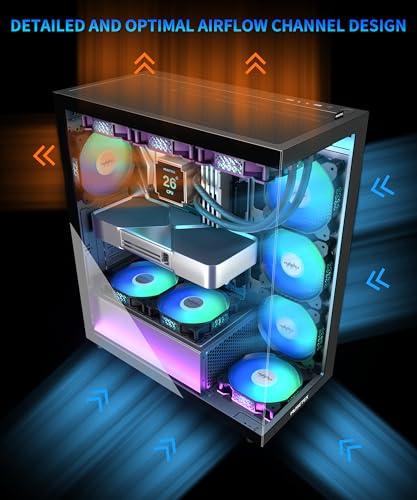
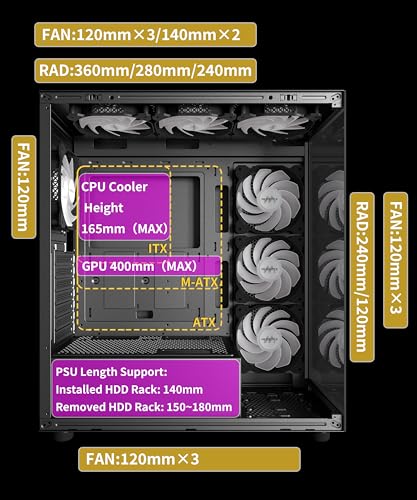
MUSETEX ATX PC Case 7 PWM ARGB Fans Pre-Installed, Type-C Mid Tower Computer Case with Full-View Dual Tempered Glass, Gaming PC Case, Black(K2)



As an Amazon Associate we earn from qualifying purchases. Product prices and availability are accurate as of the date/time indicated.

MOROVOL PC Case Pre-Install 4 RGB Fans, ATX Gaming Computer Case with Diamond-Shaped Mesh Front & Tempered Glass Side Panel, USB 3.0 Airflow Mid Tower case,621


As an Amazon Associate we earn from qualifying purchases. Product prices and availability are accurate as of the date/time indicated.
| Model | Key point from the title | Price tier | Best for |
|---|---|---|---|
| MUSETEX NN8 | 6 pre-installed PWM ARGB fans, polygonal mesh, opening glass panel | Budget | First build without buying fans |
| DARKROCK EC2 | Up to 8 x 120mm fans, 360mm radiator, 1 fan included | Budget | Builders who plan to add their own fans |
| CORSAIR 3500X | Panoramic glass, reverse connection board support, no fans | Mid-range | Custom fan setups |
| GAMDIAS ATX mid tower | 4 ARGB fans, 340mm GPU, 360mm radiator, 160mm cooler limits | Budget | Anyone who wants clearances stated up front |
| NZXT H5 Flow | Compact mid-tower, 2 fans, 360mm front radiator support | Mid-range | Smaller desks, first airflow build |
| Rosewill RWGC1 | 4 PWM fans, same clearance figures as the GAMDIAS title | Budget | Shoppers comparing like-for-like specs |
| MUSETEX Y6 | 4 non-LED fans, Type-C, 270-degree glass | Mid-range | Clean, no-RGB showcase builds |
| CORSAIR iCUE Link 3500X RGB | 3 iCUE Link RX120 RGB fans included | Premium | Corsair-ecosystem builders |
| MUSETEX K2 | 7 PWM ARGB fans, dual glass, Type-C | Mid-range | Full-glass showcase builds |
| MOROVOL 621 | 4 RGB fans, diamond-pattern mesh front, USB 3.0 | Budget | Value airflow case |
What is shifting in the case market right now
Tempered glass used to be a premium feature. Across these ten titles it is universal, which means glass no longer tells you anything about quality; the difference now sits in everything around it. A growing number of listings advertise full-view or dual-panel glass, and that trend pushes designers to hide intake behind side gaps or narrow mesh strips. That looks clean in photographs, yet it asks you to read the airflow description carefully, because a glass wrap-around is not the same thing as a mesh front.
The second change is in what comes in the box. Fan-included cases used to ship with one or two basic fans. Titles here advertise six or seven pre-installed ARGB fans on mainstream budget models. More fans lets a manufacturer print a bigger number on the box, but it also moves the buyer’s job from “choose and buy fans” to “figure out how to power and sync them”. Many fan sets ship with a controller or hub, others expect motherboard headers, and a few use proprietary daisy-chain connectors. That is worth checking before you assume the bundle is a bargain.
Third, front-panel connectivity is slowly moving from USB 3.0 Type-A toward Type-C. The port is only useful when the motherboard supplies the matching internal header, so a Type-C badge on the case is a half-feature until you check your board’s manual. Fourth, graphics cards keep getting longer and thicker, and a few listings now name current-generation card support explicitly. Treat that wording as marketing shorthand and read the length and thickness limits instead.
Radiator support is also becoming a headline spec even on inexpensive cases, with 360mm mounts now common in titles. That widens choices for liquid cooling, but it can push buyers into thinking every case fits every radiator; thickness limits and front-mount GPU trade-offs still apply and are rarely printed in the title.
Finally, back-connect motherboards and reverse connection cases are slowly appearing, which moves the power and fan connectors behind the tray. If you do not already own that kind of board, it is not a reason to buy, but it does influence how tidy a build can look.
How we picked these
We built this list from the listings’ own titles, from published specifications and manufacturer documentation where it exists, and from the themes that recur in buyer reviews. Nobody on the team used or measured these units. That means we never state a temperature, a noise level or a build-quality conclusion as if we had gathered it ourselves. Wherever a number appears that does not come from a title, it is a labeled estimate with its assumptions spelled out. Cases were included because they are ATX mid-tower style listings aimed at gaming builds; we did not rank them in a strict order, because the right case depends on your parts, so each entry explains who it suits and what to check on the listing.
The ten cases, one by one
MUSETEX NN8: six included fans at a budget tier
The title advertises an ATX mid-tower with six pre-installed PWM ARGB fans, a polygonal mesh front, an opening tempered glass side panel and two USB 3.0 ports. The fan count is the standout, since it is the second highest among these ten. It suits a first-time builder who wants to avoid separate fan purchases and who likes lit interiors. Everything beyond the title, including how the fans are wired and whether a hub is included, is something to confirm on the listing.
Imagine a bedroom build with a mainstream graphics card: several fans take intake duty across the front, one or two exhaust, and the motherboard’s ARGB header runs the lighting. It appeals if you hate hunting for matching fans, and less so if you prefer a dark interior, since the title does not mention a way to switch the lighting off.
Against its closest neighbors, the NN8 trades clearance transparency for fan count. The GAMDIAS and Rosewill titles give you three fit numbers and four fans; this one gives you six fans and none of the numbers. If your graphics card is long or your cooler is tall, that gap is the reason to read the dimension sheet before the fan count.
Pros
- Six fans in the box saves a shopping step.
- Mesh front is named in the title.
- The opening glass panel may simplify access, depending on its hinge design.
Cons
- Title lists two USB 3.0 ports and no Type-C.
- No GPU length, cooler height or radiator figures appear in the title.
- Six lit fans means more cables to route.
Check the listing: radiator support, GPU clearance, the fan hub or controller, and how the opening panel latches. Ask yourself: do I want to keep the stock fan count, or will I replace some with quieter ones?
DARKROCK EC2: room to grow, one fan to start
The title says ATX mid-tower, Type-C ready, support for 50-series graphics cards, tempered glass, up to eight 120mm fans, a 360mm radiator and one pre-installed fan. It sits in the lowest price tier here, and it is a case for people who want to choose their own fans. Buyers who plan to add a few well-reviewed fans can end up with a better setup than a case that ships with many unknown ones, though the extra purchase moves the real cost up.
Picture someone assembling their first liquid-cooled gaming PC. The 360mm radiator figure suggests an AIO can mount, which already makes the case more flexible than fixed-fan budget models. They would still need to confirm whether the radiator mounts at the front or the top, and how much space the radiator and fans leave for the graphics card.
The honest way to read this listing is as a platform rather than a bundle. Eight fan positions and a 360mm radiator mount give you the structure; the single fan is only a placeholder. Budget for at least two more intake fans and one exhaust if you want it to match the pre-fanned cases, and decide whether you would rather have those fans be quiet models you chose yourself.
Pros
- Up to eight fan positions listed.
- Lowest price tier in this set.
- Type-C and large-GPU wording appear in the title.
Cons
- Only one fan is included, so airflow needs extra purchases.
- “Supports 50 series” is a marketing phrase, not a length limit.
- Title does not state the cooler height cap.
Check the listing: maximum GPU length, CPU cooler height, and where the radiator mounts. Ask yourself: how many extra fans will I actually buy, and will the final cost still beat the pre-fanned alternatives?
CORSAIR 3500X: the blank canvas with a big glass panel
This is a mid-tower ATX case with panoramic tempered glass, reverse connection motherboard compatibility and no fans included. The brand is well known in the PC hardware market, but the title gives few measurable specs, so treat the entry as a shell for a builder who already has fans or plans to buy them.
The reverse connection mention matters for one specific audience: someone who already owns a back-connect board, or who is planning to buy one. For everyone else, the practical appeal is the large glass window and the ability to pick exactly the fans and lighting you want. A buyer who wants a quiet build can install larger, slower fans and tune the curve in the BIOS without removing anything first.
Because the title lists no fans, this is the case where total build cost drifts furthest from the shelf price. It is also the one where you get the most control: you decide the fan size, the bearing type, the lighting and the noise profile. Builders who already keep spare fans from an earlier machine are the group that gets the best value from a shell like this.
Pros
- Panoramic glass for a showcase look.
- Choice of fans and lighting without removing stock parts.
- Supports the reverse connection board layout named in the title.
Cons
- No fans included, so a working airflow setup costs more than the shelf price.
- No clearance figures in the title.
- Front panel type (mesh or solid) is not stated.
Check the listing: front panel design, included dust filters, and the supported radiator positions. Ask yourself: am I buying fans separately for this case, and what will three decent ones add to the price?
GAMDIAS ATX mid tower: clearances written into the title
This listing spells out four fan-and-fit numbers: four built-in 120mm ARGB fans, front airflow mesh, room for up to six 120mm fans, 340mm GPU length, 360mm AIO or radiator support and 160mm CPU cooler height. It is the kind of title that makes comparison easy, and it targets buyers who want the numbers before they click.
A practical example: suppose you plan to install a 330mm graphics card and a tall tower air cooler. The GPU fits on paper, but the 160mm cooler limit rules out a number of large dual-tower coolers, some of which exceed that height. Checking your cooler’s height before ordering avoids a return. A shopper using a compact AIO or a slimmer air cooler has no such problem.
Compared with the NN8, this listing carries fewer fans but more certainty. The extra two fan positions beyond the four included ones leave a path to a six-fan layout without moving to a different case. For many builds, four intakes and exhausts arranged sensibly are enough, and the stated limits tell you quickly whether your parts qualify.
Pros
- Stated GPU, cooler and radiator limits.
- Four ARGB fans plus front mesh at a budget tier.
- Room for two more fans beyond the included four.
Cons
- 160mm cooler height excludes some tall air coolers.
- ARGB fans may need a motherboard header or controller.
- 340mm GPU limit may drop if a front radiator is installed; the title does not say.
Check the listing: whether the GPU limit changes with a front radiator, and what the fan connectors look like. Ask yourself: is my cooler under 160mm?
NZXT H5 Flow: compact footprint, two fans, first-airflow positioning
The title describes a compact ATX mid-tower with two included 120mm fans, support for a 360mm front radiator and tempered glass, and it quotes the brand’s own description as a “great first airflow build”. That last phrase is the manufacturer’s marketing language, not a conclusion we reached. In practical terms, the title gives a smaller outline than a standard full-size mid-tower, which can matter on a crowded desk.
Consider someone with a narrow desk shelf who still wants a 360mm AIO. The compact outline helps with the shelf, and the front radiator mention suggests the AIO will mount at the front. The trade-off is that compact cases often leave less space behind the motherboard tray and around the PSU, so cable management needs patience.
Because the title gives only two fans, the sensible plan for a high-wattage build is to add at least one more front intake. That brings the mid-range tier closer to the pre-fanned budget listings in total cost, so the comparison becomes a question of footprint and brand against a larger, cheaper, fan-rich case. Neither answer is wrong; it depends on how much desk space you have.
Pros
- Compact outline stated in the title.
- 360mm front radiator support.
- A widely recognized brand name, which may matter for support questions.
Cons
- Only two fans in the box.
- Title gives no GPU or cooler clearances.
- Mid-range tier is higher than several pre-fanned budget cases.
Check the listing: GPU length with the front radiator installed, and the number of drive bays. Ask yourself: do I value the smaller footprint enough to pay more for fewer included fans?
Rosewill RWGC1: the near-twin of the GAMDIAS listing
Read the Rosewill title next to the GAMDIAS one and the specs match: ATX mid tower, tempered glass, front airflow mesh, room for six 120mm fans, 340mm GPU, 360mm AIO or radiator, 160mm CPU cooler. The differences are the brand, the model code, and the fans, which are four PWM models rather than four ARGB ones. We cannot tell from titles whether the two share a chassis, so we flag them as near-duplicates and leave the comparison to photographs and dimension drawings on the listings.
The PWM wording matters for builders who care about fan-speed control. PWM lets the motherboard set speed by temperature, which suits a quiet daily-driver machine. If you want no lighting at all, this listing’s title does not mention LEDs, but it does not promise a lighting-free interior either.
When two listings are this close, use the differences that do show up: fan type, brand support terms, the return window, and the photographs of the cable area and front panel. If both seem equal on those, the lower total price is a reasonable tie-breaker. Do not assume the two are interchangeable, since titles cannot confirm panel thickness, dust filters or screw quality.
Pros
- PWM fans are named in the title.
- Same stated clearances as the GAMDIAS listing.
- Budget price tier in this set.
Cons
- Near-identical title to another listing makes it hard to see what differs.
- Lighting details are not stated.
- No Type-C mention.
Check the listing: whether the fans have lighting, and the front I/O. Ask yourself: if two listings share specs, which has the clearer photos and return terms?
MUSETEX Y6: four non-LED fans and wrap-around glass
The Y6 title lists four pre-installed non-LED fans, an ATX mid-tower layout, Type-C and 270-degree full-view tempered glass. The non-LED wording stands out: while most budget cases push lighting, this one signals a cleaner interior for builders who do not want RGB. Full-view glass can look striking, but it is worth finding out where the intake sits, because many wrap-around designs draw air through side or bottom gaps instead of a mesh face.
Picture a white-and-black desk setup with no lighting: the non-LED fans keep the interior neutral, so the cooler or graphics card is the visual focus. The caution is that a showcase glass design may restrict air, so cooling headroom depends on how the case breathes.
This is the entry that best matches a muted desk, but it asks for more homework than the mesh-front cases. Look for photographs of the front and sides with the glass removed, check whether dust filters cover the intake gaps, and see if the roof or rear offers enough exhaust. Wrap-around glass is a style decision first and a cooling decision second.
Pros
- Non-LED fans suit a restrained look.
- Type-C is named in the title.
- Wide glass area shows the build.
Cons
- Title gives no clearance numbers.
- Intake design is not described.
- Mid-range tier is above the budget cases here.
Check the listing: where the air enters, filter coverage and radiator mounting. Ask yourself: do I want a lit interior later, and can I add RGB fans easily?
CORSAIR iCUE Link 3500X RGB: the same shell, with a fan ecosystem attached
This listing is the 3500X shell paired with three iCUE Link RX120 RGB fans, panoramic glass and reverse connection compatibility. It sits at the premium tier by a wide margin in this set. If you already own other iCUE Link parts, the single-cable daisy-chain approach can reduce cable clutter. If not, you are paying for an ecosystem as well as a case.
The useful comparison is with the fan-free 3500X listing: the same case body, but with three fans included. Before choosing between them, price three standalone fans and check whether the included set needs a separate system hub or software. Titles do not say whether a hub is bundled, so this is a “check the listing” item.
Treat the premium tier here as a statement about parts, not about airflow. The shell is the same one sold without fans, so the extra spend buys three lit fans and their connection system. If you plan to replace those fans with your own, the bundled set is not a good value. If you will keep them and add matching components later, it is more reasonable.
Pros
- Three RGB fans included.
- Panoramic glass and reverse connection support.
- Fits into an existing iCUE Link setup.
Cons
- Highest price tier in this set.
- Fans may depend on a proprietary connection and software.
- Title gives no GPU or radiator limits.
Check the listing: whether a controller or hub is included and how many fans the chain supports. Ask yourself: will I really use the ecosystem, or would the cheaper 3500X plus my own fans do the same job?
MUSETEX K2: seven fans behind dual glass
The K2 title promises seven pre-installed PWM ARGB fans, Type-C, a mid-tower ATX layout and full-view dual tempered glass. Seven is the highest fan count in this set, and the listing leans toward showcase builds. It suits someone who wants a glowing interior and does not want to open a second box of fans.
Suppose you plan a build with a large cooler and a lit graphics card, and you value being able to see every part. Dual glass delivers that view. The thing to verify is how the seven fans are arranged. Fans placed across the glass-facing sides contribute to the look, but airflow depends on intake and exhaust balance, not on a total.
Among the showcase-oriented listings, the K2 packs the most fans, which makes it the opposite of the fan-free CORSAIR shell. The trade-off is simplicity: you receive a working fan set, but you also receive seven cables and a lighting setup to manage. Learn how they connect before you start building, and plan where they bundle behind the tray.
Pros
- Seven PWM ARGB fans in the box.
- Type-C front port named in the title.
- Dual-glass layout for full visibility.
Cons
- Dual glass can look striking but is heavier and more fragile.
- No clearance figures in the title.
- Seven lit fans mean seven sets of cables.
Check the listing: fan positions, the controller, and GPU clearance. Ask yourself: how many of the seven fans actually push air through the system?
MOROVOL 621: diamond-pattern mesh on a budget
The MOROVOL title mentions four pre-installed RGB fans, an ATX layout, a diamond-shaped mesh front, a tempered glass side panel and USB 3.0. It is among the lower price tiers here, and the mesh front is the chief airflow clue. Note the title says RGB rather than ARGB, which can mean simpler color-cycling fans that use a different connector from addressable ones. We cannot confirm which from the title.
For a buyer upgrading from an older solid-front case, the mesh face may be the single most useful change, since intake is the part of airflow most often restricted. Four fans give you a start, and you can verify whether the remaining mounting spots accept more.
For buyers comparing cheaper cases, this entry is a reference point: a mesh front and four fans at a budget tier. What it leaves out of the title (radiator support, clearances, Type-C) is what you should confirm. If the missing numbers turn out to be acceptable for your parts, it remains a low-cost route to a ventilated build.
Pros
- Mesh front named in the title.
- Four fans included at a budget tier.
- USB 3.0 front port.
Cons
- “RGB” may mean non-addressable fans that sync differently.
- No Type-C mentioned.
- No clearance figures in the title.
Check the listing: fan connector type, radiator support and GPU length. Ask yourself: does the lighting control work with my motherboard software?
A practical buying guide for choosing a PC case
Start with fit, not looks
Three measurements decide whether a case works with your parts: graphics card length, CPU cooler height and radiator thickness. Only two of the ten titles state any of them (the GAMDIAS and Rosewill listings state 340mm, 160mm and 360mm). For the others, you will need to read the dimension sheet on the listing or the manufacturer page. Record your parts’ dimensions first. Graphics card length is on the maker’s product page, cooler height is in the cooler’s specifications and radiator thickness plus fan thickness is the figure that matters for the front or top mount.
Also check the motherboard size. Every case here says ATX, which accepts ATX, micro-ATX and mini-ITX boards, but standoff positions and cable cutouts differ. A reverse connection case needs a board with matching connector placement for the extra tidy look, and it still accepts standard boards in most designs; confirm that on the listing.
Airflow: where the air enters
Airflow in a case is a pressure problem. Fans pull air in at the front or bottom, and exhaust fans push it out at the back or top. If more air goes in than comes out, the case has positive pressure, which tends to keep dust out through filters; if more goes out than comes in, dust enters through gaps. Neither is wrong, but you want the intake to face something open, such as the mesh named in the GAMDIAS, Rosewill, NN8 and MOROVOL titles, and you want filters you can remove for cleaning.
Fan count is a weaker indicator than fan placement. Three intake fans on a mesh front and one exhaust fan at the rear form a coherent path. Seven fans arranged around glass can be a good setup if they sit at the front, top and rear, and a poor one if they mostly face the side panel. Look at photographs for the fan positions, not the count in the title.
Front ports, cables and the motherboard header
Type-C at the front needs a matching internal header on the motherboard, usually labeled as USB 3.2 Gen 2 Type-E or similar. Open your board’s manual and check for it. If it is missing, the Type-C port stays unused, and the case’s USB 3.0 Type-A ports become your only fast front ports. Do the same with ARGB: a 5V three-pin header is the standard addressable connector, and a fan set with a controller hub may not need it. Powering six or seven fans from a hub rather than individual motherboard headers also changes how many headers you need.
Glass, mesh and noise
Glass reflects sound inside the case, while mesh lets it out, so a mesh-front case with slow fans tends to feel louder at a given speed than a solid-front design, but cools better under load. This is a general tendency, not a measurement of any case here. If you prioritize quiet, our guide to quieter cases covers the trade-offs in more detail. For airflow-first ranking among tower styles, see the comparison of gaming towers.
Worked example: a 320mm graphics card with a 360mm AIO
Assumptions: a 320mm-long graphics card, an ATX board, a tower air cooler 155mm tall or a 360mm all-in-one liquid cooler, and a power draw of roughly 450W combined from the CPU and GPU under a long gaming session. These are assumptions for illustration, not measurements of any case or part.
Fit step one: the graphics card at 320mm clears the 340mm limit stated for the GAMDIAS and Rosewill titles by 20mm. If a front radiator reduces that limit, the margin shrinks, and the listing’s dimension drawing will say by how much. A 155mm air cooler clears the 160mm cooler cap by 5mm, a thin but legal margin.
Airflow step two: the temperature rise of air passing through a case can be estimated with a simple rule. One cubic foot per minute of air carries away about 0.57 watts per degree Celsius of rise, so the rise is roughly 1.76 times the heat in watts divided by the airflow in CFM. With 450W of heat and an effective airflow of 100 CFM, the exhaust air runs about 8 degrees warmer than the intake. At 60 CFM effective airflow, the rise is closer to 13 degrees, and at 150 CFM it is about 5 degrees. The assumed 50 CFM per 120mm fan at moderate speed is a rough figure, and restrictive filters, dense mesh and glass obstruction reduce it. Two fans leave little margin for a 450W machine; beyond three or four, placement matters more than count.
| Spec concept | What to look for | Why it matters |
|---|---|---|
| GPU length limit | Value in mm, with and without a front radiator | Long cards can hit a front radiator or drive cage |
| CPU cooler height | Maximum in mm (for example 160mm) | Tall air coolers can stop the side panel closing |
| Radiator support | Size and position (front or top) | 360mm mounts need thickness clearance for fans |
| Intake design | Mesh front, filter coverage | A solid or gap-fed front limits air |
| Fan connectors | PWM, ARGB, RGB, proprietary | Decides whether you need a hub or board headers |
| Front I/O | USB 3.0 Type-A, Type-C, board header needed | Type-C needs a matching internal header |
| Board layout | Standard or reverse connection | Back-connect boards need matching cutouts |
Choosing among white, showcase and beginner designs
If appearance is a priority, our roundups of white cases and showcase builds look at colorways and glass layouts rather than airflow alone. If this is your first build, the beginner-focused list weights ease of assembly more heavily.
Mistakes buyers make with PC cases
- Buying on fan count. Seven fans facing a glass wall are not seven fans of cooling. Count intake and exhaust paths.
- Skipping the cooler height. A 160mm cap fits many coolers but not all dual-tower models, and discovering that at assembly time costs a return.
- Treating “supports 360mm radiator” as a guarantee. Radiator thickness, fan thickness and memory height decide whether it fits.
- Assuming Type-C will work. Without a matching header on the motherboard, the port may do nothing.
- Forgetting about the power supply. Check PSU length and cable routing space, especially in compact designs.
- Ignoring lighting hardware. RGB and ARGB use different connectors, and mixing them can lead to the wrong color or no light.
- Paying for ecosystem extras without a plan. A premium fan system is useful only when you will use the matching hub and software.
- Not planning cable routing. A case with six or seven lit fans can mean many connectors; check for a hub and a place to hide the slack.
- Buying the shell and forgetting dust filters. Look for removable filters on the intake, because a mesh front without a filter collects dust quickly.
- Overlooking weight and fragility of glass. Panels can chip during moves, so keep the original packaging if you transport the PC.
Power and safety reminder: always power down and unplug the system before installing fans or radiators, and handle tempered glass with care. A case does not fix an undersized power supply or a poorly seated cooler.
Verdict by use case
Lowest outlay with fans included: the MUSETEX NN8 and MOROVOL 621 sit in the budget tier with multiple fans and a mesh element, and the GAMDIAS and Rosewill listings add stated clearances. Choose your own cooling: the DARKROCK EC2 and the plain CORSAIR 3500X give you shells with room for an upgraded fan setup. Compact desk and AIO plan: the NZXT H5 Flow brings a smaller outline and 360mm front radiator support. Clean look without RGB: the MUSETEX Y6 is the only title that advertises non-LED fans. Showcase: the MUSETEX K2 and the CORSAIR iCUE Link 3500X RGB go furthest, with the Corsair being a premium pick for those already inside its ecosystem. For airflow first, read the fan placement and mesh, not the fan count.
A few rules of thumb help when two options tie. If your graphics card is longer than 330mm, shortlist only listings that state a limit above it. If your cooler is taller than 160mm, drop the GAMDIAS and Rosewill listings unless the dimension sheet says otherwise. If you own an older motherboard, ignore the Type-C wording. If you build once and rarely open the case, favor mesh and filters over glass drama.
Frequently asked questions
Is a case with more pre-installed fans always cooler?
No. Fan count only tells you how many fans ship in the box, not how much air reaches your parts. Airflow depends on the intake panel, how restrictive the filters are, fan speed, and whether intake and exhaust are balanced. A case with three well-placed intake fans and one exhaust can outperform a seven-fan case that has most fans pointed at a glass panel. Count the fans that face the front mesh and the rear exhaust first.
What does “reverse connection motherboard compatible” mean on a case listing?
It refers to motherboards whose power, fan and USB connectors sit on the back of the board, so cables run behind the tray instead of across the front. Only certain boards use this layout, and the case needs matching cutouts. If you own a standard motherboard, you do not need this feature, but it should not stop a standard board from fitting. Confirm the supported board layouts on the listing before ordering.
Can I fit a 360mm radiator in these cases?
Several titles state 360mm radiator support, but that number is a mounting limit, not a promise that every radiator fits. Thickness of the radiator plus fans, memory height, and GPU length all interact. Front-mounted radiators usually reduce the space left for a long graphics card, and top-mounted ones can collide with tall RAM or the motherboard’s VRM heatsink. Read the dimension drawing for the exact mounting position you plan to use.
Do I need a Type-C front port on my case?
Only if you plan to use Type-C devices at the front. Using the port also requires a matching internal header on your motherboard, which many older boards lack. A case can advertise Type-C and still leave that port dead on an older board unless you add an adapter. If you own an older motherboard, the USB 3.0 ports on a case such as the MOROVOL or the MUSETEX NN8 are enough for most people.
Is tempered glass on two sides worth it?
It is mainly a visual choice. Dual-glass cases show off the interior but offer no extra cooling, and glass panels can add weight and fragility during shipping or moving. If you rarely look at the inside of your machine, a solid or mesh side panel may suit you better. If you want a showcase, check how the panels attach and whether the front intake still has enough open area for airflow.
Should I buy the CORSAIR 3500X without fans or the iCUE Link version with fans?
Compare the full cost. The fan-free listing leaves you to buy three or more fans, which gives freedom to pick quieter or cheaper models. The iCUE Link version bundles three fans that daisy-chain, but may require a matching hub and the maker’s software. If you already use iCUE Link hardware, the bundle simplifies cabling. If you do not, price a set of standard PWM fans first and see how much of the premium you are really paying for the ecosystem.









