
The best thermal pad for most M.2 SSD heatsinks is the ARCTIC TP-3 in the 1.0 mm, 120 x 20 mm four-pack: it is soft, electrically insulating, sold by a well-known cooling brand, and 1.0 mm is the thickness most aftermarket and motherboard heatsinks are built around. If your gap is larger, the 1.5 mm TP-3 or a mixed-thickness kit is the safer buy. A thermal pad is a compressible silicone strip that fills the air gap between an NVMe drive and its heatsink so heat can leave the controller and NAND. This guide compares six pad packs on size, thickness, pack count and stated conductivity.
Our Top Picks
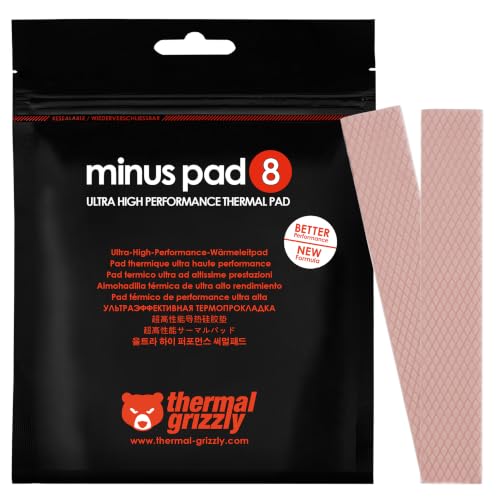 Thermal Grizzly Minus Pad 8 120x20x1.0 mm 2120x20x1.0mm (2 Pack)4.7 x 0.8 x 0 inches0 PoundsCheck on Amazon

Top 3 picks at a glance
Quick List
- SGTKJSJS 70 x 20 x 1 mm – best for a pre-cut 2280 pad with no trimming
- ARCTIC TP-3 1.5 mm – best for deeper gaps under tall heatsinks
- 70 x 22 mm 1 mm and 2 mm kit – best for full-width coverage with two thicknesses in one pack
- 20-piece 0.5 mm and 1 mm set – best for builders with several drives or laptops
- Thermal Grizzly Minus Pad 8 1.0 mm – best for a higher-rated pad from an enthusiast brand
- ARCTIC TP-3 1.0 mm – best overall for most M.2 heatsinks
Which One Is Right for You?
| If you… | Choose |
|---|---|
| want one safe default for a typical heatsink | ARCTIC TP-3 1.0 mm |
| measured a gap of about 1.5 mm | ARCTIC TP-3 1.5 mm |
| want a higher stated conductivity from a brand with a published datasheet | Thermal Grizzly Minus Pad 8 1.0 mm |
| are not sure whether you need 1 mm or 2 mm | 70 x 22 mm 1 mm and 2 mm kit |
| are cooling several drives or want spare pieces for mistakes | 20-piece 0.5 mm and 1 mm set |
| need a ready-cut strip sized for an 80 mm drive | SGTKJSJS 70 x 20 x 1 mm |
Start with the gap, not the brand. Measure or read the heatsink instructions, pick the thinnest pad that still touches both the chips and the metal, and only then compare conductivity ratings. A well-matched 1 mm pad usually beats a better-rated pad that does not make full contact.
All 6 Picks in Detail
1. SGTKJSJS 70 x 20 x 1 mm – Best for a pre-cut 2280 pad with no trimming
As an Amazon Associate we earn from qualifying purchases at no extra cost to you.
This is a straightforward four-piece pack of 1 mm pads cut to 70 x 20 mm, which is close to the footprint of an M.2 2280 drive’s controller and NAND row. It suits someone who has a bare heatsink with no pad, or whose factory pad has torn, and just wants a strip that drops into place. Because the length and width are already near the right size, you can usually fit one piece with little or no trimming.
- Size: 70 x 20 mm per piece
- Thickness: 1 mm
- Pack: four pieces
- Intended use: M.2 2280 SSD and NVMe heatsinks, per the listing
- Stated conductivity: not given in the listing name; confirm on the product page
Fit note: a 70 mm strip is slightly shorter than the 80 mm module, which is fine because the controller and memory chips sit toward the end of the board away from the connector. Lay the pad over the chips, trim any overhang, and keep the cut edges clear of the screw posts so the heatsink seats evenly. If you plan to use the pad on a double-sided drive, check that the pack has enough pieces for a second pad on the back.
Who should skip it: if your motherboard heatsink shipped with its own pad and the manual names a specific thickness, buy that exact thickness instead of assuming 1 mm. This pack only helps when 1 mm is the right number. A good routine is to peel one liner, press the pad onto the heatsink’s contact area, and peel the second liner only when you are ready to close the heatsink, so dust cannot settle on the exposed face. The listing name does not say whether the pads are adhesive on both faces, so check the product page and, if they are not, press them into place by hand before fitting the sink. Keep the three spare pieces in a sealed bag, because exposed pads collect lint.
Pros
- Pre-cut size matches an 80 mm drive
- Four pieces leave room for a retry or a second drive
Cons
- No conductivity figure in the listing name
- Only one thickness, so it will not help with unusually tall gaps
Compared with the ARCTIC TP-3 1.0 mm pack, this one is simpler and already sized, but it gives you less published material data to rely on.
2. ARCTIC TP-3 1.5 mm – Best for deeper gaps under tall heatsinks

The 1.5 mm version of the TP-3 is the one to buy when a ruler or the heatsink manual says the gap is larger than the usual 1 mm. Some thick motherboard shields and chunky aftermarket sinks leave that much room, and a pad that is too thin simply will not touch both surfaces. ARCTIC describes the TP-3 as very soft, which helps it conform without needing heavy clamping pressure on the drive.
- Size: 120 x 20 mm per strip
- Thickness: 1.5 mm
- Pack: four pieces
- Material: silicone-based, electrically insulating; ARCTIC lists hardness of 55 Shore OO and a continuous-use range of -40 to 150 degrees C
- Stated conductivity: ARCTIC’s page describes a thermal-resistance test method rather than a simple W/mK number; confirm details with the manufacturer
Fit note: ARCTIC sells this same pad in several thicknesses, so you can step down to 1.0 mm or 0.5 mm if the 1.5 mm strip proves too thick. Test-fit the heatsink without screws first and look for a clean imprint on the pad, which shows the chips are making contact. If the heatsink will not sit flat on its posts, the pad is too thick for your gap.
Who should skip it: anyone with a standard desktop heatsink. A pad that is thicker than the gap will lift the heatsink off its posts, so the thicker choice is only correct when you know the gap is deep. ARCTIC’s page lists the TP-3 in 0.5 mm, 1.0 mm and 1.5 mm versions and describes the pad as non-adhesive, so plan on the heatsink’s own clamping force to hold it in place and position it carefully before you close the sink. Because the material is so soft, handle it by the edges, and use a clean blade or sharp scissors for cutting so the edges stay square. A 120 mm strip yields several 40 to 70 mm pieces, which is useful if you own more than one drive.
Pros
- Soft, conforming material from an established brand
- Long strips can be cut to fit more than one drive
Cons
- Too thick for many standard heatsinks
- Over-compressing a thick pad can stress the drive, so tighten screws evenly and gently
If you are unsure of your gap, the 1.0 mm TP-3 is the more common starting point; this 1.5 mm pack is the follow-up for tall heatsinks.
3. 70 x 22 mm 1 mm and 2 mm Kit – Best for full-width coverage with two thicknesses

This pack gives you four 70 x 22 mm pads in both 1 mm and 2 mm options, and the 22 mm width matches the full width of an M.2 2280 module. It suits builders who cannot tell in advance which thickness a given heatsink needs, and who would rather carry both than reorder. The listing advertises 12.0 W/mK, a manufacturer claim worth treating cautiously: conductivity ratings from lesser-known sellers are rarely backed by a published test method.
- Size: 70 x 22 mm per piece
- Thickness: 1 mm and 2 mm options, per the listing
- Pack: four pieces; confirm the split between thicknesses on the listing
- Stated conductivity: 12.0 W/mK, as claimed by the seller
- Material: heat-resistant silicone, per the listing
Fit note: because the width matches the full 22 mm of the module, you can cover the controller and both NAND packages in one piece without piecing strips together. Keep the 1 mm pieces for the first attempt and use the 2 mm pieces only if the gap measures that large. Always check the listing for how many pads of each thickness are in the pack.
Who should skip it: anyone who wants a rating they can verify. The 12.0 W/mK number is the seller’s claim, and the listing name does not say how it was measured. The practical value here is the choice of two thicknesses, not the headline figure. A sensible way to use the kit is to fit a 1 mm piece first, close the heatsink without tightening fully, and look at the imprint on the pad: a clear, even mark across the controller and memory chips means contact is good, while a patchy mark means the gap is deeper. Only then try the 2 mm piece. Never stack both thicknesses to fill a gap you have not measured.
Pros
- Two thicknesses cover most heatsink gaps
- Full 22 mm width covers the whole module
Cons
- The 12.0 W/mK figure is a seller claim without a published method
- Very high-rated pads tend to be firmer, which can matter on low-pressure heatsinks
Next to the Thermal Grizzly Minus Pad 8, this kit offers more flexibility but less transparency about how its rating was measured.
4. 20-Piece 0.5 mm and 1 mm Set – Best for builders with several drives or laptops

This is the bulk option: twenty 70 x 20 mm pieces in 0.5 mm and 1 mm thicknesses. It makes sense if you are outfitting several desktops, swapping drives in a laptop, or experimenting with pad thickness and want spares. Thin 0.5 mm pads suit slim heatsinks and tight laptop covers, while the 1 mm pieces match typical desktop heatsinks.
- Size: 70 x 20 mm per piece
- Thickness: 0.5 mm and 1 mm, per the listing
- Pack: 20 pieces
- Intended use: M.2 2280 SSD and NVMe heatsinks
- Stated conductivity: not given in the listing name; confirm on the product page
Fit note: the thin 0.5 mm pieces are the ones to try in laptops with a shallow gap under a metal shield, while the 1 mm pieces match typical desktop heatsinks. Label the pieces you have used so you do not confuse thicknesses later. If you only own one drive, a smaller pack will do the same job.
Who should skip it: single-drive owners with a standard desktop heatsink, who will use one or two pieces and waste the rest. The set earns its keep with several drives, a repair bench, or a laptop where the factory pad was damaged during a drive swap. Thin 0.5 mm pieces are useful under a metal laptop shield with little space, while the 1 mm pieces suit desktop heatsinks. If a listed size is close to, but not exactly, your drive, trimming is easy with sharp scissors. Sort the pieces by thickness into labeled bags as soon as you open the pack, because 0.5 mm and 1 mm pads look alike and mixing them up leads to a poorly seated heatsink.
Pros
- Plenty of spares for multiple installs
- Includes a thin option for low-clearance spaces
Cons
- No larger thickness, so it will not fill deeper gaps
- Quantity matters less than fit if you only have one drive
Compared with the SGTKJSJS four-pack, you get more pieces and a thinner option, at the cost of a bigger pile you may never use.
5. Thermal Grizzly Minus Pad 8 1.0 mm – Best for a higher-rated pad from an enthusiast brand
The Minus Pad 8 is rated at 8.0 W/mK in Thermal Grizzly’s datasheet, with a softness of 60 Shore 00 and a very wide temperature range, and it is self-adhesive and electrically non-conductive. The listing is worded for GPU and RAM use, but the 120 x 20 mm, 1.0 mm strip is easy to cut down for an M.2 drive. It suits builders who want a published conductivity rating from a brand known to enthusiasts and are comfortable trimming a strip.
- Size: 120 x 20 mm per strip
- Thickness: 1.0 mm
- Pack: two pieces
- Stated conductivity: 8.0 W/mK per the manufacturer datasheet
- Material: modified silicone with metal-oxide filler; electrically insulating
Fit note: the strip is 120 mm long, so you can cut it into two or three pieces, which stretches a two-pack across multiple drives. Cut with sharp scissors or a hobby knife against a clean surface, and avoid touching the pad faces more than needed so dust does not reduce adhesion. Because the listing is aimed at GPU and RAM use, confirm that the thickness suits your M.2 heatsink before you trim anything.
Who should skip it: anyone who dislikes cutting or who wants a pad marketed specifically for M.2. The listing speaks of GPU and RAM use, so there is no M.2-specific guidance on the page, and you must size the piece yourself. Cut a strip about as wide as the module and long enough to cover the controller and the memory packages, and stop well short of the connector end. Thermal Grizzly describes the pad as self-adhesive, so pick the face you want to stick down before you peel the liner: the heatsink is usually the better choice, because it lets you lift the sink away later without pulling on the drive. A harder, higher-rated pad may need slightly more clamping force to seat, so tighten the heatsink gradually.
Pros
- Published datasheet with a clear conductivity rating
- Self-adhesive and easy to remove
Cons
- Only two strips per pack
- Not marketed specifically for M.2, so trim carefully to avoid the connector end
Against the ARCTIC TP-3 1.0 mm, this pad brings a higher stated number but half as many strips.
6. ARCTIC TP-3 1.0 mm – Best overall for most M.2 heatsinks

Our top pick is the 1.0 mm TP-3 four-pack. One millimeter is the most common requirement for aftermarket and motherboard M.2 heatsinks, the strips are long enough to cut into several pieces, and the material is soft enough to settle without crushing the drive. ARCTIC says TP-3 pads can be stacked up to 2.0 mm, though a single correctly sized pad is better than a stack when you can manage it.
- Size: 120 x 20 mm per strip
- Thickness: 1.0 mm
- Pack: four pieces
- Material: silicone-based, electrically insulating; ARCTIC lists a dielectric strength of about 7.6 kV/mm on retailer spec sheets and a V-0 flammability rating on its page
- Stated conductivity: described by thermal resistance rather than a headline W/mK number
Fit note: because 1.0 mm is the most common starting point, this pack is the easiest to recommend when you do not know your exact gap. Cut one piece to cover the controller and memory chips, fit the heatsink, and confirm the pad shows a light imprint. Keep the spare strips for a second drive or for a retry if the first cut is off.
Who should skip it: people who already know their heatsink needs a different thickness, such as a 1.25 mm pad specified by the motherboard maker or a deep 2 mm gap. For everyone else, this is the pack to start with. ARCTIC’s page describes the TP-3 as non-adhesive, so seat the pad on the heatsink’s contact area, press gently, and fit the sink straight down rather than sliding it. If the first fit leaves a faint, even imprint on the pad, you are done; if the imprint is missing in places, step up to the 1.5 mm version or stack a thin spare under the first piece, which ARCTIC says is acceptable for TP-3 pads. Four 120 mm strips make this a good pack for a household with several drives.
Pros
- Most common thickness for M.2 heatsinks
- Four long strips yield many cut pieces
Cons
- No simple conductivity figure to compare directly with other brands
- The 20 mm width leaves a small margin on each side of a 22 mm module
The nearest alternative is the 1.5 mm TP-3: choose that only when you have confirmed a deeper gap.
Specs Compared
| Product | Piece size | Thickness | Pack | Stated conductivity |
|---|---|---|---|---|
| SGTKJSJS 70 x 20 x 1 mm | 70 x 20 mm | 1 mm | 4 pieces | confirm on listing |
| ARCTIC TP-3 1.5 mm | 120 x 20 mm | 1.5 mm | 4 pieces | confirm on listing |
| 70 x 22 mm 1 mm and 2 mm kit | 70 x 22 mm | 1 mm and 2 mm | 4 pieces | 12.0 W/mK (seller claim) |
| 20-piece 0.5 mm and 1 mm set | 70 x 20 mm | 0.5 mm and 1 mm | 20 pieces | confirm on listing |
| Thermal Grizzly Minus Pad 8 1.0 mm | 120 x 20 mm | 1.0 mm | 2 pieces | 8.0 W/mK (datasheet) |
| ARCTIC TP-3 1.0 mm | 120 x 20 mm | 1.0 mm | 4 pieces | confirm on listing |
How We Chose These
This ranking is based on research, not lab work. We started with the six pad packs in the list and read each listing name and the manufacturer pages where they exist. We then compared sizes against the M.2 2280 footprint, checked that thicknesses covered the common 0.5 to 2 mm range, and favored packs with enough pieces to allow a second attempt. Published datasheets counted for more than unverified claims, and we treated seller-stated conductivity numbers as marketing until backed by a test method. Material safety (electrically insulating silicone) was a requirement. We also checked ARCTIC’s published page for the TP-3 to confirm thickness options, hardness and the non-adhesive finish, and we kept the list to the products named, with no outside additions. Check the product page before you buy.
What to Look For
Thickness decides contact
The single most important spec is thickness. The right pad is the thinnest one that still touches both the drive’s chips and the heatsink while the heatsink sits in its designed position. Too thin and you leave an air gap, which is worse than no heatsink. Too thick and the heatsink presses on the drive, which can flex the board or crack solder joints over time. Typical gaps run from 0.5 mm in slim laptop covers to 1 mm on desktop heatsinks and up to 2 mm under tall shields. If the motherboard maker or heatsink came with a pad, match its thickness first; some boards specify a figure such as 1.25 mm, so a nearby size like 1.0 mm may leave marginal contact.
Conductivity ratings are not the whole story
A W/mK rating describes how well the material conducts heat, but different sellers measure it differently, and real performance depends on contact pressure and the thickness of the pad. A soft 3 to 6 W/mK pad that sits flat often performs as well as a firm 10 W/mK pad that cannot compress. Treat ratings from different brands as rough guides, and prefer manufacturers that publish datasheets. A 12 W/mK claim on a no-name pack is not directly comparable to an 8 W/mK datasheet number from a brand that discloses its test conditions.
Size, coverage and cutting
An M.2 2280 drive is 22 mm wide and 80 mm long, but the heat sits in the controller and NAND packages, not at the connector end. A 70 x 20 mm or 70 x 22 mm pad covers those chips; long 120 x 20 mm strips are cut down. Never let a pad overlap the connector or notch. For a double-sided drive, you need a pad on each side and enough clearance under the drive, so check that your slot and heatsink support it.
Safety and installation
Use electrically insulating silicone pads, not conductive materials. Peel the plastic film from both sides, stick the pad to the heatsink rather than the drive, then fit the heatsink and tighten the screws evenly and lightly. Avoid thermal paste on M.2 drives because the gap is too large and paste can creep onto contacts. Worked example: if the heatsink gap measures about 1.2 mm, use a 1.0 mm pad that compresses slightly, not a 2.0 mm pad that forces the sink off the board.
Which drives get hot enough to need a heatsink
Fast PCIe 4.0 and PCIe 5.0 NVMe drives generate more heat than older or SATA-based M.2 drives, and many will slow themselves down when the controller gets too hot. That slowdown, called thermal throttling, shows up as a drop in transfer speed during long writes. A heatsink with a correctly sized pad helps the drive hold its rated speed for longer. Drives that sit under a graphics card, in a cramped small-form-factor case or in a laptop with little airflow benefit the most. Check your drive maker’s recommended temperature range, and use your motherboard’s monitoring tools to watch the drive during long copies.
Single-sided and double-sided drives
A single-sided drive has all of its chips on one face, so one pad on the heatsink side is usually enough. A double-sided drive has memory chips on both faces, and the underside heat has no easy path out. Some motherboard heatsinks are designed for single-sided drives only, and forcing a double-sided drive under one can leave poor contact or too much pressure. Before you buy extra pads, check the drive’s specification sheet and your heatsink’s instructions.
Worked example: matching a pad to a measured gap
The table below turns the thickness rule into a quick decision. It assumes you have either measured the gap with calipers or read the number in the heatsink manual, and it keeps to thicknesses that appear in this list. Remember that a soft pad compresses: ARCTIC says its 0.5 mm TP-3 can compress to about 0.3 mm, so a pad slightly thicker than the gap is normal, while a pad far thicker than the gap is not.
| Gap or situation | Pad to try first | Why |
|---|---|---|
| Slim laptop cover, gap near 0.5 mm | 0.5 mm piece from the 20-piece set | Thin enough to touch without lifting the cover |
| Typical desktop heatsink, gap near 1 mm | ARCTIC TP-3 1.0 mm or a 1 mm piece from another pack | Most common thickness; soft enough to settle |
| Tall shield, gap near 1.5 mm | ARCTIC TP-3 1.5 mm | Fills the deeper space without forcing the sink |
| Deep gap near 2 mm | 2 mm piece from the 70 x 22 mm kit | Single piece beats stacking |
| No measurement and no manual | The two-thickness kit | Lets you try 1 mm, then 2 mm, using the imprint as feedback |
If the imprint check shows full contact with the lightest pad that works, stop there. More thickness never improves heat transfer; it only adds material the heat must cross.
Handling, cleaning and replacing pads
Wipe the heatsink and the drive’s chips with isopropyl alcohol and let them dry fully before fitting a new pad, so fingerprints and old residue do not create a film. Handle pads by the edges and keep the liners on until the last moment. A pad that has been compressed once can keep a permanent imprint, so when you remove a heatsink for any reason, inspect the pad for tears and thin spots and replace it if it looks damaged or does not spring back. Store spare pads flat in a sealed bag, away from dust and heat.
Questions
Do I need a thermal pad for my M.2 SSD?
If your motherboard or drive already includes a heatsink with a pad, you usually do not need another one. You need a pad when you add an aftermarket heatsink, replace a damaged factory pad, or move a heatsink to a new drive.
What thickness should I choose?
Use the thickness the manufacturer specifies; if none is given, 1 mm is the most common choice. Measure the gap if you can, and start slightly thinner rather than thicker.
Can I stack two thin pads?
ARCTIC states that its TP-3 pads can be stacked up to 2.0 mm, but a single pad of the right thickness is simpler and gives one fewer interface. Stack only when you cannot get the right thickness.
Is thermal paste better than a pad on an SSD?
No, paste is not recommended for M.2 drives. The gap is usually too large for paste to bridge, and it can spread onto contacts and components.
Do I need to remove the plastic film?
Yes, remove the film from both sides of the pad. Leaving a film in place adds an insulating layer and defeats the purpose of the pad.
Does a higher W/mK number always run cooler?
Not necessarily. Contact, thickness and compression often matter as much as the rating, so a well-fitted softer pad can match a firmer higher-rated one.
Where should the pad go on a motherboard heatsink?
Put it on the heatsink’s contact area, directly over where the controller and memory packages will sit, and keep it clear of the connector end. Fitting it to the heatsink first also lets you check the imprint when you lift the sink off.
Can I reuse a pad after removing the heatsink?
You can if it is intact, clean and springs back to its original thickness, but a pad that is torn, dirty or permanently dented should be replaced. Pads are inexpensive compared with the drive, so replacing a doubtful one is the safer choice.
Do motherboard heatsinks come with a protective film on the pad?
Many do, and the manual usually tells you to peel it off before installing the drive. Check your board’s instructions, because leaving a film in place adds an insulating layer between the chips and the metal.
Update History
- October 14, 2026 – Initial publication; product set drawn from current catalog listings.
- Check the product page for current specifications and availability before buying.
Sources
- Manufacturer product and specification pages for ARCTIC and Thermal Grizzly
- Retailer listing titles and specification fields






