
The NZXT H6 Flow in white is the safest choice for most builders who want a clean white PC. It is a compact dual-chamber ATX case with a panoramic glass front, three included 120 mm fans, and room for a 360 mm radiator on top. A white case is simply a chassis with a white painted or coated finish, but the real choice is about airflow, graphics card length and whether your motherboard connectors are hidden. If you want the biggest GPU room, look at the Lian Li V100 or the ASUS A31. If you want a showpiece with the most glass, the Lian Li O11 Vision Compact is the one.
Our Top Picks
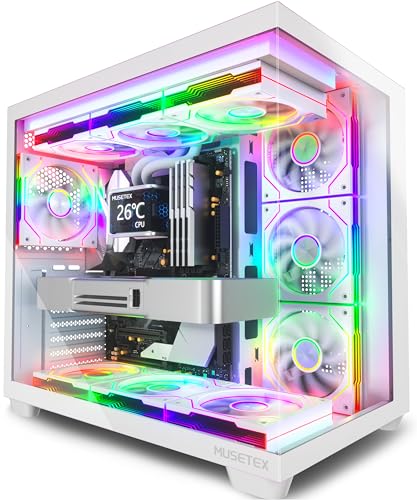 MUSETEX Y6 PC Case16.73"D x 10.83"W x 15.67"H16.73 x 10.83 x 15.67 inches14.64 poundsCheck on Amazon



Top 3 picks at a glance
Quick List
- MUSETEX Y6 – best for a fan-packed ARGB build with seven pre-installed fans
- Lian Li V100 White – best for large graphics cards and a straightforward front I/O
- NZXT H6 Flow White – best all-round white case with strong airflow and fans included
- ASUS A31 White Edition – best for hidden-connector motherboards and big GPUs
- Lian Li O11 Vision Compact White – best for a three-sided glass showcase
- HYTE Y70 Touch Infinite – best for a built-in touchscreen display (confirm the white finish)
Which One Is Right for You?
| If you… | Choose |
|---|---|
| want a display piece with glass on three sides | Lian Li O11 Vision Compact White |
| need space for a very long graphics card | Lian Li V100 White |
| want a hidden-cable look with a compatible motherboard | ASUS A31 White Edition |
| want good airflow with fans already included | NZXT H6 Flow White |
| want to fill the case with RGB fans without buying any | MUSETEX Y6 |
| want a screen on the case itself and are willing to pay for a design piece | HYTE Y70 Touch Infinite |
Before you pick on looks alone, check the size of your graphics card and cooler against each case. White cases show off cable color, so plan on white or sleeved cables if you want a tidy interior. Most of the cases here are dual-chamber designs, which move the power supply and cable bundle out of sight but also limit where radiators and fans fit.
All 6 Picks in Detail
1. MUSETEX Y6 – Best for Lots of Pre-Installed ARGB Fans
As an Amazon Associate we earn from qualifying purchases at no extra cost to you.

The MUSETEX Y6 is an ATX mid-tower with seven pre-installed infinity mirror PWM ARGB fans, a Type-C front port and a wide-view tempered glass design, according to the listing name. Its pitch is value in fans: a builder can fill the front, top and rear with lighting without buying separate fan packs. The catalog name is cut off and does not state the color, so make sure the white version is the one you select. Exact GPU length, radiator support and drive bays are not stated and need confirming on the page.
- Form factor: ATX mid-tower
- Fans: seven pre-installed PWM ARGB fans with an infinity mirror design
- Front I/O: Type-C port, per the listing name
- Side panel: wide-view tempered glass
- GPU length, CPU cooler height and radiator support: confirm on listing
Pros
- Fans are included, so the case is ready for lighting
- PWM fans can be controlled through the motherboard header
- Type-C on the front panel matches modern devices
Cons
- Many included fans mean many cables to route
- Clearance numbers are not in the listing name
- Brand has less of a track record than the Lian Li, NZXT or ASUS entries
Compared with the NZXT H6 Flow, the MUSETEX gives you more fans out of the box, while the NZXT gives you a better-documented set of dimensions.
2. Lian Li V100 White – Best for Large GPUs and Simple Layout

The Lian Li V100 in white (model V100RW) is an ATX mid-tower with side-mounted USB-C I/O, dust filters, support for graphics cards up to 420 mm and a 360 mm radiator, plus a GPU support bracket in the box. Those numbers put it at the top of this list for oversized cards, and the bracket matters because heavy coolers can bend a card over time. The side I/O placement keeps cables away from the front glass and helps with desk placement. The listing does not state the fan count or the motherboard sizes, so confirm those on the product page before ordering.
- Form factor: ATX mid-tower, white finish (model V100RW)
- GPU clearance: up to 420 mm per the listing name
- Radiator support: 360 mm
- Front or side I/O: side-mounted USB-C
- Extras: dust filter and included GPU support bracket
Pros
- Room for the biggest current graphics cards
- Included bracket helps reduce GPU sag
- Dust filters make long-term cleaning easier
Cons
- Included fans are not stated in the name
- Large cards still need cable bend room for 12-volt power connectors
It has more GPU room than the NZXT H6 Flow, which tops out around 365 mm.
3. NZXT H6 Flow White – Best All-Round Airflow Case

The H6 Flow is a compact dual-chamber ATX case with panoramic glass and three 120 mm fans installed at the front. NZXT lists graphics card clearance up to 365 mm, CPU cooler height of 163 mm, power supply room of 200 mm, and radiator support up to 360 mm on top and 120 mm at the rear. Front I/O includes two USB 3.2 Gen 1 Type-A ports, one USB-C and an audio jack. Its smaller footprint saves desk space, and the perforated side panel gives the intake fans a clear path. It is the least risky pick for a first white build, because every dimension that matters for compatibility is published by the maker, and the compact size means fewer surprises at assembly time.
- Form factors: ATX, micro-ATX and mini-ITX boards
- Fans: three 120 mm fans included, front side
- Radiators: up to 360 mm top, 120 mm rear, per NZXT
- Clearances: GPU up to 365 mm, CPU cooler 163 mm, PSU 200 mm
- Front I/O: two USB-A, one USB-C, audio jack
Pros
- Well-documented dimensions make compatibility checks easy
- Three fans included, with room for more
- Compact enough for smaller desks
Cons
- 365 mm GPU limit rules out the longest cards
- Included fans are non-RGB on this version
It is easier to build in than the Lian Li O11 Vision Compact, which looks more dramatic but has tighter rules on parts.
4. ASUS A31 White Edition – Best for Hidden-Connector Boards

The A31 White Edition is an ATX mid-tower with a panoramic design. ASUS lists support for hidden-connector motherboards, 360 mm radiators and 380 mm graphics cards. Hidden-connector boards, such as ASUS’s BTF type, move power and drive connectors to the back of the board, which makes the front of the build look cleaner. If your board uses standard connectors, check that the case can also be used conventionally. Ask whether you need a matching motherboard and graphics card to get the full effect, because only a few boards and cards use the rear-mounted connector layout today.
- Form factor: ATX mid-tower, white edition
- Design: panoramic glass
- Motherboard support: hidden-connector boards among others; confirm standard board support
- Radiator support: up to 360 mm
- GPU clearance: up to 380 mm
Pros
- Can produce a very clean look with the right parts
- Generous GPU and radiator room
- Panoramic glass shows off the build
Cons
- Full benefit needs compatible hidden-connector hardware
- Fan count and front I/O are not in the listing name
Compared with the Lian Li V100, it trades 40 mm of GPU room for the hidden-connector layout.
5. Lian Li O11 Vision Compact White – Best for a Glass Showcase

The O11 Vision Compact is a compact dual-chamber ATX case with three glass panels and back-connect support. Retailer specifications list GPU clearance of 408 mm, CPU cooler height of roughly 164 to 167 mm depending on the source, and a power supply limit under 220 mm. Radiators go on the top and bottom at up to 360 mm, and some sources list a side mount, so check that detail if you need it. Fans are not included, so budget for a full set. It is a display case first and a quiet airflow tool second, so pair it with good fans and a sensible fan curve if your parts run warm.
- Form factor: compact ATX, back-connect motherboard support
- Glass: three-panel tempered glass design
- GPU clearance: 408 mm per retailer specifications
- CPU cooler height: about 164 to 167 mm; sources differ, so confirm
- Fans: not included, per retailer specifications
Pros
- Spectacular three-sided view of the components
- Big GPU room for a compact footprint
- Plenty of fan and radiator mounts
Cons
- No fans in the box
- Glass front limits intake airflow unless fans are well placed
It offers more GPU room than the NZXT H6 Flow, but the NZXT comes with fans and easier assembly.
6. HYTE Y70 Touch Infinite – Best for a Built-In Touchscreen

The HYTE Y70 Touch Infinite is a dual-chamber ATX chassis with an integrated 2.5K LCD touchscreen. It is the odd one out because the listing name does not state the case color, and the product is more of a display design piece than a pure airflow case. The screen can show system information or custom content. If you want a white build, confirm that the version you pick is the white finish. Clearances, radiator support and fan count are not in the visible listing name, so read the full page and the maker’s dimensions before buying a long graphics card for it.
- Form factor: dual-chamber ATX chassis
- Display: integrated 2.5K LCD touchscreen
- Finish: confirm that the white option is selected
- Radiator and fan support: confirm on listing
- GPU clearance: confirm on listing
Pros
- Touchscreen shows stats or custom visuals
- Dual-chamber layout hides the power supply
- Distinctive look no other case here offers
Cons
- Color is not stated in the listing name
- The screen adds cost and software to manage
It is the most unusual pick, and the ASUS A31 is the better choice if you simply want a white case with good clearances.
Specs Compared
| Case | Form factor | Max GPU stated | Radiator stated | Fans included | Front or side I/O |
|---|---|---|---|---|---|
| MUSETEX Y6 | ATX mid-tower | Confirm on listing | Confirm on listing | 7 ARGB PWM | Type-C |
| Lian Li V100 White | ATX mid-tower | 420 mm | 360 mm | Confirm on listing | Side USB-C |
| NZXT H6 Flow White | Compact dual-chamber ATX | 365 mm (NZXT) | 360 mm top, 120 mm rear | 3 x 120 mm | 2 USB-A, 1 USB-C, audio |
| ASUS A31 White Edition | ATX mid-tower | 380 mm | 360 mm | Confirm on listing | Confirm on listing |
| Lian Li O11 Vision Compact White | Compact dual-chamber ATX | 408 mm (retailer specs) | Up to 360 mm top and bottom | None | Confirm on listing |
| HYTE Y70 Touch Infinite | Dual-chamber ATX | Confirm on listing | Confirm on listing | Confirm on listing | Confirm on listing |
How We Chose These
We started from the white cases currently offered in this category and compared what each manufacturer and retailer specification page actually says. The factors that decided the order were stated graphics card clearance, radiator support, whether fans are included, the type of front I/O, and how clearly the numbers are published. Visual features such as the glass layout, hidden connectors and the touchscreen were considered as separate strengths. The aim is to help you compare like with like. Where the listing name is cut off or silent, we used “confirm on listing” instead of guessing, and we flagged the one case whose finish is not stated.
What to Look For
Graphics card length and thickness
Measure the card you plan to buy, then add at least 10 to 20 millimeters for cables and airflow. A card that is 330 mm long fits any case here, while a 360 mm card needs the H6 Flow’s 365 mm limit to be respected with almost no spare room. Cards also vary in height above the slot, so check that the side panel clears the cooler shroud. Thickness matters too: three-slot cards press close to the side glass or the vertical GPU mount in dual-chamber cases. If you plan to use a 12-volt high-power connector, leave room for a gentle cable bend of at least 35 mm before the plug.
Radiators, fans and cooler height
A 360 mm radiator is three 120 mm fans wide. Count the full stack: a 27 mm thick radiator plus 25 mm fans needs about 52 mm of depth, and top-mounted setups must clear the motherboard’s memory and VRM heatsinks. Tower air coolers need their height to fit under the side panel; the H6 Flow lists 163 mm and the O11 Vision Compact lists about 164 to 167 mm depending on source. A worked example: a 160 mm air cooler fits both, but a 170 mm cooler fits neither.
Airflow versus glass
Glass fronts and panoramic panels look dramatic, but intake fans sitting behind solid glass pull air from small gaps. Perforated or mesh panels such as the one on the H6 Flow give fans open intake. If you choose a glass-heavy case, plan for fans on the bottom, side and top to compensate, and consider a slightly more aggressive fan curve. Dust filters on intake paths save cleaning time. A useful rule of thumb is to keep intake fans slightly stronger than exhaust fans, which creates positive pressure and pushes dust out through gaps instead of pulling it in. With three front intakes and a single rear exhaust, as on a typical dual-chamber layout, you already have that balance.
Motherboard layout and hidden connectors
Standard ATX boards place power and USB connectors on the front edge and the right side. Back-connect and hidden-connector boards, such as ASUS’s BTF design, move those to the rear. Cases built for them, like the A31 and O11 Vision Compact, have the cutouts and clearance needed. A standard board still works in many of these cases, but double-check the board size, since some support E-ATX, micro-ATX or mini-ITX and others do not.
Keeping white looking white
A white case shows dust, fingerprints and cable colors. Wipe with a soft microfiber cloth and avoid harsh solvents, which can dull the coating. Many cheaper plastics yellow over time near hot components, so keep intake paths open. Also remember that white cases rarely come with white cables, so plan for sleeved extension cables and a white power supply cable set if the interior will be visible through three panels. Matching white fans, cables and a white graphics card lifts the whole build, but black cables in a white interior look intentional only if the rest of the build is accented to match.
Check what the front panel offers. A Type-C port is now common, but a case without a header for it on your motherboard will leave it unused, so look for a USB 3.2 Gen 2 header on the board. Count fan headers too: seven included fans need either a hub or several headers, and ARGB lighting uses a separate three-pin connector from PWM fan power. Dual-chamber cases give about 20 to 30 millimeters of cable space behind the tray, which is enough for a tidy build if you plan the routes before installing the power supply.
Questions
Are white PC cases harder to keep clean?
They show dust and smudges faster than black cases, so they need a light wipe every few weeks. Dust filters on intake paths reduce the amount that reaches the interior. A microfiber cloth is safe for painted surfaces.
Do white cases run hotter than black ones?
The color of the paint makes little difference to PC temperatures. Airflow, fan placement and the panel design decide how hot components get. Mesh or perforated intakes help far more than any finish.
Will a standard ATX motherboard fit a hidden-connector case?
In most cases yes, but you lose the clean look and may need extra cable length. Check the specification page to see which motherboard standards the case supports. Some designs prefer a matching board.
How long a graphics card can these cases take?
The stated limits range from 365 mm on the NZXT H6 Flow to 420 mm on the Lian Li V100, with the ASUS A31 at 380 mm and the O11 Vision Compact at 408 mm per retailer specifications. Add a margin for power cables before you buy.
Do these cases come with fans, or must I buy them separately?
It depends on the case. The NZXT H6 Flow includes three, the MUSETEX Y6 includes seven, and the Lian Li O11 Vision Compact lists none. For the rest, confirm on the product page.
Is the touchscreen case worth it?
Only if you want the display. It adds visual features and software to manage, and the visible listing does not state the case color or clearance numbers. For a plain white case, the other five picks are more straightforward.
Update History
- October 20, 2026 – Initial publication; product set drawn from current catalog listings.
- Check the product page for current specifications and availability before buying.
Sources
- Manufacturer product and specification pages for NZXT
- Retailer listing titles and specification fields for each product above, including the Lian Li and ASUS cases
- Retailer and review-site specification summaries for the Lian Li O11 Vision Compact









