The best internal PCIe sound card on this list for most listeners who use headphones or stereo speakers is the Creative Sound Blaster AE-X, a PCIe x1 card built around an ESS DAC with a stated 130dB rating, a discrete headphone amplifier and support for headphones from 8 to 600 ohms. If you run a surround speaker set, the Audigy Fx Pro (7.1 analog) or the Sound BlasterX AE-5 Plus (5.1 plus Dolby Digital Live and DTS encoding) is the better fit. An internal PCIe sound card replaces your motherboard’s onboard audio chip with a dedicated one, and fits in a spare PCIe slot.
Our Top Picks
 Creative Sound Blaster Audigy Fx Pro Hi-Res PCIe4.13 inches6.93 x 5.59 x 1.57 inches0.1 PoundsCheck on Amazon



Top 3 picks at a glance
Quick List
- Sound Blaster Audigy Fx Pro – best for 7.1 analog surround on a modest upgrade
- Sound Blaster AE-X – best overall for headphones and stereo speakers
- Padarsey PCIe 5.1 (CMI8738) – best only for old Windows 7 era systems (a runner-up)
- Sound Blaster Z SE – best for a proven mid-range gaming card with a 600-ohm amp
- Sound BlasterX AE-5 Plus – best for gamers who want surround encoding and RGB lighting
- GLOTRENDS ST113 – best for driver-free setup and a clean optical output
Which One Is Right for You?
| If you… | Choose |
|---|---|
| use high-impedance headphones and want the most capable amplifier here | Sound Blaster AE-X |
| own a 7.1 analog speaker set and want a simple upgrade over onboard audio | Sound Blaster Audigy Fx Pro |
| want surround encoding over optical to a receiver and lit-up styling | Sound BlasterX AE-5 Plus |
| want a proven gaming sound card with a 600-ohm headphone amp and ASIO support | Sound Blaster Z SE |
| want plug-and-play operation and an isolated optical output without installing drivers | GLOTRENDS ST113 |
| have a very old system running Windows 7 and need basic 5.1 output | Padarsey PCIe 5.1 (CMI8738) |
The decision usually comes down to what you plug into the card: headphones, stereo speakers, a surround set or an optical link to a receiver. Pick the card whose outputs match that gear first, then use the DAC and amplifier details to choose among the contenders. Supported operating system matters just as much for the oldest card.
All 6 Picks in Detail
1. Sound Blaster Audigy Fx Pro – Best for 7.1 Analog Surround
As an Amazon Associate we earn from qualifying purchases at no extra cost to you.

This is Creative’s recent Audigy-series card, announced in 2026, and its selling point is full 7.1 analog output on a low-profile PCIe x1 card. The listing describes Hi-Res audio, surround sound and clean audio as a PC upgrade. Published specifications list 32-bit/384kHz playback, a DAC rated at 120dB signal-to-noise, optical S/PDIF output, a built-in headphone amplifier and support for Windows 10 and 11.
Because it is the newest Audigy card, it suits people who want a straightforward upgrade over onboard audio without moving up to the premium Xamp amplifier. It provides full 7.1 analog output and optical S/PDIF out, plus a front-panel header. Check that your desktop has a free PCIe slot and that your speaker set uses analog inputs.
- Interface: PCIe x1, low-profile
- Playback: up to 32-bit/384kHz per published data
- DAC rating: 120dB SNR per published data
- Surround: 7.1 analog output; optical S/PDIF out
- Recording: 24-bit/192kHz per one source, 32-bit/192kHz per another; confirm on listing
- Software: Creative’s Nexus app with equalizer and voice tools
Pros
- Seven-channel analog output for a surround set
- Half-height bracket included for small cases
Cons
- Headphone amplifier is aimed at typical headphones, not very demanding ones
- No Dolby Digital Live or DTS encoding listed
Choose it over the AE-5 Plus if you need seven analog channels, and choose the AE-5 Plus if you need encoded surround.
2. Sound Blaster AE-X – Best Overall for Headphones and Stereo

The AE-X is the premium stereo card in the group. The listing mentions 32-bit/384kHz playback and a Hi-Res PCIe design for desktops. Published data describes an ESS DAC with a claimed 130dB rating, a discrete Xamp headphone bi-amplifier supporting 8 to 600 ohm headphones, RCA line-out, coaxial S/PDIF out, an optical input, and a PCIe x1 interface. Sources disagree on headphone power ratings, so treat the exact milliwatt figure as unconfirmed.
The card is built around stereo outputs, so it is the better choice for people with a good pair of headphones or powered speakers connected by RCA. If you want multichannel analog outputs, look at the other Creative cards. Check the speaker connections before buying, because an RCA-to-3.5mm cable may be needed for some speakers.
- Interface: PCIe x1
- Playback: 32-bit/384kHz
- DAC rating: about 130dB per published data
- Headphone amplifier: discrete Xamp supporting 8 to 600 ohms
- Outputs: headphone, RCA line-out, coaxial S/PDIF out; optical in per published data
- Surround: stereo-oriented; multichannel output confirm on listing
Pros
- Capable amplifier for a wide range of headphones
- Strongest stated DAC rating in the group
Cons
- Not aimed at multichannel speaker setups
- Amplifier power figures vary between sources
It outclasses the Z SE on stated DAC performance, while the Z SE is better when you want discrete surround jacks.
3. Padarsey PCIe 5.1 (CMI8738) – A Basic Card for Older Windows

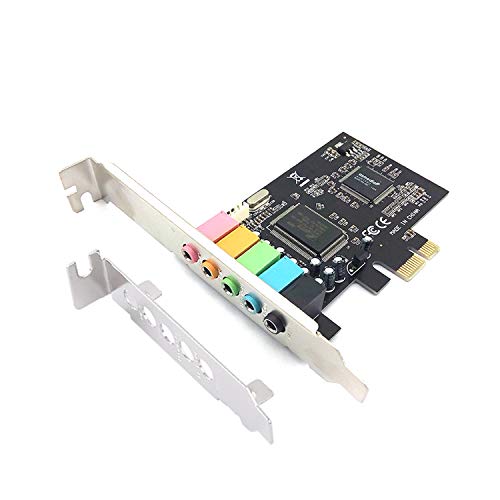
This card is included as a runner-up because it does not match the Hi-Res expectations of the others. The listing describes a PCIe 5.1 internal sound card for Windows 7 with a CMI8738 chip and a PCI Express adapter. Published listing data shows a 48kHz maximum sample rate and five analog jacks for microphone, line in, front, rear and bass or center. A related listing from the same seller says the card does not support Windows 10, so confirm operating system support before buying.
Think of this card as a replacement for a failed legacy audio chip rather than an upgrade. Its jacks cover microphone, line in and 5.1 outputs, which is enough for basic speakers, but the listing data shows a low maximum sample rate and an older Windows list. If your system runs a current version of Windows, check for a driver before you order.
- Chip: C-Media CMI8738 per the listing name
- Channels: 5.1 analog output
- Sample rate: up to 48kHz per published listing data
- Operating system: Windows 7 named in the listing; Windows 10 and 11 support unconfirmed
- Bracket: low-profile bracket mentioned in related listings; confirm on listing
- Headphone amplifier: none stated
Pros
- Simple route to 5.1 analog on an older machine
Cons
- Dated chip and a low sample-rate ceiling
- Driver and modern Windows support uncertain
Every other card here is a better modern choice; this one only makes sense for legacy systems.
4. Sound Blaster Z SE – Best for a Proven Mid-Range Gaming Card

The Z SE sits between the budget Audigy and the premium AE-5 Plus. The listing says internal PCI-e gaming sound card and DAC, 24-bit/192kHz, 116dB SNR, ASIO, a 600-ohm headphone amplifier and microphone equalizer. Comparison data lists discrete 5.1 and virtual 7.1 output, Dolby Digital Live and DTS support, and a 24-bit/192kHz recording path. The DAC model is not named in the sources we found.
The Z SE has been in the Creative lineup for several years, so drivers and community guidance are plentiful. It suits players who want a microphone path with equalization for voice chat and an amplifier able to drive demanding headphones. Check the bracket height on the listing if your case needs a low-profile card.
- Interface: PCIe
- Playback: 24-bit/192kHz
- DAC rating: 116dB SNR per the listing
- Headphone amplifier: supports up to 600 ohms per the listing
- Surround: discrete 5.1 and virtual 7.1 per comparison data; confirm on listing
- Extras: ASIO support and microphone equalizer
Pros
- Good recording path for a headset microphone
- Established product with mature drivers
Cons
- Lower stated bit depth and sample rate than the newer cards
- DAC chip not named
The AE-5 Plus is the nearest step up, adding a higher-rated DAC and lighting.
5. Sound BlasterX AE-5 Plus – Best for Surround Encoding and RGB

The AE-5 Plus is the gamer-focused card. The listing describes a SABRE32-class Hi-res 32-bit/384kHz PCIe sound card and DAC with Dolby Digital and DTS, Xamp discrete headphone bi-amp and RGB lighting. Published data lists a 122dB rating, a headphone output impedance of 1 ohm, support for 16 to 600 ohm headphones, 5.1 discrete and 7.1 virtual surround, and an optical output for encoded audio to a receiver.
The AE-5 Plus is the card to consider if you pass multichannel audio to a receiver and still want a strong headphone output. The lighting is a styling feature for builds with a window panel and is usually adjustable in Creative’s software; confirm the details on the listing. If you do not want RGB, look at the Z SE instead.
- Interface: PCIe
- Playback: up to 32-bit/384kHz
- DAC rating: up to 122dB per the listing
- Headphone amplifier: Xamp discrete bi-amp, 16 to 600 ohms per published data
- Surround: 5.1 discrete, 7.1 virtual, Dolby Digital Live and DTS encoding
- Lighting: RGB; the lighting strip may need an additional power connection, confirm on listing
Pros
- Can send encoded surround to a receiver over optical
- Good amplifier for headphones up to 600 ohms
Cons
- Lighting and extra connections add cable work
- Recording tops out lower than playback
Compared with the AE-X, it has the surround encoding and the lighting, while the AE-X has the higher stated DAC rating.
6. GLOTRENDS ST113 – Best for Driver-Free Setup

The ST113 takes a different approach: it combines an SSS1700 controller with an ES9018K2M DAC and presents itself to the operating system as a USB audio device, so it works without installing a driver. The listing mentions Hi-Fi audio, a driver-free setup and an isolated optical output. Published data lists headphone and speaker outputs, a microphone input, optical and coaxial digital outputs and a front-panel header. Because it uses a basic USB audio class, resolution is limited to 24-bit/96kHz on the analog output and it does not support DSD.
Driver-free operation means the card appears as a standard audio device on common operating systems, which makes it handy for mixed setups. There is no control panel for equalizers or surround, so any processing has to come from the operating system or your media player. It is a good pick if you prefer simple, predictable audio.
- Interface: PCIe x1 slot with USB audio class operation
- DAC: ESS ES9018K2M with an SSS1700 controller
- Resolution: up to 24-bit/96kHz on analog outputs per published data
- Outputs: headphone, speaker, optical and coaxial digital
- Input: 3.5mm microphone in
- Software: no vendor suite; driver-free per the listing
Pros
- Works across operating systems without driver installation
- Isolated optical output for a clean digital link
Cons
- No software suite or surround processing
- Resolution cap below the Creative cards
It is the simplest alternative to the Creative cards if you want fewer controls and no software.
Specs Compared
| Product | Interface | Max playback | Stated DAC rating | Surround / outputs | Headphone amp |
|---|---|---|---|---|---|
| Sound Blaster Audigy Fx Pro | PCIe x1, low-profile | 32-bit/384kHz | 120dB per published data | 7.1 analog, optical out | Built in; high-impedance limit confirm on listing |
| Sound Blaster AE-X | PCIe x1 | 32-bit/384kHz | About 130dB | Stereo RCA, coax out; multichannel confirm on listing | Xamp, 8 to 600 ohms |
| Padarsey PCIe 5.1 (CMI8738) | PCIe | 48kHz per listing data | Confirm on listing | 5.1 analog | Not stated |
| Sound Blaster Z SE | PCIe | 24-bit/192kHz | 116dB | Discrete 5.1, virtual 7.1; Dolby Digital Live and DTS | Up to 600 ohms |
| Sound BlasterX AE-5 Plus | PCIe | 32-bit/384kHz | Up to 122dB | 5.1 discrete, 7.1 virtual; optical encoding | Xamp, 16 to 600 ohms |
| GLOTRENDS ST113 | PCIe x1, driver-free | 24-bit/96kHz analog per published data | Confirm on listing | Headphone, speaker, optical, coaxial | Confirm on listing |
How We Chose These
This guide is built from listing names, manufacturer product pages and published specification coverage, not from physical use of the cards. We first matched each card’s outputs to the common ways people listen: headphones, stereo speakers, surround speakers and optical links. We then compared the stated resolution, DAC rating, headphone amplifier range and operating system support. All signal-to-noise and dynamic range numbers are manufacturer claims and are not directly comparable between brands, so we used them only as a rough guide. Where a value was missing from the listing, we wrote “confirm on listing” and did not guess.
What to Look For
Why a sound card at all?
A dedicated card moves audio processing off the motherboard, away from electrical noise from the CPU and graphics card. It also adds features that many boards lack: a stronger headphone amplifier, a microphone path with equalization, surround processing and extra outputs. The improvement is most noticeable with high-impedance headphones, a good set of speakers or an optical connection to a receiver. With basic earbuds, the difference may be small.
Headphone impedance and the amplifier
Headphone impedance is measured in ohms. Low-impedance models of 16 to 32 ohms work with almost any source. Headphones above about 80 ohms often need a stronger amplifier to reach a good volume, and models at 250 to 600 ohms are the reason cards advertise support up to 600 ohms. A rule of thumb: if your headphones are rated above 100 ohms, pick a card with a discrete amplifier such as the AE-X, AE-5 Plus or Z SE.
Resolution, DAC and signal-to-noise numbers
Specs like 32-bit/384kHz describe the highest format the card can play, not the quality of what you will hear. Most music is 16-bit/44.1kHz or 24-bit/96kHz, and most games run at 48kHz. The signal-to-noise figure, in decibels, describes how far the signal sits above the noise; 116 to 130dB are all far beyond what speakers or headphones can reveal. Use them as a tiebreaker, not a main reason to buy.
Slots, bracket and compatibility
Most cards here use a PCIe x1 slot, which can be in an x1 or x16 position on the board. Check that the slot is free and not blocked by a long graphics card; the Audigy Fx Pro ships with a half-height bracket for small cases. Verify operating system support before buying, since older cards may lack drivers for Windows 11. Cards that need extra power, such as lighting, need a free connector from the power supply.
Connections and cables
Match the card’s outputs to your gear. Headphones use the 3.5mm headphone jack or, on some cards, a front-panel header. Powered stereo speakers often take RCA or 3.5mm line-out. A surround speaker set uses three 3.5mm jacks for front, rear and center-subwoofer on a 5.1 card. An AV receiver is best served by an optical TOSLINK or coaxial S/PDIF digital link, where the receiver handles the final conversion. Remember that optical cables carry two-channel PCM or compressed surround, not a multichannel analog signal, so a receiver connected by optical depends on the card’s encoding features. Buy the right cable ahead of time, because the cable you need may not be in the box.
Worked example
Imagine you use 250-ohm studio headphones, a desktop with a free x1 slot, and no surround speakers. The AE-X or AE-5 Plus matches the headphones, and the AE-X has the cleaner stereo outputs. If you had a 5.1 speaker set instead, the Z SE or AE-5 Plus gives discrete outputs, and the Audigy Fx Pro gives all seven analog channels if you have a 7.1 speaker set.
Questions
Is an internal sound card better than a USB DAC?
Neither is always better. An internal card saves desk space and can power surround speakers, while an external DAC can be moved between devices and avoids the electrical noise inside the case.
Do I need a sound card for gaming?
No, onboard audio is acceptable for most players. A card helps with demanding headphones, surround setups and microphone processing, but it will not change frame rates.
Will a PCIe x1 card fit in an x16 slot?
Yes, an x1 card works in a larger slot and runs at x1 speed, which is more than enough for audio. Avoid placing it directly under a hot graphics card if airflow is tight.
Does the Padarsey card work on Windows 11?
The listing names Windows 7, and a related listing from the same seller says Windows 10 is unsupported. Treat Windows 11 support as unconfirmed and check the product page.
What does 600 ohm headphone support mean?
It means the amplifier is designed to drive headphones with impedances up to 600 ohms. It does not mean every 600-ohm headphone will get loud, so check the headphone maker’s recommended amplifier power.
Do these cards support Dolby Digital Live and DTS?
The AE-5 Plus and Z SE list those encoders, while the Audigy Fx Pro, AE-X and ST113 do not state them in the information we found. Confirm on the listing if encoded surround over optical is important to you.
Update History
- October 14, 2026 – Initial publication; product set drawn from current catalog listings.
- Check the product page for current specifications and availability before buying.
Sources
- Manufacturer product and specification pages for Creative Sound Blaster cards
- Retailer listing titles and specification fields for each product
- Published hardware coverage of the AE-X, Audigy Fx Pro and AE-5 Plus specifications