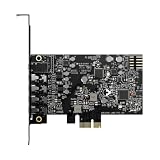
The Fosi Audio K5 Pro is the best overall external DAC amp here for a PC paired with desktop speakers, because it takes USB-C, optical, and coaxial digital inputs, sends line-level audio out through stereo RCA jacks to powered speakers, and still drives headphones with a stated 1000mW of power. An external DAC (digital-to-analog converter) moves the conversion step out of your noisy motherboard and into a dedicated box. Smaller desks suit the Fosi Q4, balanced-headphone fans suit the SK02, and surround-and-mic users suit the Sound Blaster X4. Two listed items are speakers, not DAC amps, and we flag them as runner-ups.
Our Top Picks




Top 3 picks at a glance
Quick List
- Fosi Audio Q4 – best for a simple, compact DAC with USB, optical, and coaxial inputs and RCA outputs
- Fosi Audio K5 Pro – best overall for powered speakers plus headphones and a mic input
- Sound Blaster X4 – best for gamers who want 7.1 surround processing and a mic-friendly external card
- LENRUE USB Computer Speakers – best for a no-DAC desktop setup (a speaker, not a DAC amp)
- Fosi Audio SK02 – best for balanced 4.4mm headphones and a preamp output
- Single USB Computer Speaker – best as a simple add-on speaker (a speaker, not a DAC amp)
Which One Is Right for You?
| If you… | Choose |
|---|---|
| have powered speakers with RCA inputs and also use headphones | Fosi Audio K5 Pro |
| want a small box with the basics and a bass and treble knob | Fosi Audio Q4 |
| own balanced 4.4mm headphones or want a preamp output | Fosi Audio SK02 |
| play games and want surround modes and a headset mic jack | Sound Blaster X4 |
| have no speakers at all and want one plug-in solution | LENRUE USB Computer Speakers |
| just need a single extra speaker for a laptop or desk | Single USB Computer Speaker |
First, look at the back of your speakers: RCA inputs, 3.5mm, or USB decide which output you need. Then decide whether you also want to plug in headphones, which calls for a proper headphone amp stage. Finally, check which digital output your PC offers, since a motherboard with an optical port gives you a cleaner path to a DAC than a crowded USB hub.
All 6 Picks in Detail
1. Fosi Audio Q4 – Best for a Compact Desktop DAC
As an Amazon Associate we earn from qualifying purchases at no extra cost to you.

The Fosi Audio Q4 is a small desktop DAC and headphone amp, and the listing positions it for PCs, home stereos, and powered speakers. It accepts a USB connection from the PC and also optical input, with a coaxial input described in the manufacturer’s information. It has been around for years, which means plenty of builders have paired it with active monitors or compact bookshelf speakers.
- USB, optical, and coaxial digital inputs (confirm the exact set on the listing)
- RCA line outputs for powered speakers or a stereo amplifier
- 3.5mm headphone output
- Bass and treble controls, according to the manufacturer
- Output power: sources differ between roughly 100mW and 160mW into 32 ohms, so confirm on listing
It is the right fit for a modest speaker desk setup where you want a physical volume knob and a separate headphone jack. The headphone stage is best for low to moderate impedance headphones, not high-impedance studio models.
Setup is straightforward: connect USB to the PC, pick the device as the default output in your operating system, and run RCA cables to the speakers. If your motherboard has an optical output, you can try that path as an alternative and keep USB for other devices. The bass and treble knobs are handy for thin-sounding speakers, but leaving them centered is the best starting point.
Pros:
- Compact and uncomplicated, with the essential inputs
- RCA output is a good match for most powered speakers
Cons:
- Headphone power is modest next to the K5 Pro
- USB sample rate ceiling is lower than the SK02
It is the simpler, quieter cousin of the K5 Pro, with less headphone power and no microphone input.
2. Fosi Audio K5 Pro – Best Overall for Speakers Plus Headphones

The Fosi Audio K5 Pro is a gaming DAC and headphone amp with a stated 1000mW of power. It accepts USB-C, optical, and coaxial inputs, adds a microphone input, and offers bass and treble control. For PC speakers, its stereo RCA output feeds an amplifier or powered pair, and the headphone and RCA outputs can work at the same time according to the manufacturer. That combination makes it the most flexible all-round option in the group.
- USB-C, optical, and coaxial digital inputs
- Microphone input on a 3.5mm jack
- Headphone amp: 1000mW at 16 ohms, with lower figures at higher impedances per Fosi
- Bass, treble, and master volume controls
- Optical and coaxial inputs up to 24-bit/192kHz; USB limit differs by source, so confirm on listing
It suits builders who switch between speakers for music and headphones for late-night gaming without changing cables. The tone controls are useful for small desk speakers that sound thin.
Because the headphone and RCA outputs can run together, you can leave the speakers connected and simply mute them with the speaker’s own control when you put on headphones. The microphone input is a convenience for a headset with separate jacks, although a USB headset would bypass it entirely. Keep in mind that the digital inputs are only useful if your source has the matching output, so check your motherboard or console before relying on optical or coaxial.
Pros:
- Strong headphone power for demanding cans
- Three digital inputs plus a mic jack
Cons:
- USB resolution is lower than the SK02’s stated formats
- Bass and treble knobs can color the sound if left raised
Choose it over the Q4 if you want more headphone headroom and a mic input.
3. Sound Blaster X4 – Best for Gaming Surround and a Mic
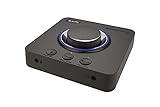
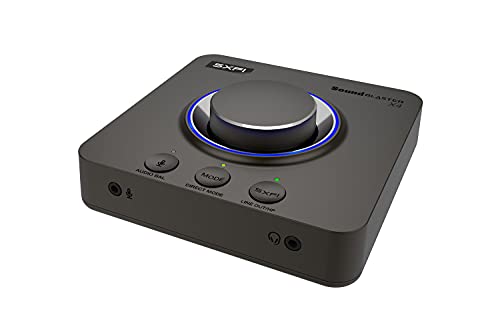
The Sound Blaster X4 takes a different approach. It is an external USB DAC and headphone amp with 7.1 surround processing, Dolby Audio, and multi-device support, aimed at gamers and streamers. Creative’s published specifications describe 24-bit/192kHz playback and a headphone amp for 32 to 600 ohm headphones. The headphone output impedance is a relatively high 10 ohms, which suits headphones of roughly 80 ohms and above best.
- External USB DAC and headphone amp
- 7.1 surround processing and Dolby Audio
- Supports multiple devices, according to the listing
- Playback up to 24-bit/192kHz per Creative
- Line outputs and connections for speakers: confirm on listing
It makes sense if you play online games, want a built-in mic input for a headset, and enjoy tweaking sound profiles through software. For a pure music setup with RCA-fed speakers, a simpler Fosi unit is more direct.
The multi-device idea matters if you switch between a PC, a console, and a phone: you can keep one headset plugged into the unit and move the source. Surround processing is virtual, so its effect depends on your headphones and your taste. Try it with a game you know well, and turn it off for music if it changes the tone more than you like. Always install the manufacturer’s software from the official site and check its options before first use.
Pros:
- Software features for gaming and voice chat
- Broad headphone impedance range
Cons:
- Higher output impedance can color low-impedance in-ear monitors
- More features means more software to manage
Compared with the K5 Pro it adds surround processing but offers fewer plug-and-play analog outputs for speakers, as far as the listing states.
4. LENRUE USB Computer Speakers – Best for a No-DAC Setup

This listing is not a DAC amp, and it does not match the facet. It is a pair of wired, USB-powered computer speakers in a soundbar form with 10W stereo sound and colorful lighting, described as plug-and-play. The conversion from digital to analog happens inside the speaker, so there is no need for an external DAC. We include it as a runner-up for readers who want the simplest possible path.
- Wired USB-powered soundbar for a computer
- 10W stereo output, per the listing
- Colorful lighting
- Plug-and-play setup without drivers, according to the name
- Inputs beyond USB: confirm on listing
It is useful for an office, a dorm, or a spare PC. It is not a replacement for a DAC feeding a real pair of powered monitors, but it is a sensible step up from laptop speakers.
A soundbar this size is designed to sit below a monitor, so place it at ear height pointing at you for the best stereo spread. Lighting effects are a matter of taste and are usually switchable, so check how to turn them off before using it in a dark room. Because it draws power over USB, plug it into a port on the PC itself rather than an unpowered hub, which helps avoid crackle and dropouts.
Pros:
- Nothing else to buy or configure
- Small footprint under the monitor
Cons:
- Cannot be improved with an external DAC in the same way
- Limited bass and power compared with a real speaker pair
If you later want better sound, upgrade to one of the Fosi units with a proper powered pair.
5. Fosi Audio SK02 – Best for Balanced Headphones and a Preamp Output

The Fosi Audio SK02 is described as a DAC headphone amplifier and preamp with USB-C and optical inputs plus 4.4mm balanced and 3.5mm headphone outputs. Fosi’s information lists an ESS SABRE DAC chip and support for PCM up to 32-bit/384kHz and DSD256. That makes it the most modern and format-capable unit in the Fosi lineup, and the only one with a balanced headphone jack.
- USB-C and optical inputs (no coaxial input in the listing name)
- 4.4mm balanced and 3.5mm single-ended headphone outputs
- Preamp function for connecting active speakers; confirm output type on listing
- ESS SABRE DAC chip per the manufacturer
- Output power varies by source; confirm on listing
It suits a builder with balanced headphones, or a speaker listener who wants a clean line output to a pair of active monitors and a premium DAC chip. Note that it has fewer digital inputs than the K5 Pro.
The balanced output is the reason to choose it. If your headphones came with a 4.4mm cable, or you plan to buy one, you can use the extra power and lower crosstalk the balanced path offers. Manufacturer and retailer pages quote different output figures for the balanced jack, so check the current specification before pairing it with hard-to-drive headphones. For a speaker desk, treat it as a clean source feeding active monitors through the line output.
Pros:
- Balanced output and high-resolution decoding
- Compact desktop footprint
Cons:
- No mic input and no coaxial input per the name
- Balanced benefits only apply to balanced-cabled headphones
The K5 Pro is the better choice for a general gamer, while the SK02 is the audio enthusiast’s pick.
6. Single USB Computer Speaker – Best as a Simple Add-On
![[Single] Computer Speaker for Desktop PC, USB-Powered, Plug-n-Play, Wired, External Speaker for Laptop, with Crystal-Clear Sound, Loud Volum](https://m.media-amazon.com/images/I/41h+u6rxKoL._SL160_.jpg)
This listing is a single computer speaker, USB-powered and wired, described as plug-and-play with a clear sound and loud volume. It is not a DAC amp and does not match the facet. A single speaker plays a mono mix, which is fine for notification sounds and video calls but is not what most builders mean by PC speakers.
- Single speaker unit, not a stereo pair
- USB-powered and wired
- Plug-and-play per the listing
- For desktop PC and laptop use
- Power and input details: confirm on listing
It makes sense as a second desk speaker for a secondary computer or a travel-friendly add-on. For music, games, or movies, a proper stereo pair driven by a DAC amp will sound much better.
If you do buy it, place it near the monitor and keep volume moderate, because a small enclosure can distort when pushed. Buying two and placing one on each side is possible, but each unit would play the same mono signal unless the product supports pairing, which you should confirm on the product page. For the same money and effort, a stereo soundbar or a powered pair is a more satisfying desk speaker.
Pros:
- Easy to set up and to move between devices
- Very small footprint
Cons:
- One speaker only, so no stereo imaging
- Not usable as a DAC for other speakers
It sits at the bottom of this list because the LENRUE soundbar gives you a stereo pair for the same plug-in simplicity.
Specs Compared
| Model | Type | Digital inputs | Analog outputs | Headphone output | Max resolution |
|---|---|---|---|---|---|
| Fosi Audio Q4 | DAC and headphone amp | USB, optical, coaxial (confirm on listing) | RCA and 3.5mm | 3.5mm | Up to 24-bit/192kHz on optical and coaxial |
| Fosi Audio K5 Pro | DAC and headphone amp | USB-C, optical, coaxial | RCA | 3.5mm, 1000mW at 16 ohms | 24-bit/192kHz optical and coaxial; USB confirm on listing |
| Sound Blaster X4 | USB DAC, amp, and sound card | USB | Confirm on listing | Headphone, 32 to 600 ohms | 24-bit/192kHz |
| LENRUE USB Computer Speakers | Powered USB speakers (not a DAC amp) | USB | Built-in speakers | Confirm on listing | Not stated |
| Fosi Audio SK02 | DAC, headphone amp, and preamp | USB-C, optical | Preamp output (confirm on listing) | 4.4mm balanced and 3.5mm | PCM up to 32-bit/384kHz and DSD256 per Fosi |
| Single USB Computer Speaker | Single USB speaker (not a DAC amp) | USB | Built-in speaker | Confirm on listing | Not stated |
How We Chose These
We began with the six catalog listings supplied for this page and read each listing name carefully. We then compared them against manufacturer product and specification pages from Fosi Audio and Creative and against retailer specification fields. The criteria were the digital inputs, the analog outputs for speakers, headphone amp power and impedance range, supported sample rates, and how clearly the listing states each value. We did not use these devices ourselves, so every statement comes from published specifications, and we flag where sources disagree. Two listings are speakers rather than DAC amps, so we mark them as runner-ups. Where manufacturer and retailer sources disagree on a figure, we avoid picking a side and tell you to confirm it.
What to Look For
Outputs that match your speakers
Powered desktop speakers usually take RCA (red and white), 3.5mm, or sometimes balanced TRS or XLR inputs. A DAC amp for speakers needs a matching line-level output, and RCA is the most common. If your speakers only have a 3.5mm input, a simple RCA-to-3.5mm cable works. Passive speakers need an amplifier in between, and a headphone amp cannot drive them. Keep line-level volume at a moderate setting on the DAC and use the speaker’s own knob for fine control to minimize noise.
Inputs and sample rates
USB is the easiest connection and works with almost any PC, but optical and coaxial can help if your motherboard has the output and you want to avoid USB noise. Optical (TOSLINK) typically carries up to 24-bit/192kHz, and some units cap USB at 24-bit/96kHz. For music from streaming services, CD-quality 16-bit/44.1kHz is the norm, so a lower ceiling is rarely audible. The extra resolution of 32-bit/384kHz is mostly useful for high-resolution files and does not change everyday listening much.
Headphone amp power and impedance
A headphone amp must deliver enough voltage and current for the headphone. Low-impedance headphones of 16 to 32 ohms are easy to drive, mid-range models of 80 to 150 ohms need more voltage, and studio models of 250 to 600 ohms need a lot. A rule of thumb for output impedance is to use headphones with at least eight times the amp’s output impedance, so a 10 ohm output pairs best with roughly 80 ohm headphones or higher. Balanced 4.4mm outputs offer more power, but only with balanced-cabled headphones.
Controls, noise, and safe use
A physical volume knob is more convenient than software alone. Tone controls such as bass and treble can help small speakers but should be left flat for accurate sound. To avoid hum, use the supplied USB cable, keep audio cables away from power cords, and plug the PC and speakers into the same outlet strip if you hear a buzz. For safety, turn the volume to the minimum before plugging in headphones or switching sources, because a line output set high can produce a loud pop and may damage hearing or speaker drivers.
Drivers, compatibility, and setup
Most simple USB DACs use the standard USB audio class, so Windows, macOS, and Linux recognize them without a driver. Some devices with software features, like surround processing, ask for a download. After connecting, set the DAC as the default playback device and match the sample rate in the sound settings; 24-bit/96kHz is a safe choice for a unit with that USB ceiling. If you hear crackling, try a different USB port, ideally one directly on the motherboard, and avoid sharing the port with a busy hub. Finally, keep the DAC away from the PC’s power supply and graphics card exhaust, since heat and electrical noise both shorten the life of small desktop electronics.
Worked example
Say you own a pair of powered speakers with RCA inputs and a pair of 250 ohm studio headphones. You need an RCA output and a headphone amp that can supply enough voltage. A K5 Pro with a stated 80mW at 300 ohms is a reasonable fit, while a unit with a 10 ohm output impedance would not meet the eight-times rule for most low-impedance headphones. If you instead own 32 ohm gaming headphones, nearly any unit here will drive them with ease.
Questions
Do I need an external DAC for PC speakers?
Not always. Many modern motherboards have decent audio, and USB speakers contain their own conversion. An external DAC helps when you hear hiss or buzz from the motherboard output, want more inputs, or want better headphone control.
Can a DAC amp drive passive speakers?
No. A headphone amp and a line output are not strong enough for passive speakers, which need a power amplifier. For passive speakers, use a stereo amplifier or choose active, powered speakers.
Is USB or optical better for a PC DAC?
Both work well. USB is more convenient and often supports a wider range of formats, while optical electrically isolates the PC from the DAC, which can reduce noise on some systems. If your motherboard has an optical port, it is worth trying.
What does balanced 4.4mm output mean?
It is a connector for balanced headphone cables that carry separate signals for each side. It can provide more power and lower crosstalk, but you need a balanced cable and compatible headphones to benefit.
Will an external DAC improve game audio?
It can reduce noise and give you better volume and tone control. Surround features like those on the Sound Blaster X4 are processing, not conversion, so they depend on the game and your headphones.
Update History
- October 20, 2026 – Initial publication; product set drawn from current catalog listings.
- Check the product page for current specifications and availability before buying.
Sources
- Manufacturer product and specification pages for Fosi Audio and Creative (Sound Blaster)
- Retailer listing titles and specification fields for all six listed products