
The Klipsch ProMedia 2.1 THX Certified is the best overall pick here for PC builders who want a wired desktop system with a real 6.5-inch subwoofer, a published 100-watt continuous rating and a long track record on gaming desks. A 2.1 system pairs two small satellite speakers with a separate subwoofer that handles the low bass, so music, games and movies get weight your monitor speakers cannot deliver. If you want Bluetooth and RGB, the Klipsch ProMedia Lumina is the modern alternative, and the smaller Cyber Acoustics sets suit tight desks and light use.
Our Top Picks
 Klipsch ProMedia 2.1 THX Certified Computer Speaker System3-piece5.67 x 4.2 x 8.5 Inches2.1 PoundsCheck on Amazon
 Cyber Acoustics CA-3610 2.1 Multimedia Speaker System with2.1 62W13.2 x 10.6 x 9.8 inches9.7 poundsCheck on Amazon


Top 3 picks at a glance

Quick List
- Klipsch ProMedia 2.1 THX – best for wired desktop listening with the strongest published power numbers
- Cyber Acoustics CA-3090 – best for a compact, low-power desk where space matters more than volume
- Nylavee 2.1 Bluetooth System – best for casual users who want Bluetooth 5.4 and lighting effects
- Klipsch ProMedia Lumina 2.1 – best for gaming setups that want RGB, Bluetooth 5.3 and USB-C input
- Cyber Acoustics CA-3610 – best for a mid-size desk that needs a control pod with a separate bass knob
- 100W RMS Wood-Cabinet 2.1 System – best for buyers who want RCA and AUX inputs plus Bluetooth 5.3, with specs to confirm
Which One Is Right for You?
| If you… | Choose |
|---|---|
| Want RGB on the satellites and a modern Bluetooth 5.3 link | Klipsch ProMedia Lumina 2.1 |
| Play games and watch films mostly at your desk and prefer a wired, certified design | Klipsch ProMedia 2.1 THX |
| Have a small desk and listen at low to moderate volume | Cyber Acoustics CA-3090 |
| Want a bass control on the desk pod and a bit more power than the smallest set | Cyber Acoustics CA-3610 |
| Connect a phone and a PC to the same speakers and like lighting effects | Nylavee 2.1 Bluetooth System |
| Want RCA inputs for a console, turntable preamp or TV alongside the PC | 100W RMS Wood-Cabinet 2.1 System |
| Need the safest choice if you plan to keep the speakers for many years | Klipsch ProMedia 2.1 THX |
The choice comes down to connection type and room size. A 6.5-inch subwoofer with a 100-watt class amplifier is plenty for a normal bedroom or office, while the 4 to 5.25-inch subwoofers in the Cyber Acoustics sets are sized for close-range listening. Pick wired if you care about lip-sync in games and video, and pick Bluetooth only if you will really use it.
All 6 Picks in Detail
1. Klipsch ProMedia 2.1 THX – Best for wired desktop listening
As an Amazon Associate we earn from qualifying purchases at no extra cost to you.
This is the system most PC builders mean when they say “Klipsch speakers.” The listing name states a 2.1 layout and THX certification, and Klipsch’s specification sheet gives 100 watts continuous and 200 watts peak system power with a frequency response of 35 Hz to 22 kHz. The satellites use 3-inch midrange drivers with a horn-loaded tweeter, and the subwoofer is a 6.5-inch ported unit with a side-firing driver. It suits a builder who wants a plug-in-and-forget wired system for a main gaming or work desk and who has room for a roughly 10-inch cube on the floor.
- System power: 100 W continuous, 200 W peak (manufacturer sheet)
- Frequency response: 35 Hz to 22 kHz
- Drivers: 3-inch midrange satellites, 6.5-inch ported subwoofer
- Input: 3.5 mm plug, with a headphone output on the control side
- Certification: THX Certified, per the listing
- Wireless: none stated in the listing name; confirm on the product page
In practice this is a set you place once and leave alone. The satellites are small enough to sit on either side of a 27-inch monitor, and the control pod keeps the volume knob within reach. Because there is no wireless chip, there is nothing to update, pair or lose connection with, which some builders value over extra features. Those who stream from a phone will need a separate cable or a Bluetooth receiver.
Pros
- High, clearly published power ratings
- Real subwoofer depth for the size
- Simple wired signal path with no pairing
Cons
- No RGB and no USB input
- The subwoofer is large for a small desk
Compared with the Lumina, it gives up Bluetooth and lighting but keeps a simpler and more traditional design.
2. Cyber Acoustics CA-3090 – Best for a compact, low-power desk

The CA-3090 is a small, wired 2.1 system rated at 18 watts peak, which retailers generally describe as roughly 9 watts RMS. It uses 2-inch satellite drivers and a 4-inch ported subwoofer, with a control pod that holds the power switch, master volume, headphone jack and an auxiliary input. It is aimed at a dorm desk, a secondary PC or an office where volume is low and space is tight. Treat it as a step up from laptop or monitor speakers rather than as a party system.
- Peak power: 18 W total, per retailer specifications
- Drivers: 2-inch satellites, 4-inch ported subwoofer
- Connection: 3.5 mm audio, wired only
- Controls: pod with volume, headphone jack and aux input
- Power: built-in supply for North American outlets
- Bluetooth: not offered
Because the amplifier is modest, the practical advice is to keep the satellites close, within an arm or two of your seat, and set the bass level on the subwoofer low at first. Small drivers distort when pushed, and running the volume at about half keeps the sound cleaner. If you later outgrow it, the 3.5 mm input means it can move to a bedroom TV or a spare laptop without any adapter.
Pros
- Small footprint, easy to fit beside a monitor
- Headphone jack on the desk pod
- Simple, inexpensive approach to adding bass
Cons
- Limited output for larger rooms
- Bass reach is modest because of the 4-inch driver
Compared with the CA-3610, it is smaller and quieter, so choose it only if desk space is the main limit.
3. Nylavee 2.1 Bluetooth System – Best for casual Bluetooth and lighting

Nylavee’s listing advertises a 2.1 computer speaker set with Bluetooth 5.4, eight lighting modes, a 60-watt peak rating and AC-adapter power with USB and further inputs named in the full title. The brand is not one most builders will know, and the listing name does not tell us the RMS rating, driver sizes or frequency range, so read the product page before buying. It fits a casual user who wants to stream from a phone, add a bit of colored light to a desk and spend little. It is not the pick for critical listening.
- Bluetooth: version 5.4, per the listing
- Peak power: 60 W; RMS rating not stated, confirm on listing
- Lighting: eight modes
- Power: external AC adapter
- Inputs: USB and other connections named on the listing; confirm which
- Drivers and frequency response: confirm on listing
Because the title is long on feature keywords and short on numbers, a careful buyer should look for the RMS rating, the subwoofer driver size and the list of physical inputs before ordering. Bluetooth 5.4 is a recent standard, but your PC also needs Bluetooth hardware, or a USB adapter, to use it. If you mostly play from a wired PC, the extra radio features matter less than basic sound quality.
Pros
- Newer Bluetooth version than several older sets
- Lighting without extra software
Cons
- Peak-only power rating says little about real output
- Limited specification detail in the title
Compared with the Lumina, it offers a similar feature list on paper but with far less published detail.
4. Klipsch ProMedia Lumina 2.1 – Best for RGB gaming setups

The Lumina is Klipsch’s newer take on the desktop system, adding built-in RGB lighting. Klipsch and retail sources describe a 100-watt RMS amplifier in the subwoofer, a 6.5-inch side-firing woofer, satellites with a 1-inch tweeter and 3-inch midrange, Bluetooth 5.3, USB-C and a 3.5 mm auxiliary input. Lighting and equalizer settings are managed through an app and Windows desktop software. It suits a builder who wants one system for PC, phone and a console over aux. Some retailer pages show a wrong wattage figure, so rely on the manufacturer’s numbers.
- Power: 100 W RMS, 200 W peak per manufacturer and retail sources
- Drivers: 1-inch tweeter and 3-inch midrange per satellite, 6.5-inch subwoofer
- Connections: Bluetooth 5.3, USB-C, 3.5 mm aux
- Lighting: addressable RGB on the satellites, software-controlled
- Extras: night mode and equalizer in the companion app
- Bluetooth codec: basic SBC listed by some sources
The lighting is the main difference from the older THX model. It sits on the back of the satellites, so it glows on the wall behind the monitor rather than shining in your eyes, and the Windows software can sync it with other supported RGB devices. If you do not care about lighting, the lighting adds little for you, but the USB-C input and Bluetooth make it more flexible for a desk that also hosts a phone or tablet.
Pros
- Digital USB-C input suits modern PCs
- Strong power rating and a full-size subwoofer
Cons
- Lighting software is Windows-only
- Bluetooth is basic for music quality
Compared with the ProMedia 2.1 THX, it adds connectivity and lighting while adding a more complicated feature set.
5. Cyber Acoustics CA-3610 – Best for a mid-size desk with a bass control

The CA-3610 is a wired 2.1 set quoted at 62 watts peak and about 30 watts RMS. Each satellite uses dual 2-inch drivers, and the down-firing 5.25-inch subwoofer is ported. The control pod has power, master volume, a separate bass volume, a headphone jack and an auxiliary input. Retailers occasionally call it “wireless”, but the listing and manual point to a 3.5 mm wired connection, so confirm before you assume Bluetooth. It is a good fit for a standard desk where the CA-3090 feels small but a large system feels excessive.
- Power: 62 W peak, about 30 W RMS per retailer data
- Satellites: dual 2-inch drivers each
- Subwoofer: 5.25-inch, down-firing, ported
- Controls: master volume, bass volume, headphone jack, aux in
- Connection: 3.5 mm wired
- Bluetooth: not part of the design as far as sources show
Keep the down-firing subwoofer on a hard surface or a small stand, since carpet can block the port opening and cut bass. The pod makes it easy to turn the bass down late at night without touching the PC volume, which is helpful in shared rooms. The satellites are lightweight, so use the cable length provided to keep them level with your ears rather than lying low on the desk.
Pros
- Separate bass control on the pod
- More output than the CA-3090
Cons
- No wireless or USB input
- Dimensions differ between listings
Compared with the CA-3090, it adds power and a bass knob, and compared with the Klipsch sets it gives up output and bass depth.
6. 100W RMS Wood-Cabinet 2.1 System – Best for RCA and AUX flexibility
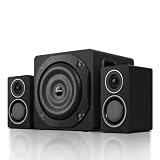
This listing is a generic-brand 2.1 system claiming 100 watts RMS, Bluetooth 5.3, a 6.5-inch subwoofer, wood cabinets and silk-dome tweeters, with AUX and RCA inputs mentioned in the title. The brand name is not shown in the visible listing text, so it is a runner-up: the claims are attractive, but a 100-watt RMS figure at this size should be checked on the product page and against the amplifier details. RCA input makes it useful for a TV, console or turntable preamp next to a PC.
- Power: 100 W RMS claimed; confirm on listing
- Subwoofer: 6.5-inch, per the title
- Tweeters: silk dome, per the title
- Cabinets: wood, per the title
- Inputs: AUX and RCA, plus Bluetooth 5.3
- Warranty and brand: confirm on listing
Before you rely on the stated 100 W RMS, check whether the product page lists the amplifier output per channel or only as a total. A system that really delivers 100 W RMS would normally be heavy and have a large power supply, so look at the weight and the dimensions listed. If the page does not explain the claim, treat the figure as a ceiling and not as a promise.
Pros
- RCA and AUX inputs cover several sources
- Wood cabinets can reduce panel resonance compared with thin plastic
Cons
- Limited brand and specification transparency
- No published frequency response in the title
Compared with the ProMedia 2.1 THX, it promises similar power but offers far less verified detail, so it sits behind it.
Specs Compared
| Model | Power rating | Subwoofer | Satellite drivers | Inputs | Wireless |
|---|---|---|---|---|---|
| Klipsch ProMedia 2.1 THX | 100 W continuous / 200 W peak | 6.5-inch ported | 3-inch midrange with horn tweeter | 3.5 mm, headphone out | None listed |
| Cyber Acoustics CA-3090 | 18 W peak | 4-inch ported | 2-inch | 3.5 mm, aux in, headphone out | None |
| Nylavee 2.1 | 60 W peak | Confirm on listing | Confirm on listing | USB and others, confirm on listing | Bluetooth 5.4 |
| Klipsch ProMedia Lumina 2.1 | 100 W RMS / 200 W peak | 6.5-inch side-firing ported | 1-inch tweeter plus 3-inch midrange | USB-C, 3.5 mm aux | Bluetooth 5.3 |
| Cyber Acoustics CA-3610 | 62 W peak / about 30 W RMS | 5.25-inch down-firing ported | Dual 2-inch | 3.5 mm, aux in, headphone out | None |
| 100W RMS Wood-Cabinet 2.1 | 100 W RMS claimed | 6.5-inch | Silk-dome tweeters | AUX, RCA | Bluetooth 5.3 |
How We Chose These
This page is built from research, not from listening sessions. We began with the six speaker listings currently assigned to this topic and read each listing name closely. We then compared those claims with manufacturer specification sheets and retailer data where the brands are established, and we noted every place where sources disagree, such as peak versus continuous power. We weighted published power in RMS terms, subwoofer size, the type of inputs, and how much specification detail a buyer can verify. Where a listing does not state a value, the table says to confirm it on the product page rather than guessing.
What to Look For
RMS versus peak power
Speaker makers quote two kinds of wattage. RMS, or continuous power, describes what the amplifier can deliver steadily, while peak describes a brief burst and is often about double the RMS figure or more. A system sold as “200 W peak” may deliver 100 W RMS, and another sold as “60 W peak” might deliver around 30 W RMS or less. Compare RMS to RMS when you can. If a listing gives only a peak number, treat it as a marketing figure and look for the continuous rating on the product page.
As a rule of thumb for a normal desk, 20 to 40 watts RMS is already loud when you sit an arm’s length from the satellites. Higher ratings buy headroom, meaning bass notes in games and films do not clip when the volume knob is turned up.
Subwoofer size and bass reach
Human hearing runs from about 20 Hz to 20 kHz, but most small systems start rolling off well above 40 Hz. A 4-inch subwoofer such as the one in the CA-3090 mostly adds warmth, while a 6.5-inch ported subwoofer can reach into the mid-30 Hz range, as the ProMedia sheet suggests. Ported cabinets move more air for their size but need a little space from the wall. Down-firing designs, like the CA-3610, should sit on a hard floor or a stand rather than on thick carpet that can muffle the port.
Inputs and how they connect to your PC
Most desktop motherboards have a 3.5 mm green line-out jack on the rear panel, which is what a wired set normally uses. If the sound has a faint hiss, a USB DAC or a USB-C input can bypass the onboard analog stage. Bluetooth is convenient but adds delay, usually enough to be noticeable in games and video unless both devices support a low-latency codec. For that reason, use the wired or USB input for gaming and keep Bluetooth for phones. RCA inputs are useful when you add a console or a TV.
Placement: a simple worked example
Say your monitor sits on a desk 28 inches deep and your ears are about 24 inches from the screen. Place the satellites roughly 24 inches apart, angled in toward your head, so you and the two speakers form an approximate triangle. Put the subwoofer on the floor under the desk or beside it, a few inches from the wall, then set the bass control so voices do not sound boomy. If the bass seems to disappear in one spot, move the subwoofer a foot and listen again. Small moves often fix more than an expensive upgrade.
Satellite drivers, tweeters and clarity
The satellites handle everything above the subwoofer crossover, which is where voices, guitars and footsteps live. A 3-inch midrange driver with a dedicated tweeter, as in the two Klipsch systems, spreads the work between two drivers and generally keeps vocals cleaner at higher volume. A single 2-inch driver or a pair of 2-inch drivers works for close listening but starts to sound thin and strained when pushed. Cabinet material matters too: sealed plastic and MDF enclosures are common, and wood panels can help reduce resonance. A crossover frequency around 3 to 4 kHz for the horn tweeter, as Klipsch quotes, is typical for this class.
Safety and cable management. Powered speakers use mains power through the subwoofer or an external adapter, so keep them off the floor where liquids collect and do not coil the power cable tightly. Use only the supplied adapter for sets that come with one, and keep cables away from monitor and USB cables to reduce interference hum.
Questions
Is a 2.1 speaker system better than 2.0 for a gaming PC?
A 2.1 system adds a separate subwoofer, so explosions, engines and music have more low-frequency weight. If you have limited desk space or mostly listen to voices, a 2.0 pair can be enough. For general gaming and films, 2.1 is the better all-round choice.
Do I need Bluetooth on desktop speakers?
Not for a PC that is wired to the speakers. Bluetooth is useful if you also want to play audio from a phone or tablet without plugging in. Keep in mind that the connection can add delay in games and video.
Why does my subwoofer hum or buzz?
Hum often comes from a ground loop or from a low-quality audio cable run alongside a power cable. Try a different outlet, keep audio and power cables separate, or use a USB audio device. If the buzz remains with nothing playing, contact the maker.
What does THX certified mean on a PC speaker set?
THX certification means the system met the THX program’s performance requirements for things such as output level and distortion at the time of certification. It is a useful quality signal, but it is not a replacement for checking power ratings and connections.
Where should I put the subwoofer?
Start on the floor near your desk, either beside it or under it, and close to a wall or corner for more bass. If it sounds boomy, move it a few inches away from the wall. Down-firing models need a clear floor surface.
Can I use these speakers with a console or TV?
Yes, if the set has an auxiliary or RCA input. Sets with only a 3.5 mm jack can still work with a console controller or a TV that has a headphone output. Check the connection list on the listing before buying.
Update History
- October 20, 2026 – Initial publication; product set drawn from current catalog listings.
- Check the product page for current specifications and availability before buying.
Sources
- Manufacturer product and specification pages for Klipsch and Cyber Acoustics
- Retailer listing titles and specification fields for all six products
- Published specification sheets and retailer data cross-checked for power ratings and driver sizes






