
Small form factor builds pack a full gaming system into a chassis with roughly 15 to 25 liters of internal volume, so every watt of heat has less room to spread out before the fans remove it. Thermal management in an SFF build is the planning work that keeps the processor and graphics card within safe temperatures: estimating the heat, choosing a cooler that fits, and arranging intake and exhaust so that air actually reaches the hottest parts.
This article works through one example build step by step. The numbers here are estimates derived from component power and standard heat-balance arithmetic. They are not readings from a bench, and they will shift with the parts you choose, the room temperature and the fan curve you run.
As an Amazon Associate we earn from qualifying purchases at no extra cost to you.


Our Top Picks

Defining the worked example
The example uses a Mini-ITX board, an 8-core desktop processor with a sustained power limit near 120 W, a graphics card drawing about 280 W, and a 750 W SFX-L power supply. The case is a 20-liter chassis with one intake path at the front, space for a 240 mm radiator at the top, and a rear exhaust. Storage is two M.2 drives and one 2.5-inch SSD. Board, memory, drives and fans together add an estimated 40 W under load.
Those assumptions set the thermal budget. The processor and the graphics card produce most of the heat, while the rest of the system adds a smaller amount. A real build will differ, so the method matters more than the exact figures. Start by listing the sustained power of each part under the load you expect, not its peak figure for a few milliseconds. Sustained power is what the cooler must remove over a long session.
Keep the assumptions visible when you compare options. Changing the processor to a lower-power model or undervolting the graphics card reduces the heat budget directly, and that can matter more than a bigger cooler in a small case.
Heat budget: how much air the case must move
Heat in the case has two sources: the components and the power supply. Adding the example’s parts gives roughly 440 W of component heat. The PSU adds its own loss, so at 90 percent efficiency the wall draw is about 489 W, and the difference of around 49 W also ends up inside the chassis. The whole build therefore dumps close to 490 W of heat into the air at this load.
Airflow is set by how much temperature rise you will accept in the air leaving the case. Using standard heat-balance arithmetic, 490 W corresponds to about 1,670 BTU per hour. For a 15 C rise in exhaust air, the case needs roughly 57 CFM of volume flow. For a 10 C rise, the requirement climbs to about 86 CFM. A tighter rise means more airflow, which usually means louder fans, so the target is a compromise between temperature and noise.
These are the minimum figures for an ideal chassis. Filters, cable clutter, tight bends and fan restriction all reduce the flow a fan delivers, so the fan specification must exceed the calculated requirement by a clear margin. A fan rated for 50 CFM in open air may deliver much less through a dense filter, which is why SFF builds often lean on static pressure fans in the intake path.
Airflow path in a small chassis
In a small case the air path is short, and that is both an advantage and a risk. Cool air should enter at the front or sides, pass across the graphics card and the processor cooler, and leave through the rear or top. If the path crosses the power supply first, the GPU receives air that has already been warmed by the PSU, which is a common cause of high graphics temperatures in SFF builds.
Intake placement decides where the hottest air ends up. A front intake directly in front of the graphics card gives it the coolest air. Side intakes help when the front is blocked by a radiator or a filter, but they can pull warm air from the board area if the case has no internal baffle. Check that intake openings are not blocked by the GPU bracket, the drive cage or a cable bundle, since even a partial block can change the pressure distribution across the card.
Exhaust should be strong enough to remove what the intake delivers. Rear and top exhaust fans carry the heat out of the case, and if the exhaust is weaker than the intake, the case becomes pressurized and dust pours in through the gaps. Balance the two so that exhaust is slightly stronger than intake when filters are clean. Our guide to improving PC airflow covers the general principles that apply to any chassis.
Cooler choice: low-profile air versus a small AIO
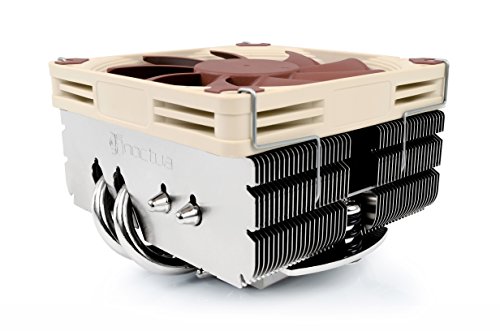
A low-profile air cooler uses a short tower with a fan on top, which keeps the height inside a compact case. It does not depend on a pump or a radiator, so it avoids leak risk and pump noise. Its limit is that it dumps heat directly into the case, which means the same airflow must carry both the cooler’s heat and the heat from the rest of the system. A low-profile tower with a 92 mm or 120 mm fan suits a 120 W processor, but it is less effective at higher power. For a shortlist of compact designs, see our guide to low-profile CPU coolers.
A small AIO mounted to the top of the case moves the processor’s heat to a radiator, and the radiator fans exhaust that heat outside the chassis. That separation helps the CPU in a compact build, because the cooler does not heat the case air as much. The drawbacks are the pump noise, the cost of the cooler, and the mount requirement. A 240 mm radiator needs the top panel to clear the memory and the board’s heatsinks, which can rule it out in tight layouts. A 120 mm or 140 mm AIO may suit smaller cases if the mount allows it.
In the worked example, the AIO option gives the processor more thermal headroom, while the low-profile option keeps noise and complexity lower. The better choice depends on whether the top mount has room for a radiator and whether you accept the pump noise.
Power supply heat and SFX placement
SFF builds typically use SFX or SFX-L power supplies, which are smaller than standard ATX units and generate more heat per cubic centimeter. A power supply with 90 percent efficiency at its working load loses about 10 percent of the wall power as heat, and that heat is generated inside the PSU enclosure. The PSU fan draws air from the case or from outside, depending on the mounting. If the PSU fan takes air from the GPU’s exhaust path, the power supply heats the air that reaches the card.
Check whether the PSU fan draws air from outside the case through a dedicated opening. Some SFF chassis place the PSU at the rear, with its fan pulling air from the outside. Others place it inside the case, where the fan works with the rest of the internal flow. Mount the unit so its fan has clean intake air, and check that the cable bundle does not block its path. Efficiency also matters because a 90 percent unit releases roughly 17 percent less heat than an 80 percent unit at the same output, which is a meaningful difference in a tight case.
Use a PSU sized for the actual load, not for the largest peak you expect. A unit that runs near half load often has a more favourable efficiency curve, which reduces heat inside the case. Our guide to power supplies for gaming PCs covers wattage and form factor choices in more detail.
Scenario comparison with estimated temperatures
The table below compares three configurations for the worked example. The temperature ranges are estimates from the heat budget above, assuming a room near 24 C and sustained gaming load. Real results depend on cooler quality, fan speed, dust and case design, so use the table to compare directions rather than to predict exact values.
| Configuration | Cooler and fans | Estimated GPU range | Estimated CPU range | Noise tier |
|---|---|---|---|---|
| A: Low-profile air, minimal fans | Low-profile tower, 2 intake, 1 exhaust | 78 to 84 C | 85 to 92 C, throttling likely at top end | High |
| B: Top AIO, balanced fans | 240 mm AIO, 3 intake, 2 exhaust | 72 to 78 C | 70 to 78 C | Moderate |
| C: Top AIO with power limit | 240 mm AIO, 3 intake, 2 exhaust, GPU power limit lowered by about 15 percent | 68 to 74 C | 70 to 78 C | Low to moderate |
Configuration A is the cheapest and quietest, but it runs close to throttling under sustained load. Configuration B cools both parts well at moderate noise, and it is the reasonable default for most builders who have room for the radiator. Configuration C gives the graphics card the largest margin for a small loss in performance, which many users accept as a worthwhile trade for quieter operation.
The power-limit row shows a useful principle: lowering the GPU’s power target reduces the heat that the case must handle. That lever is often more effective than adding a fan, because it cuts the source rather than moving the air. Test any power-limit change carefully, and confirm frame rates still meet your expectations in the games you play.
Troubleshooting: thermal throttling in SFF builds
If a compact build slows down during long sessions, begin by confirming that the throttling is thermal rather than a power or driver issue. Use a monitoring tool to record temperatures, clock speeds and fan speeds during the same game. Our guide to PC temperature monitoring software lists options that log these values over time, which helps you see whether the slowdown follows the temperature.
If the GPU is the first to slow, check the intake path. A filter that is half blocked, a cable that covers the front vent or a GPU bracket that obstructs the card’s intake can each raise the temperature sharply. Clear the path, then rerun the same game and compare the logs. If the card still climbs, lower its power limit slightly, since the reduction often costs less performance than the throttling it prevents.
If the processor is the limit, look at the cooler and its mount. A low-profile tower with thermal paste that has dried out or is applied unevenly can run far warmer than expected. A radiator that is mounted at the top with the fans pointing the wrong way can also move air in the wrong direction. Reseat the cooler, check the fan orientation, and make sure the radiator’s exhaust path is clear before deciding that the design itself is at fault.
Frequently asked questions
What counts as an SFF gaming PC?
A small form factor gaming PC is a build housed in a chassis of roughly 15 to 25 liters, usually with a Mini-ITX or Micro-ATX board and a compact power supply. The small volume leaves little room between the graphics card, the CPU cooler and the case walls, so heat builds up faster than in a mid-tower. Thermal planning matters more in SFF because there is less air to dilute the heat each component produces.
How much air does an SFF gaming PC need to move?
The answer depends on the heat the system produces and the temperature rise you accept in the exhaust air. As an estimate, a build that puts about 490 W of heat into the chassis needs roughly 57 CFM to hold a 15 C rise, and about 86 CFM for a 10 C rise. These are heat-balance figures rather than measurements, and filters and restriction reduce delivered airflow, so plan for a margin above the calculated number.
Is a low-profile air cooler or a small AIO better in a tiny case?
Each suits different limits. A low-profile air cooler avoids pump noise and leak risk, and it leaves its heat in the case, which can work in a well ventilated chassis. A small AIO moves heat to a radiator that the fans exhaust outside the case, which often helps the processor in a compact build but needs a top or front mount with clearance. Choose based on the mount points your case offers and how much pump noise you will accept.
Does the power supply heat the SFF case as well?
Yes. A power supply converts wall power to DC with some loss, and that loss becomes heat inside the case. At 90 percent efficiency, a system drawing 440 W from its components pulls about 489 W from the wall, so roughly 49 W stays in the chassis as PSU loss. Position the SFX unit so its fan draws air from outside the case rather than recirculating hot air from the GPU.
What is the most common thermal mistake in SFF builds?
The most common mistake is focusing on the CPU cooler while leaving the graphics card short of air. The card often produces the largest share of the heat, and a case that sends its intake air past the processor first leaves the GPU with warmer air. Check the air path from intake to exhaust, confirm that the card has a clear intake, and make sure the exhaust fans do not trap hot air near the GPU bracket.









