
Once a homelab grows past one machine, stacking towers on a shelf gets messy, and that is when people look at rackmount cases, the flat, wide chassis measured in “U” that bolt into a 19-inch server rack. They are a different world from desktop towers, with their own cooling, depth, and noise considerations. Here is what to know before you buy one for a home server or NAS.
As an Amazon Associate we earn from qualifying purchases at no extra cost to you.

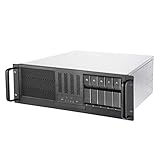
How rack cases are sized
Rack chassis height is measured in rack units (U), where 1U is 44.5mm. Cases come as 1U, 2U, 3U, 4U, and taller. The higher the number, the more room for standard components and cooling. A 4U case is the most homelab-friendly because it is tall enough to accept a normal ATX motherboard, tower-ish coolers, and full-height GPUs, much like a desktop laid on its side.
The cooling and cooler-height catch
Low-profile rack cases (1U-2U) cannot fit a normal tower cooler, they demand low-profile coolers and rely on rows of small, high-RPM (loud) fans to force air across the components. 4U cases relax this, fitting standard air coolers or even AIO radiators on the right models. Always check the case’s stated maximum CPU cooler height and GPU length before buying.
| Size | Height | Fits ATX + tower cooler? | Noise | Best for |
|---|---|---|---|---|
| 1U | 44.5mm | No (low-profile only) | Very loud | Dense compute |
| 2U | 89mm | Rarely | Loud | Servers |
| 3U | 133mm | Limited coolers | Moderate | Mixed |
| 4U | 178mm | Yes, on many models | Manageable | Homelab, NAS, quiet builds |
Depth, rails, and drive bays
Rack cases vary a lot in depth, and a deep chassis needs a rack (or open frame) that can accommodate it, plus sliding rails rated for the weight. For a NAS, look for cases with hot-swap drive cages that let you add or replace disks from the front without opening the lid. Confirm the motherboard form factor supported (many take ATX/micro-ATX; some want proprietary or SSI layouts) and that your PSU type fits, some rack cases need a specific form factor rather than a standard ATX unit.
Should a homelabber go rack?
If you have or plan a real rack and multiple machines, a 4U case is the sweet spot: standard parts, reasonable cooling, and front drive access. If you have just one server, a normal desktop tower with lots of drive bays is quieter, cheaper, and simpler, don’t buy into rack hardware until the machine count justifies it.
FAQ
Can I put a normal ATX build in a rack case?
Yes, in a 4U (and many 3U) case, which accepts standard ATX/micro-ATX boards, regular coolers, and full-length GPUs. Smaller 1U-2U cases require low-profile coolers and specialized parts, so they are not drop-in homes for a typical desktop build.
Are rackmount cases loud?
Slim ones are, because they rely on many small high-RPM fans. A 4U case with room for larger, slower fans or an AIO can be as quiet as a desktop. If noise matters, choose a taller case and quality fans rather than a dense 1U-2U chassis.
Bottom line
Rackmount cases are measured in U, and for a homelab the 4U size is usually best because it fits standard ATX parts, normal coolers, and front drive bays with manageable noise. Slim 1U-2U cases demand low-profile coolers and scream. Only invest in rack hardware once you have multiple machines and a rack to hold them, otherwise a roomy tower is simpler.
Before committing, measure your space and plan for the whole rack ecosystem, not just the case. A rack-mounted chassis needs a rack or a set of shelf rails rated for its loaded weight, which for a drive-heavy 4U NAS can be 15-25kg. Deep chassis also need clearance behind the rack for cables, and the front-to-back airflow design means you should not block either end. Noise-sensitive homelabbers often keep the rack in a closet, basement, or garage precisely because even a quiet 4U build hums more than a living-room desktop. If none of that appeals and you only need one always-on machine, a standard tower with six-plus drive bays gives you NAS-grade storage with none of the rack overhead, and you can always graduate to rackmount later when the lab actually outgrows it.









