
If your graphics card throttles, whines its fans to full speed, or reports memory-junction temperatures nudging 90-100 C during gaming, aging or poorly applied thermal pads are a common culprit. Over time the factory pads dry out and lose contact, letting VRAM and voltage regulators run dangerously warm. Replacing them is one of the most effective DIY cooling upgrades for an older card, often dropping memory temperatures by 15-25 C. This guide walks through doing it safely.
As an Amazon Associate we earn from qualifying purchases at no extra cost to you.

Our Top Picks
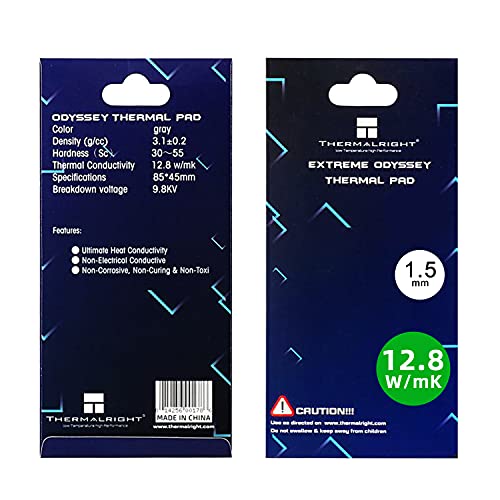 Thermalright Thermal Pad 1.5mm 12.8 W/mK85x45x1.5mm3.35 x 1.77 x 0.06 inches0.1 PoundsCheck on Amazon

Before you start: understand the risk
Opening a graphics card usually voids its warranty and, done carelessly, can crack the die or tear a pad off a component. Only attempt this on an out-of-warranty card, work slowly, and never power on a card with any pad missing. If the card is under warranty and overheating, RMA it instead.
What you will need
Gather a precision screwdriver set, isopropyl alcohol (90%+), lint-free cloths, fresh thermal paste for the GPU die, and replacement thermal pads. Pad thickness is critical, so measure or research the correct values before buying.
| Component | Typical pad thickness | Recommended conductivity |
|---|---|---|
| VRAM modules | 1.5-2.0 mm | ~12-17 W/mK |
| VRM / MOSFETs | 1.0-1.5 mm | ~12-17 W/mK |
| Backplate contact pads | 2.0-3.0 mm | ~6-12 W/mK |
| GPU die | Paste, not pad | >8 W/mK paste |
Step by step
1. Disassemble carefully
Remove the backplate, then the cooler screws in a cross pattern. Disconnect the fan header before lifting the heatsink. Gently rock the cooler loose; if it sticks, the old paste has cured, so warm it by running the card for a minute first or apply light, even pressure rather than prying.
2. Note original thicknesses
Photograph pad locations and measure the old pads with calipers before removing them. Matching the original thickness is essential: too thin and the pad will not make contact, too thick and it can hold the cooler off the GPU die, causing the exact overheating you are trying to fix.
3. Clean and re-pad
Wipe old paste and pad residue with isopropyl alcohol. Cut new pads to size, place them on the VRAM and VRM, and apply a small amount of fresh paste to the GPU die. Peel any film from both sides of each pad.
4. Reassemble and test
Reseat the cooler with even, cross-pattern screw tension. Reconnect the fan header. Boot, run a monitoring tool, and load the card. Expect memory-junction temperatures to fall well below the previous highs.
Common mistakes to avoid
Most failed re-pad jobs trace back to a handful of errors. Using pads that are too thick is the biggest one: an extra half-millimeter can hold the heatsink off the GPU die, so your memory runs cooler while the core overheats, a net loss. Forgetting to peel the thin plastic film from a pad is another classic, leaving an insulating layer that undoes the whole effort.
Test with a stress load, not just idle
Idle temperatures always look fine; the truth shows up under sustained load. After reassembly, run a graphics stress test or a demanding game for 15-20 minutes while watching both the core and memory-junction sensors. A healthy result keeps the memory hotspot comfortably below its throttle point with a reasonable gap, often under 15 C, between core and memory. If the gap is still large, recheck your pad thickness and mounting pressure rather than assuming the job is done.
FAQ
How do I know if my thermal pads need replacing?
Watch memory-junction temperature, not just the core. If the memory hotspot approaches 95-100 C under load while the core stays reasonable, or if the card throttles and spins fans aggressively on an aging board, dried pads are a likely cause. A 15-20 C gap between core and memory is a red flag.
Can I use thermal paste instead of pads on VRAM?
No. Pads bridge a physical gap between the memory chips and the heatsink that paste is far too thin to fill. Use paste only on the flat, direct-contact GPU die, and use correctly sized pads everywhere there is a gap to span.
Bottom line
Replacing dried GPU thermal pads is a high-payoff repair for an out-of-warranty card running hot, frequently knocking 15-25 C off VRAM temperatures. The whole job hinges on matching the original pad thickness and never running the card with a pad missing. Measure first, work in a cross pattern, and you will restore a throttling card to quiet, full-speed operation. For an older card that still has plenty of gaming life left, it is one of the most cost-effective ways to buy several more years of reliable service before an upgrade.









