
If you have ever stared at the tangle of black cables hanging off your power supply and wondered why some graphics cards need a 6-pin plug, others an 8-pin, and the newest ones a chunky 16-pin, you are not alone. The difference between a 6-pin and 8-pin PCIe connector comes down to how much current the plug is rated to deliver safely, and getting it wrong can mean a card that refuses to boot or, worse, a cable that runs hot under load. This guide breaks down what those extra pins actually do and how to plug them in with confidence.
As an Amazon Associate we earn from qualifying purchases at no extra cost to you.




Our Top Picks
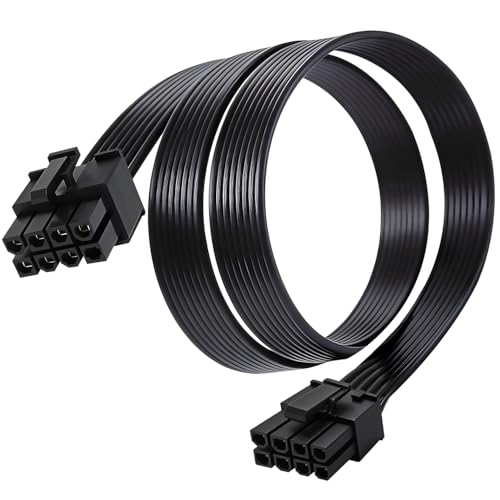

Top 3 picks at a glance
What the pins actually carry
A PCIe power connector delivers 12-volt power from the PSU to the graphics card. The extra pins on an 8-pin plug are not there to add more voltage, they add more ground and sense lines so the connector can safely carry roughly twice the current. The card reads those sense pins to confirm a beefier cable is attached before it draws the full amount.
Rated power delivery
Industry spec ratings are conservative, and real cables usually tolerate more, but you should design around the rated figures rather than the margins.
| Connector | Pins (12V / ground / sense) | Rated power | Typical use |
|---|---|---|---|
| PCIe 6-pin | 2 / 3 / 1 | ~75 W | Entry GPUs, older mid-range |
| PCIe 8-pin | 3 / 3 / 2 | ~150 W | Mainstream to high-end GPUs |
| PCIe slot (no cable) | – | ~75 W | Baseline from motherboard |
| 12VHPWR / 12V-2×6 | 12 + 4 sense | up to ~600 W | RTX 40/50-series |
Add the numbers up and the logic becomes clear. A card pulling around 220 W typically uses one 8-pin plus the 75 W slot feed, while a 300 W card needs two 8-pins or an 8-pin plus a 6-pin. The slot itself contributes 75 W in every case.
The 6+2 pin design
Most modern PSU cables terminate in a “6+2” plug: a 6-pin block with a detachable 2-pin piece. Snap the two halves together for an 8-pin socket, or leave the pair off for a 6-pin socket. This is why you rarely see a true dedicated 6-pin cable anymore. Always seat both halves fully when the card has an 8-pin socket, because a partially clipped connector concentrates current on fewer contacts and generates heat.
Can you use an 8-pin cable in a 6-pin socket?
No, the physical keying prevents it, and you should not try to force it. Use the 6+2 flexibility instead: split off the 2-pin tail for a 6-pin socket. Never use a 6-pin-to-8-pin adapter that simply jumps the missing sense pins, since that lets a card believe it has 150 W of headroom on a cable only rated for 75 W.
Daisy-chained vs single cables
A daisy-chain (pigtail) cable has two GPU plugs on one run back to the PSU. For cards under roughly 250 W total draw this is usually fine, but for high-end cards pulling 300 W or more, running two separate cables from two PSU sockets spreads the load and keeps voltage drop and heat in check. When in doubt, one cable per connector is the safer habit.
How to confirm what your card needs
Never guess from the cable, always read the card. Look at the top edge of the graphics card for its power sockets: a single 8-pin, dual 8-pin, a 6-pin plus 8-pin, or a 16-pin all tell you exactly how many watts the board is designed to pull. The card’s spec page lists both the socket layout and a recommended system PSU wattage, which already bakes in headroom for the rest of your build.
Match the PSU cables you actually have
A supply advertised as having “two PCIe connectors” may deliver them as one pigtail cable with two ends, or as two separate cables. For a 300 W-plus card, confirm your PSU ships two independent PCIe runs, not a single split cable, before you buy. If it only has pigtails, a higher-tier unit with dedicated cables is worth the small upgrade for a hungry GPU.
FAQ
Is a 6-pin connector enough for my graphics card?
Only for low-power cards. If your GPU has a single 6-pin socket it is designed to sip around 120-150 W total including the slot, which covers many 75-130 W class cards. Anything faster will ship with 8-pin or 16-pin sockets, and you must match what the card provides.
Why does my GPU have both a 6-pin and an 8-pin socket?
That combination targets roughly 300 W of board power: 75 W from the slot, 75 W from the 6-pin, and 150 W from the 8-pin. Populate both sockets fully. Leaving one empty will usually stop the card from booting or force it into a low-power failsafe mode.
Bottom line
The pin count on a PCIe connector is a current rating in disguise. A 6-pin handles about 75 W, an 8-pin about 150 W, and the slot adds another 75 W on top. Match every socket on your card, seat 6+2 plugs completely, and give power-hungry cards their own dedicated cables instead of relying on a single pigtail. Do that and the power side of a GPU install becomes a non-event.









