
Gaming PCs have a reputation for being power hogs, but the reality is more nuanced. The number on your PSU is a maximum capacity, not what the system actually draws. Understanding real consumption helps you size a supply correctly and estimate what your hobby costs to run each month.
As an Amazon Associate we earn from qualifying purchases at no extra cost to you.

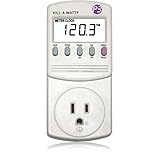
Capacity versus real draw
A build with a 750W power supply does not pull 750 watts. That figure is the ceiling. A typical mid-range gaming system draws far less most of the time, spiking only during demanding scenes. The PSU is sized for the peaks plus headroom, not the average.
| Activity | Typical whole-system draw |
|---|---|
| Idle desktop | 60-100 W |
| Web / video | 90-140 W |
| Esports titles | 180-260 W |
| AAA gaming, mid GPU | 300-380 W |
| AAA gaming, high-end GPU | 450-600 W |
Turning watts into money
Electricity is billed per kilowatt-hour. To estimate cost, multiply average draw in kilowatts by hours used by your rate. Suppose you game three hours a day at 350W, which is 0.35 kW. That is roughly 1.05 kWh per session, or about 32 kWh a month.
Why efficiency and idle matter
Because the machine spends far more hours idling than gaming, idle draw quietly dominates the monthly bill for many people. A system left on around the clock at 80W idle burns roughly 58 kWh a month doing nothing exciting. Sleep settings and a slightly more efficient PSU tier both help here.
How this guides PSU sizing
Since real peak draw for a mid build lands near 350 to 400W, a 650W to 750W unit leaves comfortable headroom for spikes and efficiency, which is best around 50 percent load. Oversizing to 1000W for a mid system wastes money and runs the unit at a less efficient low-load point.
Cutting your gaming PC’s running cost
If the monthly figure bothers you, the levers are straightforward. Because idle hours often dominate the bill, the single biggest saving is simply not leaving the machine on when it is doing nothing. Enabling sleep after a period of inactivity can cut idle draw from 80 watts to a couple of watts, which over a month is the difference between roughly 58 kilowatt-hours and almost nothing.
| Change | Rough monthly saving |
|---|---|
| Sleep instead of idle 24/7 | 40-55 kWh |
| Undervolt the GPU | 3-8 kWh |
| Cap frame rate to display refresh | 5-15 kWh |
| Higher efficiency PSU tier | 1-4 kWh |
Capping your frame rate to match your monitor’s refresh is an underrated one. Rendering hundreds of unnecessary frames burns GPU power for no visible benefit, so a sensible cap trims draw and heat at once. Undervolting stacks on top, shaving watts while keeping performance. None of these individually transforms the bill, but together they meaningfully reduce both your electricity use and the amount of waste heat your PC pumps into the room during summer.
FAQ
Does a bigger power supply use more electricity?
No. The components decide how much power is drawn; the PSU only supplies it. A 1000W unit powering a 300W load draws about the same from the wall as a 650W unit powering that same load.
How can I measure my exact usage?
A cheap wall power meter plugged between the PC and the outlet shows real-time watts and cumulative kWh. It is the most accurate way to see idle and gaming draw for your specific build.
Bottom line
A mainstream gaming PC pulls roughly 300 to 400W while gaming and far less at idle, costing most people only a few dollars a month to play. Size your PSU for real peaks plus headroom rather than the scary label number, and mind idle hours if the machine runs constantly.









