
When designing a modern home office, a dedicated media room, or a family gaming corner, the physical computer is no longer just a beige box hidden under a desk. It is a piece of functional furniture, an ambient light source, and a potential source of background noise. If you are building or upgrading a PC to integrate into your living space, you will quickly face a crucial technical decision: should you install a Pulse Width Modulation (PWM) fan hub or an Addressable RGB (ARGB) controller?
At its core, this choice is a balance between sensory comfort and visual style. A PWM fan hub is a utility-first device designed to manage system cooling and keep your room whisper-quiet. An ARGB controller is an aesthetic-first device designed to manage complex light shows, allowing your PC to blend into your room’s color palette or stand out as a vibrant centerpiece. Managing the maze of wires inside a chassis can be daunting, and choosing the wrong device can lead to cluttered spaces, noisy fans, or a lighting scheme that clashes with your interior design.
As an Amazon Associate we earn from qualifying purchases at no extra cost to you.



To help you navigate this decision, we will look at how these devices function, how they impact your home environment, and how popular options—such as the budget-friendly ARCTIC Case Fan Hub or the premium Noctua NA-FH1—compare to hybrid lighting solutions like the Thermalright ARGB and Fan HUB X12 IR and the Thermalright ARGB Fan HUB Controller.
Our Top Picks
 Thermalright ARGB Fan HUB Controller Support 8 Groups5.51 x 0.63 x 2.52 inches0.2 PoundsCheck on Amazon


Top 3 picks at a glance
Quick Verdict
For a peaceful, distraction-free home workspace where acoustic comfort is your priority, choose a PWM Fan Hub. It simplifies cable management and uses your motherboard’s smart signals to keep fan speeds (and noise levels) as low as possible. If you want to customize your room’s ambiance with synchronized, multi-colored lighting that matches your home decor, choose an ARGB Controller. For the best of both worlds, a hybrid hub that handles both cooling and lighting signals is an excellent, space-saving compromise.
Side by Side
To understand how these two hardware categories affect your living space, let us compare their physical footprints, costs, and environmental impacts side by side.
| Feature | PWM Fan Hub | ARGB Controller |
|---|---|---|
| Acoustic Comfort | Excellent; directly regulates fan speeds to minimize background hum. | None; does not control fan speeds unless it is a hybrid model. |
| Visual Impact | None; designed to be hidden away out of sight. | High; drives custom patterns, ambient glows, and color synchronization. |
| Price Range | Varies | Varies |
| Average Dimensions | Approx. 3.5 x 1.8 x 0.6 inches; lightweight (40g – 80g). | Approx. 4.5 x 2.2 x 0.7 inches; slightly heavier due to extra circuitry. |
| Power Draw | Up to 54W total (typically 12V SATA, split among 8-10 fans). | Up to 22.5W total (typically 5V SATA, split among 8-12 LED strips/fans). |
| Maintenance | Very low; set-and-forget physical installation. | Moderate; requires software updates or remote control adjustments. |
| Durability | High; simple circuit boards with minimal points of failure. | Moderate; complex microcontrollers can occasionally suffer firmware glitches. |
| Best For | Quiet home offices, minimalist desks, and professional workspaces. | Gamers, home theaters, and creative studios seeking ambient lighting. |
Where Pwm Fan Hub Wins
The primary strength of a dedicated PWM fan hub is its ability to create a quiet, comfortable auditory environment. In a home office or a quiet study, the constant revving of cooling fans can be incredibly distracting. A PWM fan hub solves this by taking a single 4-pin PWM signal from your motherboard and duplicating it across multiple fans. This allows your system to adjust fan speeds dynamically based on actual temperatures, rather than running them at a constant, noisy 100% speed.
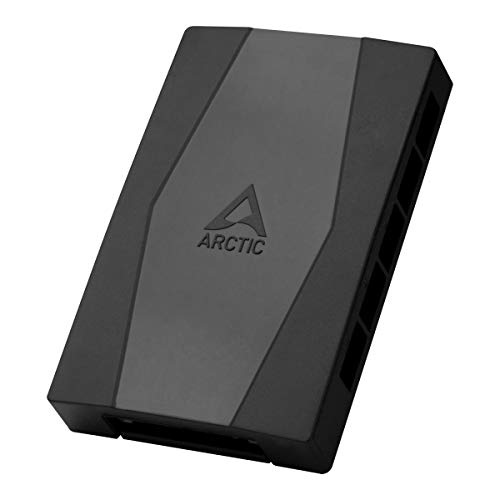
Safety and electrical reliability are also major advantages for dedicated hubs. High-quality options like the Noctua NA-FH1, 8-Port PWM Fan Hub, Magnetic with Short Circuit Protection offer robust safety features, including overcurrent protection and auto-resetting fuses. This level of protection prevents cheap fans from damaging your expensive motherboard. Additionally, basic models like the ARCTIC Case Fan Hub – 10-fold PWM Fan Distributor with SATA Power – Black provide a clean, centralized power source that can support up to ten fans using safe, direct SATA power from your power supply, keeping your main board clean and organized.
Finally, PWM hubs are incredibly compact. Because they do not require extra microchips for lighting patterns, they easily tuck behind your computer case’s motherboard tray. This keeps your workspace looking clean, uncluttered, and professional.
Where Argb Controller Wins
An ARGB controller is the ultimate tool for visual customization. Unlike standard RGB, which changes the color of an entire strip or fan at once, Addressable RGB (ARGB) allows you to control each individual LED. This means you can create smooth color gradients, soft candle-like flickers, or gentle breathing patterns that complement your room’s interior design.
For home decorators looking ahead to 2026, integrating PC lighting with the surrounding room’s smart lighting is a major trend. An ARGB controller allows your computer to act as an extension of your room’s ambient lighting. Whether you want a warm, golden glow to match your wooden desk and mid-century modern furniture, or a cool blue light to help you focus, the controller makes it possible.
Furthermore, the market has embraced hybrid controllers that combine both worlds. Devices like the Thermalright ARGB and Fan HUB X12 IR Black Hub Controller Support 12 Groups of CPU Fans,3Pin PC ARGB Controller and 4Pin PWM Fan,SATA Power Cord Direct Input(12V 4pin RGB is Not Supported) allow you to manage both your fan speeds and your lighting from a single, centralized unit. Similarly, the Thermalright ARGB Fan HUB Controller Support 8 Groups of Fans, 8-Port 4 Pin PC Fan Controller, 5V-3Pin ARGB Hub, Strong Paste+Magnetic Suction, SATA Power Cord(12V 4-pin RGB is not Supported) offers a dual-purpose layout with convenient magnetic mounting. These hybrid controllers give you the visual benefits of ARGB without sacrificing the quiet, organized performance of a PWM fan hub.
Cost Over 5 Years
When budgeting for your home setup, it is helpful to look at the total cost of ownership over a five-year period. This includes the initial purchase price, power consumption, and potential maintenance or replacement costs.
Because it uses simple, durable circuitry, it is highly likely to last five years without needing a replacement.
While their initial cost is modest, they do draw slightly more power to run dozens of individual LEDs. Running a fully lit ARGB setup (drawing about 15 to 20 watts) for 8 hours a day can add a small but measurable amount to your annual electric bill compared to a non-lit, utility-focused PWM setup.
For most homeowners, this price difference is small enough that the decision should be based on style and comfort rather than budget.
Which One for Your Home
Every living space has its own unique layout, noise tolerance, and aesthetic needs. Here is how to choose the right device for your specific home environment.
Small Apartment
In a cozy, small apartment, your computer is often close to your bed, sofa, or dining table. Minimizing noise and light pollution is essential for keeping your space comfortable. A dedicated PWM fan hub is the best choice here. It keeps your computer running quietly during late-night work sessions and avoids filling your small living space with bright, distracting lights when you are trying to relax or sleep.
Family with Kids and Pets
For a busy family home, safety, durability, and simplicity are key. Kids and pets can easily be distracted by bright, flashing lights, which might tempt them to play with the computer case or pull on cables. A PWM fan hub tucked safely inside the chassis keeps things running quietly and securely. If you do choose a hybrid controller for a family PC, make sure to use a secure mounting system, such as the magnetic suction found on the Thermalright 8-Port controller, to keep the device firmly in place inside the steel case.
Rental
If you live in a rental, you want a setup that is easy to install, pack up, and move without damaging your walls or furniture. Look for controllers that offer non-destructive mounting options. Devices featuring magnetic backs, like the Noctua NA-FH1 or the Thermalright ARGB Fan HUB Controller, can be easily attached to the metal chassis and removed in seconds without leaving sticky adhesive residue behind.
Long-Term Home
For a permanent home with a dedicated study or home theater, you have the freedom to build a fully integrated, premium setup. In this scenario, a hybrid ARGB and PWM controller is the ideal choice. It allows you to mount your PC as a stylish design piece, matching its subtle, warm lighting with your room’s smart bulbs, while still giving you full control over fan speeds to keep your home theater quiet during movie nights.
FAQ
Can I plug an ARGB fan into a standard PWM fan hub?
No. PWM hubs and ARGB controllers use entirely different connection pins and voltages. A PWM fan hub uses 4-pin connectors running at 12V to power and control the fan’s motor speed. ARGB uses 3-pin connectors running at 5V to control the individual LED lights. To get both fan speed control and lighting, you will need a hybrid controller that features both types of ports, or use two separate devices.
Do these hubs require a separate power supply connection?
Yes. Connecting multiple fans or light strips directly to your motherboard can draw too much power and damage the board’s delicate circuits. Both PWM hubs and ARGB controllers solve this by drawing power directly from your computer’s power supply unit (PSU) using a standard SATA power cable, ensuring safe and stable operation.
Will a PWM fan hub make my computer quieter than an ARGB controller?
Yes, indirectly. A dedicated PWM fan hub allows your motherboard to automatically adjust fan speeds based on how warm your computer gets, keeping noise to a minimum. A standard ARGB controller only manages lighting and has no control over fan speeds. If your fans are plugged directly into power without PWM control, they will run at 100% speed all the time, creating a loud, constant hum in your home.
Can I control my lighting without using computer software?
Yes. Some ARGB controllers come with physical remote controls or manual buttons, allowing you to change lighting patterns and colors directly. This is a great option if you want to adjust your room’s ambiance quickly without opening software on your screen, or if you prefer a simple, software-free setup.









