The Short Answer
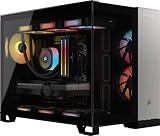
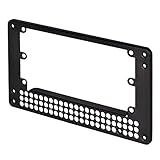
Yes, an SFX power supply is compatible with an ATX case, provided you use an SFX-to-ATX mounting adapter bracket and account for cable reach. The electrical pinout standards—including the 24-pin ATX main header, 8-pin EPS12V CPU power, and 16-pin 12V-2×6 PCIe connectors—are completely identical between SFX and ATX power supplies under Intel ATX12V specifications. However, because an SFX power supply measures just 125 mm wide by 63.5 mm high by 100 mm deep (compared to an ATX unit at 150 mm x 86 mm x 140 mm+), it will not screw directly into an ATX chassis cutout without an adapter plate. Furthermore, stock SFX modular cables are engineered for compact Mini-ITX cases and typically measure only 300 mm to 350 mm in length, which is often too short to route behind the motherboard tray of an ATX mid-tower or full-tower chassis.
Compatibility at a Glance
| Factor | Requirement | Notes |
|---|---|---|
| Mounting Dimensions | SFX-to-ATX adapter plate (6#32 thread) | Adapts the 125 x 63.5 mm SFX opening to the standard 150 x 86 mm ATX rear cutout. |
| Cable Span | EPS12V: 550–650 mm; ATX 24-Pin: 500–600 mm | Stock SFX cables (~300 mm) usually require 18AWG modular extensions in ATX towers. |
| Electrical & Pinout | ATX12V 3.1 / PCIe 5.1 compliance | Pin assignments for 24-pin, 8-pin EPS, and 12V-2×6 headers are electrically identical. |
| Thermal & Power | Adequate intake clearance and airflow | SFX 92mm fans run higher RPM curves; require clear intake vents inside large PSU shrouds. |
| Software Monitoring | Internal USB 2.0 9-pin motherboard header | Optional digital power supplies use HID/USB monitoring via software suites (e.g., iCUE). |
What Determines It
Interface
The core electrical interfaces of an SFX power supply mirror those of a standard ATX power supply. Both formats adhere to the same Intel ATX12V design guide, utilizing identical pin assignments, voltage rails (+12V, +5V, +3.3V, and +5VSB), and signal lines such as PS_ON# and PWR_OK. Modern SFX units support ATX 3.1 standards and come equipped with native 12V-2×6 (PCIe 5.1) 16-pin power connectors capable of delivering up to 600W to modern graphics cards. The terminal pitch, latching mechanisms, and gauge wires (typically 16AWG to 18AWG) match full-sized ATX units, meaning no electrical conversion or signal transformation is ever required when plugging an SFX power supply into an ATX motherboard or peripheral device.
As an Amazon Associate we earn from qualifying purchases at no extra cost to you.

Power
Power delivery performance is determined by total continuous wattage, single +12V rail output capacity, and transient spike handling rather than the physical size of the power supply casing. Modern high-density SFX power supplies can deliver 750W, 850W, or even 1000W continuously with Cybenetics Gold or Platinum efficiency ratings. Under ATX 3.1 guidelines, these units are designed to withstand transient power excursions up to 200% of their rated load for 100 microseconds. When installed in an ATX enclosure, the power supply’s electrical capacity is completely unchanged; however, high-wattage SFX power supplies feature less internal thermal mass, meaning high power draws trigger higher fan speeds compared to larger ATX power supplies with 120mm or 140mm cooling fans.
Drivers
Standard power supplies operate as plug-and-play hardware independent of system drivers or operating system intervention. However, digital SFX power supplies equipped with telemetry and fan-curve management require an available internal USB 2.0 9-pin header connection on the ATX motherboard. Software suites like Corsair iCUE or Seasonic digital monitoring interfaces interact with the power supply via standard Windows Human Interface Device (HID) driver stacks. To ensure proper telemetry reporting in device manager, ensure the motherboard chipset drivers (e.g., AMD Chipset Driver software or Intel Management Engine Interface) are fully installed. Navigate to Device Manager > Human Interface Devices to confirm that the power supply controller registers without a yellow exclamation error code.
Firmware
An SFX power supply relies on embedded microcontroller firmware to regulate timing signals, over-current protection (OCP), over-voltage protection (OVP), and internal fan control logic. Crucially, the ATX timing specifications dictate that the PWR_OK (Power Good) signal must delay between 100ms and 150ms after the +12V rail reaches stable voltage levels, ensuring the motherboard BIOS/UEFI initializes safely. Furthermore, internal firmware manages zero-RPM passive cooling modes, holding the fan motionless until internal secondary side thermistors register temperatures above 40°C to 50°C. In modern 2026 PC builds, this hardware-level firmware logic operates identically whether the unit is installed in a Mini-ITX chassis or an ATX mid-tower.
Form Factor
Physical form factor is the primary barrier when determining if an SFX power supply is compatible with an ATX case. Standard ATX power supply enclosures measure 150 mm wide, 86 mm high, and typically 140 mm to 180 mm deep, using a four-screw rectangular mounting pattern with standard 6#32 UNC threading. SFX power supplies measure 125 mm wide, 63.5 mm high, and 100 mm deep (or 130 mm deep for SFX-L units). Mounting an SFX unit directly to an ATX case cutout leaves an open gap of 25 mm horizontally and 22.5 mm vertically. To resolve this, an SFX-to-ATX adapter plate must be installed to bridge the gap and align the screw mounting holes correctly.
How to Check Yours
To verify that your SFX power supply will function seamlessly inside your chosen ATX case, perform the following step-by-step diagnostic verification before mounting hardware permanently:
- Measure EPS12V Cable Reach: Lay the motherboard inside the ATX case. Route a flexible measuring tape from the bottom PSU shroud mounting location, behind the motherboard tray, to the top-left 8-pin EPS CPU power socket. If the distance exceeds 450 mm, stock SFX cables (~300–350 mm) will not reach without pulling tight.
- Verify Bracket Bundle Contents: Inspect your SFX power supply packaging for an included steel or aluminum adapter plate. Ensure it includes four flathead 6#32 countersunk screws to attach the plate flush against the PSU faceplate.
- Check GPU Clearance and Bend Radius: Measure the space between the power supply output interface and the side glass panel or lower cable passthroughs. Ensure 12V-2×6 or PCIe cables have at least 30 mm of straight clearance from the plug before initiating any wire bends.
- Configure Motherboard Power States: Boot into the motherboard BIOS/UEFI interface by pressing Del or F2 during POST. Navigate to Advanced > APM Configuration (or Platform Power) and set ErP/EuP Mode to Enabled (S4+S5) to ensure minimal standby power drain on smaller SFX transformer circuits when the PC is powered off.
- Verify Windows Fast Startup Behavior: Boot into Windows 11, open Control Panel > Hardware and Sound > Power Options, click Choose what the power buttons do, select Change settings that are currently unavailable, and ensure system behavior is stable under cold boot sequences.
If It’s Not Compatible
Fix 1: Cable Span Shortage (EPS12V or 24-Pin Cable Cannot Reach Motherboard)
What causes it: Factory-provided SFX modular cables are deliberately shortened (300 mm to 350 mm) for small-form-factor builds, causing them to fall short when routed behind the cable management tray of an ATX chassis, which typically requires 550 mm to 650 mm of reach.
How to check: Attempt to route the 24-pin ATX or 8-pin EPS cable through the nearest chassis grommet. If the cable pulls taut against sharp metal edges or fails to bridge the gap to the motherboard headers, the cable is too short.
What to do: Purchase high-quality, individual 18AWG copper wire extension cables (typically 200 mm to 300 mm long) or order custom-length full replacement modular cables designed specifically for your exact SFX power supply pinout. Plug the extensions directly into the ends of the stock SFX cables, route them behind the tray, and secure them with cable ties to internal anchor points.
How to undo: Clip the cable ties, disconnect the extensions from the factory modular cables, and detach the stock cables from the motherboard headers when transitioning back to a compact chassis.
Fix 2: Missing Mounting Screw Alignment (Gaps Around PSU Cutout)
What causes it: Attempting to secure an SFX power supply directly to an ATX rear mounting plate leaves the power supply floating, as the screw holes do not match the standard 150 mm x 86 mm ATX layout.
How to check: Position the SFX unit against the rear PSU cutout of the ATX case. Observe that the mounting screw holes on the PSU fall completely inside the open perimeter of the ATX cutout.
What to do: Align an SFX-to-ATX offset adapter bracket over the exhaust face of the SFX power supply. Fasten the bracket to the PSU using the four included flush-mount 6#32 flathead screws. Align the assembled bracket against the ATX chassis frame and secure it using four standard 6#32 case screws into the threaded factory holes of the ATX chassis.
How to undo: Remove the four chassis screws from the outer ATX frame, detach the power supply unit with the bracket, and unscrew the four flathead screws connecting the adapter plate to the SFX power supply casing.
Fix 3: GPU Power Cable Strain or Bent 12V-2×6 / PCIe 5.1 Connectors
What causes it: Short SFX 12V-2×6 (16-pin) or 8-pin PCIe cables pull tightly across wide ATX chassis interiors, forcing extreme bend angles right at the terminal plug on the graphics card.
How to check: Inspect the 12V-2×6 terminal on the graphics card. If the wires bend sharply within 30 mm of the plastic connector housing or if the 4-pin sense lines are pulled out of alignment, the connection is under excessive mechanical strain.
What to do: Install a native, full-length 16-pin 12V-2×6 modular cable rated for 600W (using 16AWG main conductors) or a high-spec right-angle (90-degree) connector adapter designed to eliminate strain. Ensure the connector clicks fully into place until the safety latch engages flush against the socket header.
How to undo: Depress the retention clip on the 12V-2×6 terminal plug, carefully pull the connector straight out without rocking it side-to-side, and remove the right-angle adapter or replacement cable.
FAQ
1. Does using an SFX power supply in an ATX case cause higher noise levels?
Yes, an SFX power supply can be noticeably louder than a full-sized ATX unit when operating under heavy gaming or rendering workloads. Because SFX power supplies use smaller 92mm cooling fans (compared to 120mm or 140mm fans in standard ATX units), the fan must rotate at significantly higher RPMs to achieve the cubic-feet-per-minute (CFM) airflow necessary to dissipate heat from condensed internal heatsinks.
2. Can I use an SFX-L power supply instead of a standard SFX power supply in an ATX case?
Yes, SFX-L power supplies use the exact same SFX front mounting interface and 6#32 screw hole pattern as standard SFX units, making them fully compatible with all standard SFX-to-ATX adapter brackets. The only difference is that SFX-L units are 130 mm deep instead of 100 mm, which allows them to house a larger, quieter 120mm cooling fan while easily fitting inside any ATX chassis shroud.
3. Do SFX power supplies deliver less stable voltage than full-sized ATX units?
No, high-quality SFX power supplies offer voltage regulation, low ripple suppression, and transient response performance that equals or surpasses many full-sized ATX units. Premium SFX units utilize high-density Japanese 105°C-rated capacitors and advanced DC-to-DC topology on the secondary side to maintain tight tight ±1% to ±2% voltage regulation across all major positive rails.
4. Will an SFX power supply bracket work with bottom-mounted ATX PSU shrouds?
Yes, an SFX-to-ATX adapter bracket will mount flush to any standard rear ATX opening regardless of whether the case features an open layout or a bottom PSU shroud. Offset adapter plates are generally preferred because they elevate the SFX unit slightly, creating additional clearance between the power supply fan intake grill and the bottom dust filter or floor of the chassis.