The best speaker stands and desk risers for computer speakers are the ones that do two jobs: lift the tweeters to ear height and decouple the cabinets from the desk. For most desks that means an angled isolation platform such as the IsoAcoustics ISO-130 or Aperta200, or a budget foam pad such as the Auralex MoPAD, and for deeper desks a tilted metal stand such as the Kanto S4. Floor stands, such as the Kanto SP6HD class, make sense when the desk is cluttered or you want speakers at the sides rather than on the desk. The right choice follows from three numbers: tweeter height, tilt angle and how heavy your speakers are, all of which you can calculate in a few minutes.
As an Amazon Associate we earn from qualifying purchases at no extra cost to you.
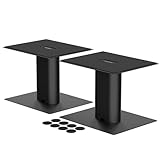

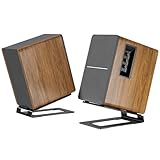

Top 3 picks at a glance
Quick comparison of stand and riser types
| Option | Type | Typical capacity and size | What it does | Price tier | Best for |
|---|---|---|---|---|---|
| IsoAcoustics ISO-130 | Isolation stand with tilt options | Compact platform of about 5.1 x 6 inches, around 20 lb capacity, 14 height and tilt combinations | Raises, tilts and decouples | Mid | Small monitors and bookshelf speakers |
| IsoAcoustics Aperta200 | Larger isolation stand | Aluminum, wider platform, up to about 6.5 degrees of tilt | Raises, tilts and decouples bigger cabinets | Premium | Medium to large bookshelf speakers |
| Auralex MoPAD | Foam isolation pad | Dense foam, high capacity (about 100 lb per the maker) | Decouples, adds slight tilt on angled versions | Entry | Budget decoupling |
| Kanto S4 | Desk stand with tilt | Designed for medium bookshelf speakers | Raises and tilts toward the listener | Mid | Desk-top bookshelf pairs |
| Kanto SP6HD class floor stands | Floor-standing stand, roughly desk-side height | Steel, heavy duty, for medium to large speakers | Moves speakers off the desk entirely | Mid | Crowded or shared desks |
| Desktop riser shelf class | Metal or wood platform that spans over the desk | Varies; check weight rating | Raises speakers and frees desk space beneath | Entry to mid | Small speakers on tight desks |
Capacities and sizes follow manufacturer descriptions and roundups; verify the exact variant and weight rating against your speakers before buying.
Why stands and risers help computer speakers
Computer speakers usually sit on the desk surface, next to the monitor. That has three side effects. The tweeters end up lower than your ears, which dulls treble and narrows the soundstage. The cabinet transmits vibration into the desk, which then radiates the boom as a second, smeared sound source. And the desk surface acts as a mirror: sound reflecting from it reaches your ears slightly after the direct sound and cancels some frequencies. A stand fixes the first, an isolation platform fixes the second, and the tilt angle reduces the third.
Worked example 1: tweeter height
Seated ear height for most adults is about 105-120 cm from the floor. A standard desk surface is 72-75 cm. That puts your ears about 30-45 cm above the desk. A bookshelf speaker 25 cm tall has its tweeter near the top, roughly 20-22 cm above the desk. To reach 35 cm above the desk you need a riser of about 13-15 cm, or you can tilt the speakers upward 10-15 degrees to direct the tweeters at your ears. Small desktop speakers with 2.75-inch drivers are only 15-18 cm tall, so they need 17-20 cm of lift.
| Speaker height | Tweeter on desk | Riser needed for 35 cm ear height | Typical solution |
|---|---|---|---|
| 15 cm (compact) | About 12 cm | About 23 cm | Riser shelf or tall stand plus tilt |
| 20 cm (small bookshelf) | About 16 cm | About 19 cm | ISO-130 at its tallest setting or a 15-20 cm stand |
| 25 cm (4-inch woofer class) | About 21 cm | About 14 cm | Aperta200 or Kanto S4 |
| 30 cm (larger bookshelf) | About 26 cm | About 9 cm | Low pad with 10 degree tilt |
Worked example 2: tilt angle
If the tweeter is 35 cm above the desk but your ears are 45 cm above it and you sit 70 cm from the speaker, the vertical gap is 10 cm. The angle to aim at your ears is arctan(10 / 70), about 8 degrees. If your tweeters sit 20 cm lower than ear level, the angle is arctan(25 / 70), about 20 degrees, which is more than most stands offer. In that case combine lift with tilt rather than relying on tilt alone. The ISO-130 and Aperta families offer small tilt increments, and the Kanto S4 is built around a tilted top plate.
Worked example 3: how isolation works
Isolation platforms are spring-and-mass systems. The resonant frequency of a loaded platform can be estimated as f = 15.76 / sqrt(d), where d is the static deflection in centimeters under the speaker’s weight. A platform that compresses 0.5 cm under load resonates near 22 Hz; one that compresses 0.2 cm resonates near 35 Hz. Isolation only begins above about 1.4 times the resonant frequency, so a 22 Hz platform isolates everything above about 31 Hz, which covers the entire bass range of a desktop speaker. A platform that is too stiff for the speaker’s weight resonates higher, perhaps near 60-80 Hz, right in the bass region, and can add a lump instead of removing one. That is why capacity ratings matter: stay within the weight range for the best effect.
Best isolation stand for small speakers: IsoAcoustics ISO-130
Spec line: compact isolation platform of roughly 5.1 x 6 inches, about 20 lb capacity per stand, 14 height and tilt combinations, with isolation performance verified by the maker at the National Research Council of Canada.
Best for: Compact studio monitors and small bookshelf speakers on a desk. Skip if: your speakers are heavy or have a large footprint; the platform is small.
- Adjustable height and tilt in one product.
- Isolation reduces desk resonance and tightens bass.
- Small footprint saves desk space.
Cons: Mid price tier per pair. Limited capacity for larger speakers.
Best isolation stand for larger cabinets: IsoAcoustics Aperta200
Spec line: aluminum isolation stand with a wider platform for larger speakers, up to about 6.5 degrees of tilt, designed for medium and large bookshelf and monitor speakers.
Best for: 4-5 inch woofer speakers such as the Edifier MR4 or R1280DB class. Skip if: you need a lot of tilt or a very low price.
- Larger platform and higher capacity.
- Solid aluminum build.
- Improves clarity and stereo imaging per reviewers.
Cons: Premium price tier. Tilt range is modest.
Best budget decoupler: Auralex MoPAD
Spec line: dense acoustic foam pad, about 100 lb capacity per the maker, angled versions available, sold per pair.
Best for: The cheapest way to stop the desk from buzzing. Skip if: you need more height than a few centimeters.
- Entry price tier.
- High capacity for the cost.
- Easy to place and reposition.
Cons: Foam compresses over time and does not add significant height. Tilt is limited to the pad’s angle.
Best tilted desk stand: Kanto S4
Spec line: desk-ready stand that raises and tilts medium bookshelf speakers toward the listening position.
Best for: Desks where you want height and tilt in one piece and a clean look. Skip if: your speakers are small, since the stand is sized for medium cabinets.
- Raised, angled top plate.
- Designed for desk use.
- Cable routing keeps wires tidy.
Cons: Takes desk depth. Does not isolate as well as a spring platform.
Best floor option: Kanto SP6HD class stands
Spec line: heavy-duty steel floor stands, roughly 36 inches tall in the SP6HD version, with a top plate for medium to large speakers and a column for cable routing.
Best for: Deep or crowded desks, where speakers sit to the sides at ear height. Skip if: floor space is tight or you sit very close to the screen.
- Moves speakers off the desk, which removes the desk reflection.
- Stable for heavier cabinets.
- Fixed ear-height targeting.
Cons: Needs floor space and a cable run. The fixed height may not match every desk and chair.
Best simple lift: desk riser shelves
Spec line: metal or wood platforms that raise speakers 10-20 cm and free the desk surface below; weight rating varies by product.
Best for: Small speakers on tight desks where monitor and cables compete for space. Skip if: you want isolation; most risers are rigid and transmit vibration.
- Entry to mid price tier.
- Frees desk space below.
- Pairs well with a foam pad on top.
Cons: Rigid platforms can resonate. Check the weight rating and stability.
Speaker placement at the desk: step by step
- Set the triangle. Place the speakers as far apart as each is from your head, typically 0.6 to 1 meter.
- Raise the tweeters. Measure from your seated ear height to the desk, subtract the tweeter height, and add that as stand height.
- Aim them. Angle the speakers so the axes cross just behind your head, which is called toe-in; start with 10-20 degrees.
- Pull them off the wall. Leave 10-15 cm behind rear-ported speakers.
- Decouple. Use a foam or spring platform between the speaker and the stand or desk.
- Listen and adjust. If the image sits too low, add height; if bass booms, add distance from walls or lower the level.
Choosing by weight and size
| Speaker class | Typical weight per speaker | Good fit | Notes |
|---|---|---|---|
| 2.75-3 inch compact (Audioengine A2+, Creative Pebble) | Under 1.5 kg | ISO-130, foam pad, riser shelf | Almost any platform works |
| 4-inch bookshelf (Edifier R1280DB, MR4) | 2.5-4 kg | ISO-130 near its limit, Aperta200, Kanto S4 | Check the capacity; many powered cabinets are heavier on the amplifier side |
| 5-inch larger (Audioengine A5+, Edifier MR5) | 4-6 kg | Aperta200, floor stands | Platform capacity matters |
Powered pairs are often unbalanced because the master speaker holds the amplifier. Check the heavier unit’s weight against the stand’s rating, not the average.
Symptoms and fixes: what the stand should solve
| Symptom at the desk | Likely cause | Stand or riser fix | Expected change |
|---|---|---|---|
| Desk buzzes on bass notes | Cabinet vibration coupling to the desk | Isolation platform or dense foam pad | Buzz drops or disappears; bass sounds tighter |
| Treble dull, sound feels low | Tweeters below ear height | Add 10-20 cm of lift or tilt up 10-15 degrees | Brighter, clearer highs and a taller soundstage |
| Voices sound hollow | Desk reflection cancelling around 500-700 Hz | Raise and tilt the speakers, clear the desk between speaker and listener | Fuller midrange |
| Image smeared left to right | Speakers too wide or not toed in | Equilateral triangle, 10-20 degrees of toe-in | Stable center image |
| Bass boomy near the wall | Rear port too close to the wall | Move the speaker out 10-15 cm using a deeper stand | Cleaner low end |
| Speakers slide or tip | Light cabinets on a smooth platform | Use a stand with non-slip surface or add putty or gel pads | Stable placement |
DIY and low-cost alternatives, and what to avoid
You can get partway there without buying a dedicated product. A stack of heavy books or a small wooden block lifts speakers, but books are not rigid and can resonate, so put a foam pad on top. A folded yoga mat or a layer of dense foam works for decoupling if it is firm enough that the speaker does not rock. Avoid soft, spongy foam that compresses fully under the speaker’s weight, because a fully compressed pad behaves like a rigid block and does not isolate. Avoid placing speakers on an empty cardboard box or hollow plastic shelf, which can amplify bass buzz. For tilt, a thin wedge of wood or a purpose-made angled pad is more reliable than propping the front edge with a coin.
Whatever you choose, make sure the speaker cannot fall: tall stands on a desk edge, loose books and slippery pads can all cause an accident, particularly near monitors.
Cable and subwoofer notes when you add stands
Raising speakers changes how cables reach the amplifier. Powered pairs have an interconnect cable between the two cabinets, usually 2-3 meters, so check it still reaches when you move them apart or onto stands at the desk edges. Leave a service loop of 10-15 cm so a bump does not pull the connector. If you have a subwoofer, keep it on the floor and use the stands only for the satellites, because a sub on a stand can shake the desk. Place the sub on a foam pad or its own feet and move it a little at a time while playing a bass-heavy track, as described in most manufacturer guides.
Frequently Asked Questions
Do computer speakers need stands?
They do not need them to work, but stands raise tweeters to ear height and reduce desk vibration, both of which improve clarity. A simple foam pad plus a few centimeters of lift is often enough for small speakers.
What height should computer speakers be at?
The tweeters should sit at or slightly below your seated ear level, which is about 30-45 cm above a standard desk. If you cannot reach that height, tilt the speakers upward so the tweeters aim at your ears.
Are isolation pads worth it?
Yes for speakers with ported or larger woofers on a hollow desk, where bass can cause buzzing and boom. For small, sealed speakers at low volume the effect is smaller, but pads are cheap and rarely hurt.
How far should speakers be from the monitor?
Place them beside the monitor, aligned with the screen’s edges or slightly forward, at the same distance from you as from each other. Do not tuck them behind the monitor bezel, which blocks the highs.
Should speakers sit on the desk or on stands?
Either can work. On-desk speakers on isolation platforms are convenient; floor stands move speakers away from the desk and its reflection but need space. Choose based on desk depth and how much clutter you have.
Do I need to angle my speakers?
Slight toe-in, 10-20 degrees, tightens the center image and tilting up by 5-10 degrees aims tweeters at your ears. If the sweet spot is too narrow or sounds harsh, reduce the angle.
Bottom line
Measure your ear height first, then pick the cheapest product that delivers the lift, tilt and isolation you need: a foam pad for small desks, an ISO-130 for compact monitors, an Aperta200 or Kanto S4 for larger cabinets, and floor stands when the desk is crowded. Based on published specs and manufacturer descriptions, matching the weight rating to your heaviest speaker and aiming the tweeters at your ears gives more audible improvement than most speaker upgrades.
Related guides
More from Amazon
Programs that pair well with the guide above. Offers and eligibility are set by Amazon and may change.
Free shipping on eligible items, Prime Video and more. Eligible new members can start with a free trial.
Start a Prime free trialAd-free music streaming. Eligible new subscribers can start with a free trial.
Try Music Unlimited freeA Prime membership for ages 18-24 with a trial period. Eligibility is set by Amazon.
See Prime for Young AdultsAudiobooks and podcasts to listen to on the go. Eligible new members can start with a free trial.
Try Audible freeAs an Amazon Associate we earn from qualifying purchases.