Look under almost any gaming desk and you will find the same scene: a power strip on the floor, a brick or two, and a thicket of HDMI, USB and power cables draped toward the carpet. An under-desk tray lifts that mess off the floor, hides the strip and keeps the cables out of the vacuum’s path. The decision behind this keyword is less about looks and more about how the tray attaches to your particular desk.
That matters because desks differ: thick wood tops, thin metal frames, standing desks with motors, or glass surfaces that cannot take a screw. The eight trays below cover clamp, screw and adhesive mounting, in steel, mesh and fabric, from 13 inches up to 36 inches. Use the guidance below to match the tray to the desk you actually own in 2026. Before shopping, flip a flashlight under the desk and note three things: how thick the top or frame rail is, where the strip and bricks currently sit, and how much clearance you have for knees and a chair. Those three observations eliminate half the options immediately and make the rest of this comparison much faster to read.
Our Top Picks
 Scanfield Under Desk Cable Management Tray2pcs Self Adhesive17 x 3.5 x 0.1 inches2.5 poundsCheck on Amazon


Top 3 picks at a glance
Quick Picks
As an Amazon Associate we earn from qualifying purchases at no extra cost to you.


| Product | Best for | Key feature from the title |
|---|---|---|
| No-Drill Metal Mesh Tray (2 Hole) | Standing desks | Metal mesh, clamp mount, no drill |
| Univivi 32 Inch Steel Tray | Wide desks with many cables | Steel, C-clamp and screw mount |
| Mzmaxy 25 Inch Tray | Mid-size desks | No drill, clamp, standing desk use |
| Univivi 36 Inch Fabric Tray | Long desks, big cable bundles | Fabric, large capacity, clamp or screw |
| VIVO Extra Deep 16.5 Inch Tray | Hiding a power strip | Holds 11 lbs, low-profile steel |
| Scanfield 17 Inch 2-Pack | Desks that cannot be clamped | No-screw adhesive, 3.5 inch interior |
| Cinati 13.4 Inch Metal Tray | Small desks, white decor | Fits desks 0.4 to 2.4 inches thick |
| Cotohim 35.8 Inch Fabric Tray | Soft, flexible routing | Fabric, clamp or screw mount |
How to Choose
Start with the attachment method
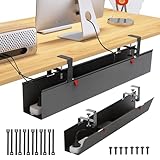
Clamp trays grip the desk edge or frame and need no tools, which suits rentals and standing desks. Screw mounts are the sturdiest but leave holes in the underside. Adhesive trays leave the desk untouched but rely on cure time and a clean, flat surface. If your desktop is very thick or has a rounded lip, check the listed thickness range before anything else.
Size the tray to the desk and the load
A tray roughly two thirds of the desk width usually hides a strip and a few bricks without sticking out. Short 13 to 17 inch trays hold one strip. Long trays at 32 to 36 inches swallow routers, hubs and cable slack. Weight limits appear on only some listings, such as the 11 lbs shown for one tray, so add up the strip and adapters before you commit.
Choose the material for your cables
Steel and metal mesh keep a rigid shape and let heat escape around a power strip. Fabric trays are lighter and quieter, and are easier to open for adding cables, but they sag under heavy bricks. Metal can rattle against a standing desk frame, so small rubber pads under contact points help.
What to ignore and where budget models cut corners
Ignore generic words like “premium” unless the listing names a material and a mount type. Budget trays tend to cut corners on clamp strength, thin sheet metal and a single mounting hole, which may flex once loaded. Always leave airflow around bricks and strips, and keep cables loose enough that a standing desk can travel without pulling on them.
The 8 Best Options
No-Drill Metal Mesh Cable Tray (2 Hole)
A clamp-mounted metal mesh tray aimed at home-office standing desks. The open mesh lets cables drop in from the top and lets warm air escape, and the clamp avoids drilling into the desk, which is useful when the furniture is rented or leased.
- No-drill clamp installation
- Mesh allows ventilation around cords
- Trade-off: the title does not list length or weight capacity
Skip it if you want a documented size before ordering.
Univivi 32 Inch Steel Tray
The steel Univivi model offers two ways to mount: a no-drill C-clamp or screws. At 32 inches it has room for a strip and several adapters side by side, so it suits a wide gaming desk with a tower, monitors and a router all drawing power.
- Durable steel material
- Clamp and screw options in one kit
- Trade-off: a long rigid tray can crowd chair legs or knees on smaller desks
Skip it if your desk is under about 40 inches wide.
Mzmaxy 25 Inch Cable Tray
This 25-inch tray uses a clamp with no drilling and is marketed for standing desks. It sits in the middle of the size range and suits a single-monitor setup with a strip and a few chargers, without protruding past the desk edges.
- No-drill clamp mount
- Mid-size footprint
- Trade-off: material and weight limit are not stated in the title
Skip it if you plan to store heavy transformers.
Univivi 36 Inch Fabric Tray
The largest of the Univivi trays, this fabric model lists a large capacity with clamp or screw mounting. It suits long desks with a router, a hub and a thick cable bundle, where the extra length hides slack rather than leaving loops hanging.
- Large capacity at 36 inches
- Fabric is flexible and easy to load
- Trade-off: fabric can sag under weighty power bricks
Skip it if you prefer a rigid shelf for a power strip.
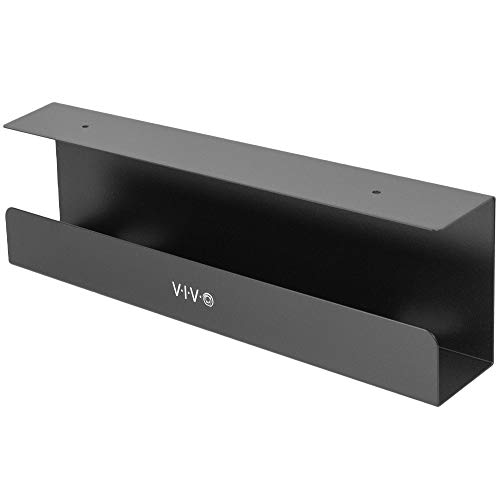
VIVO Extra Deep 16.5 Inch Tray
A short steel tray listed with an 11 lb capacity and described as a low-profile power strip holder. It is a good pick if the goal is simply to lift one strip and a charger off the floor, and the extra depth helps bulkier strips sit securely.
- Stated 11 lb holding capacity
- Extra-deep design for strips
- Trade-off: short length leaves little room for cable slack
Skip it if you need to hide a router or several adapters.
Scanfield 17 Inch 2-Pack, No-Screw
This set uses a strong adhesive, with a 24-hour cure time, and a 3.5 inch interior sized for power strips, chargers and bundled cords. The two-pack lets you split power on one side of the desk and data cables on the other.
- No drilling or clamping, so it fits unusual desks
- Two trays in the box
- Trade-off: adhesive demands a clean surface and a full cure before loading
Skip it if you move the desk often or want to reposition the tray later.
Cinati 13.4 Inch Metal Tray, White
A compact white metal tray that clamps to desks between 0.4 and 2.4 inches thick. It blends with light-colored desks and holds a small strip, which is enough for a laptop dock, a lamp and a charger.
- Clear desk thickness range in the listing
- White finish blends with pale desks
- Trade-off: the shortest tray here
Skip it if you have a long cable run or heavy gear.
Cotohim 35.8 Inch Fabric Tray
This long fabric tray, listed at 35.8 by 5.6 inches, uses a clamp or screw mount. It is the softer option for owners who dislike metal edges brushing their legs, and its length gives generous room for excess cable.
- Roomy size
- Choice of clamp or screw mounting
- Trade-off: fabric gives less structure than steel
Skip it if you want a rigid base for a heavy strip.
Which One Fits Your Situation
Standing desk that moves up and down
Go for the Mzmaxy 25 Inch tray or the no-drill metal mesh tray, since both list clamp mounting and standing desk use. Leave cable slack so the desk can travel through its full range.
Wide gaming desk with a lot of gear
The Univivi 32 Inch steel tray gives rigid support for a strip and bricks, while the Univivi 36 Inch fabric tray is the lighter alternative when you mostly need room for cable slack.
Desk you cannot drill or clamp
The Scanfield 2-Pack uses adhesive, so it is the logical match for glass tops or thin edges, as long as you allow the full curing time.
If none of these scenarios matches, pick on the mounting method first, length second and material third. A tray that attaches securely to your desk will outlast a nicer-looking one that does not, and the wrong length is far easier to live with than a wobbly mount.
Common Mistakes
- Ignoring the desk thickness range printed in the listing.
- Loading a fabric tray with heavy transformers that need a rigid base.
- Pulling cables tight, which stops a standing desk from lifting fully.
- Skipping the adhesive cure time and loading the tray too early.
- Covering a power strip completely with no airflow around it.
Related guides
- How To Set Up Computer Speakers For Better Sound At Your Desk
- How To Check Whether Your Ram Is Running At Its Rated Speed
- How To Choose The Right Monitor Riser Height For Your Desk
Frequently Asked Questions
Will a clamp tray damage my desk?
Clamps press against the surface, so thin veneers can mark. Pads or a thin cloth under the clamp reduce the risk.
How long should the tray be?
Aim for roughly half to two thirds of the desk width for a strip and a few bricks. Go longer only if you need to hide extra cable slack.
Are metal trays better than fabric?
Metal is more rigid and handles weight better. Fabric is quieter and easier to load, but it suits lighter equipment.
Can I use a tray on a standing desk?
Yes, if it mounts to the frame or underside and you leave enough slack in the cables for the full height range.
Related guides
- Best Desk Mat for Gaming and Work: 5 Compared (2026)
- Best Speaker Stands and Desk Risers for Computer Speakers: Height, Tilt and Isolation Math: 4 Compared (2026)
- Best Monitor Speakers and Soundbars for Desktop Monitors in 2026: Fit, Ports and Six Picks: 4 Compared
- 8 Best Headphone Stands for Gaming Desks (November 2026)
More from Amazon
Programs that pair well with the guide above. Offers and eligibility are set by Amazon and may change.
Free shipping on eligible items, Prime Video and more. Eligible new members can start with a free trial.
Start a Prime free trialAd-free music streaming. Eligible new subscribers can start with a free trial.
Try Music Unlimited freeA Prime membership for ages 18-24 with a trial period. Eligibility is set by Amazon.
See Prime for Young AdultsAudiobooks and podcasts to listen to on the go. Eligible new members can start with a free trial.
Try Audible freeAs an Amazon Associate we earn from qualifying purchases.