If your CPU cooler mounting screws are stripped, you already know the symptom: your screwdriver spins freely in the screw head without the screw turning, or the screw turns but never seems to tighten or loosen. Sometimes you’ll see the screw head spinning while the standoff beneath it rotates in the motherboard, or the screw just sits there at half-torque while your cooler wobbles. On tower coolers, you might notice the mounting bracket flexing unevenly when you push a corner. The most alarming version is a cooler that’s loose enough for the heatsink to rock side to side on the CPU.
How urgent is this? If the cooler is still mounted with good contact pressure and your temperatures are normal, you have time — this is a fix-it-this-weekend problem, not a shut-it-down-now problem. But if the cooler is actually loose, stop gaming and shut the machine down. A cooler with poor contact can let an i9 or Ryzen 9 hit thermal limits within seconds of load, causing throttling and, in extended sessions, potential shutdowns or long-term degradation. Even a mildly stripped screw that’s holding is a ticking clock: thermal cycles and case vibration tend to finish the job. Set aside 30 to 60 minutes, and gather a few cheap tools before you start.
As an Amazon Associate we earn from qualifying purchases at no extra cost to you.

Our Top Picks

Likely Causes
| Cause | How to confirm | Fix difficulty |
|---|---|---|
| Over-torqued during installation | Screw head rounding was noticed mid-tighten; head looks like a circle rather than a crisp Phillips cross | Easy to moderate |
| Wrong screwdriver size or worn bit | The bit rocks inside the screw head; visible play between bit and recess | Easy |
| Corrosion or thread-locker on the screw threads | Screw spins in the head region but feels gummy or releases with a crack; often on coolers used for 3+ years or in humid climates | Moderate |
| Backplate standoff spinning behind the motherboard | Turning the screw makes the plastic standoff on the rear of the board rotate with it | Moderate |
| Soft screw metal (low-quality mounting kit) | Head strips with very light torque; common with aftermarket mounting kits and budget coolers | Easy to moderate |
| Cross-threaded screw | Screw turned fine for a few rotations, then went suddenly stiff and would not budge without high force | Moderate to hard |
Fix 1: Press Harder With the Right Bit
What causes it
Most “stripped” screws aren’t truly stripped — the driver is slipping because the bit is worn, the wrong size, or not pressed firmly into the recess. Phillips #2 is the standard for nearly all cooler screws; a #1 will wobble and chew the head.
How to check
Look at the screw head under bright light. If the cross recess still has sharp 90-degree corners and the metal inside isn’t shiny and rounded, the screw may be salvageable with better technique. Test your bit: press it into the screw and wiggle side to side. Any visible rocking means a size mismatch.
What to do
Use a fresh, hardened Phillips #2 bit — ideally from a quality driver like a Wiha, Wera, or iFixit kit, not a disposable screwdriver. Push down hard (firm steady pressure, roughly what you’d use to compress a tennis ball against a wall) while turning slowly. Slow speed matters: fast spinning is what eats heads.
How to undo it
Nothing to reverse — back the screw out normally once it catches. If you were tightening, stop at snug plus a quarter turn; cooler screws rarely need more.
Fix 2: The Rubber Band Trick
What causes it
A partially rounded head still has some shape left, but the bit no longer grips. The gap between the damaged recess walls and the bit needs filling.
How to check
Fix 1 failed, but the recess isn’t a fully smooth dome. You can still see the remains of the cross pattern.
What to do
Lay a wide rubber band (a hair elastic or a cut section of bicycle inner tube works too) flat over the screw head. Press your Phillips #2 bit through the band into the recess and turn slowly with maximum downward pressure. The rubber fills the voids and adds friction. Use the widest, thickest band you can — thin office bands tear immediately. This works surprisingly often on the softer brass and aluminum screws used in cooler mounting kits.
How to undo it
Remove the rubber band and replace the screw once it’s out — it’s now weakened, and reusing it risks a repeat. A standard M3 cooler screw from any hardware store is a few cents.
Fix 3: Grip the Head With Pliers or a Screw Extractor Plier
What causes it
The screw head sits proud of the bracket or cooler body by 2mm or more, so there’s metal to grab even though the recess is destroyed.
How to check
Look sideways at the mounting point. If the cylindrical sides of the screw head are exposed above the spring washer or bracket, you have a grip surface. Heads recessed flush into a plastic retention frame won’t work with this method.
What to do
Clamp needle-nose pliers, locking pliers (Vise-Grips), or flat-jeweler’s pliers onto the sides of the screw head and turn counterclockwise. Locking pliers clamped tight and twisted with the plier handle give the best leverage. For spring-loaded cooler screws, compress the spring fully first so the screw isn’t under spring tension while you turn it — otherwise it’ll fight you.
How to undo it
Unscrew the pliers and release. Install a replacement screw — the head will be visibly mangled after pliers, and torque control matters for cooler mounting.
Fix 4: Cut a New Slot With a Dremel or Hacksaw
What causes it
The Phillips recess is fully destroyed, but the head is exposed enough to modify. Converting it to a flat-head slot gives you a fresh drive surface.
How to check
There’s at least 1.5–2mm of exposed head height above the surrounding hardware, and you have clearance for a cutting tool without touching the motherboard, cooler fins, or heat pipes. If the screw is on the far side of a fin stack with zero access, skip to Fix 5.
What to do
Protect everything around the screw first: a magnetized piece of cardboard or a rag under the work area catches metal filings, which are conductive and dangerous inside a case. Cut a straight slot across the screw head with a rotary tool and a thin cutoff wheel (1mm or thinner), or carefully with a hacksaw blade held vertically. The slot should be 1–1.5mm deep and wide enough for a flathead bit. Then back the screw out with a flathead driver, pressing hard.
How to undo it
Wipe down the area with isopropyl alcohol and a lint-free cloth to remove all filings, and inspect the motherboard surface with a flashlight before powering on. Replace the screw afterward.
Fix 5: Screw Extractor Bits
What causes it
The head is stripped but round, the pliers can’t get a bite, and cutting a slot isn’t practical.
How to check
The head diameter is at least 4mm and accessible from directly above. If the head is smaller than your smallest extractor bit, this won’t work.
What to do
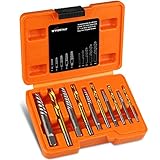
These are drill bits with reverse-facing spiral flutes. Most sets have two ends: a drilling end and an extraction end. Use the extraction end first — press firmly into the screw head, turn counterclockwise slowly, ideally with a T-handle or your driver at low speed. The flutes bite into the soft screw metal and pull the screw out as they dig. Do not use a cordless drill on high speed; the torque can spin the cooler or twist the screw head off entirely.
How to undo it
Once the screw is out, replace it with a new one of the same thread (measure the diameter and pitch, or bring the old screw to a hardware store). Check that no metal shavings dropped onto the board.
Fix 6: Hold the Backplate Standoff From Behind
What causes it
The screw itself is fine — the problem is the plastic or metal standoff on the backplate behind the motherboard spinning with the screw, so the screw never tightens.
How to check
Watch the back of the motherboard while a helper turns the screw (or reach behind yourself on an open bench build). If the standoff rotates in sync with the screw, the backplate threads or the standoff’s hex feature are stripped or the backplate isn’t captive.
What to do
Lay the case on its side and remove the rear panel (or the motherboard tray, on trays that swing out). Have a helper hold the standoff with pliers — grip the hex flats, not the plastic threads, and use moderate pressure so you don’t crack nylon standoffs — while you turn the screw from the front. On some backplates, holding pressure against the board with your palm to keep the backplate seated flat also stops rotation. Tighten in a diagonal (X) pattern across all four screws, a few turns each, so the backplate stays flat against the board.
How to undo it
Fix 7: Remove the Cooler Without the Screws — Lift Off With the Bracket Loose
What causes it
Every removal method has failed and you need the cooler off to replace the mounting hardware entirely. This gets the cooler off the CPU without drilling or destroying anything on the board.
How to check
Fixes 1 through 6 haven’t freed the screw, or one or two screws came out but the rest won’t. The cooler is still held by brackets that don’t depend on the stuck screw for lateral location.
What to do
Heat the joint first: run the system for 10–15 minutes of light load, shut down, and work while the thermal paste is warm and less tacky — or, if the machine won’t boot, warm the area with a hair dryer on low for two minutes (keep it moving, stay under roughly 60°C at the board surface). Loosen every screw that will move a full turn or two — this alone often releases the binding. Then twist the cooler gently side to side (never straight up with force; yanking a warm socketed CPU out with the cooler can pull the chip out of an LGA socket and bend pins). With most stuck screws loosened partially, the bracket has enough slack to slide the cooler off the CPU. Then you can access the screws out of the case, where pliers, extractors, and Dremel work far better.
How to undo it
Clean both surfaces with isopropyl alcohol (90%+), apply fresh paste (a rice-grain-to-pea-sized dot in the center), and remount with new screws tightened in a diagonal pattern to snug plus a quarter turn.
Fix 8: Replace the Mounting Hardware
What causes it
The screws stripped because they’re soft, too short for your board’s stack-up, or the kit’s threads are worn. The underlying hardware is the root cause and will strip again.
How to check
You got the screws out, but the heads are visibly rounded, the threads look shiny and flattened, or this is the second time the same screws stripped. Measure screw length against the thickness of your board plus backplate; screws that bottom out before clamping pressure builds are a common culprit with aftermarket kits.
What to do
Contact the cooler manufacturer’s support first — Noctua, Thermalright, DeepCool, and be quiet! all ship replacement mounting kits at no or low cost, usually within a week. Give them the cooler model and your socket (AM5 and LGA 1700/1851 have different backplates and standoffs). Alternatively, buy a universal mounting kit; match the thread of the standoffs (commonly M3 for cooler screws, sometimes 6-32). Install with a diagonal tightening pattern and modest torque — cooler screws should stop turning when the spring compresses fully, not when your wrist gives out.
How to undo it
Standard disassembly: loosen in diagonal pattern, clean old paste with isopropyl alcohol and a lint-free cloth or coffee filter, reapply paste, remount.
If Nothing Works
If a screw won’t budge even with an extractor, the last resort is drilling the head off — only do this with the motherboard out of the case on a hard, protected surface, using a bit slightly narrower than the screw head, stopping as soon as the head separates. The remaining screw shaft can usually be gripped with pliers once the cooler is free. If the standoff threads in the backplate are destroyed rather than the screw, a replacement backplate is mandatory; running a cooler with a compromised mounting system risks uneven contact pressure, which shows up as 10–20°C core-to-core temperature differences and chronic throttling. And if the stripping happened because the screws bottomed out on a socket-specific stack-up, verify the correct standoff height and washer count for your socket before reinstalling anything — otherwise the new screws strip the same way.
FAQ
Can I run my PC with one stripped cooler screw?
If the cooler still clamps evenly with solid contact and your temperatures under load are within normal range (generally below the mid-80s Celsius for a modern CPU under full load), it’s survivable short-term. Check with a monitoring tool like HWiNFO64. But plan the repair soon — the remaining screws take more load and can strip next.
Should I use thread locker on cooler screws?
No. Blue thread locker (Loctite 242) is overkill for cooler screws and makes future removal harder, which is exactly how screws get stripped. The springs on most cooler mounts prevent loosening from vibration on their own. If a screw repeatedly loosens, the problem is missing springs or wrong screw length, not vibration.
How tight should CPU cooler screws actually be?
Tighten each screw until the spring under it fully compresses and the screw stops turning with firm finger-plus-wrist pressure, then a small nudge more. Go in a diagonal pattern, two or three turns per screw per pass. If you have to lean your body weight into the driver, something’s wrong — usually the wrong standoff height or a misaligned backplate.
Will a stripped screw void my cooler warranty?
Manufacturer warranties generally cover the cooler’s own defects, and a stripped screw during normal installation doesn’t void them. However, visible damage from drilling, pliers marring the cold plate, or bent heat pipes from extraction force can complicate an RMA. If your cooler is under warranty and the mount is damaged, contact support before resorting to destructive removal — many will simply send a new bracket kit or a replacement unit.